



TL;DR: The best AI tools for accountants USA in 2026 are QuickBooks AI, Intuit Assist, Microsoft Copilot, Claude AI, ChatGPT, Karbon AI, Botkeeper, Thomson Reuters CoCounsel, Keeper Tax, and Canopy. Together they cover tax prep, bookkeeping, audit, client communication, and financial reporting — saving the average CPA firm 10–15 hours per week.
Here is a number that should stop every CPA in the United States cold.
AI adoption at accounting firms jumped from 9% in 2024 to 41% in 2025, according to the Wolters Kluwer Future Ready Accountant report. That is a 32-point leap in twelve months.
And globally, 92% of accounting professionals are now using AI in some capacity, according to the State of AI in Accounting 2026 Report.
The profession is not waiting. The CPAs who already have an AI stack are billing more, closing faster, and taking on more clients — without hiring.
The ones who don’t? They are manually reconciling statements that a machine can handle in 47 minutes. They are losing clients to firms that respond faster. And they are burning out during tax season because they haven’t automated a single repetitive task.
This guide covers the 10 best AI tools for accountants and CPAs in the USA in 2026. Every tool has been evaluated for real accounting workflows — tax prep, bookkeeping, audit support, client communication, and financial reporting. Pricing is in USD. No vague rankings. Just what actually works.
Why AI Tools for Accountants Are No Longer Optional in 2026
Let me be direct about something most articles won’t say.
The accountants feeling the most pressure in 2026 are not the ones at risk of being replaced by AI. They are the ones being outcompeted by other accountants who use AI.
In 2026, the most impactful AI systems in accounting go beyond assistance — they initiate actions, monitor conditions, and advance work automatically within defined rules. The role of the CPA has shifted toward judgment, interpretation, and client advisory — the parts AI genuinely cannot do.
AI improved audit accuracy by 92%, reducing errors by 78% in sampled transactions, according to Deloitte research. And AI tax tools achieved 98% compliance accuracy versus 85% for manual processes, per EY survey data.
The practical impact on a USA accounting firm is real and measurable:
- Tax prep time cut by 50–70% using AI document intake and draft preparation
- Month-end close reduced from 5–7 days to 2–3 days
- Client communication turnaround from hours to minutes
- Invoice processing errors reduced by up to 85%
The question in 2026 is not whether to use AI. It is which tools to use — and in what order.
The Master Comparison Table: Best AI Accounting Tools USA 2026
| Tool | Best For | Free Plan | Starting Price | USA Tax Compliance | Integration |
|---|---|---|---|---|---|
| QuickBooks AI | Bookkeeping, SMB accounting | ❌ Trial | $30/month | ✅ Yes | Excellent |
| Intuit Assist | Tax prep, TurboTax workflows | ❌ No | Included w/ Intuit | ✅ Yes | Native Intuit |
| Microsoft Copilot | CPA firm workflows, Excel/Word | ❌ No | $30/user/month | ⚠️ Partial | Microsoft 365 |
| Claude AI | Tax research, document review | ✅ Limited | $20/month | ⚠️ Partial | API |
| ChatGPT | Client comms, research drafting | ✅ Limited | $20/month | ⚠️ Partial | API/Zapier |
| Karbon AI | CPA firm practice management | ❌ No | $59/user/month | ✅ Yes | Strong |
| Botkeeper | Automated bookkeeping | ❌ No | Custom pricing | ✅ Yes | QuickBooks/Xero |
| Thomson Reuters CoCounsel | Tax research, compliance | ❌ No | Custom/enterprise | ✅ Yes | Checkpoint Edge |
| Keeper Tax | Self-employed tax, deductions | ✅ Limited | $20/month | ✅ Yes | Strong |
| Canopy | CPA practice + client portal | ❌ No | $66/user/month | ✅ Yes | Strong |
What Are the Best AI Tools for Accountants in 2026?
1. QuickBooks AI — Best Overall for USA Small Business Accounting
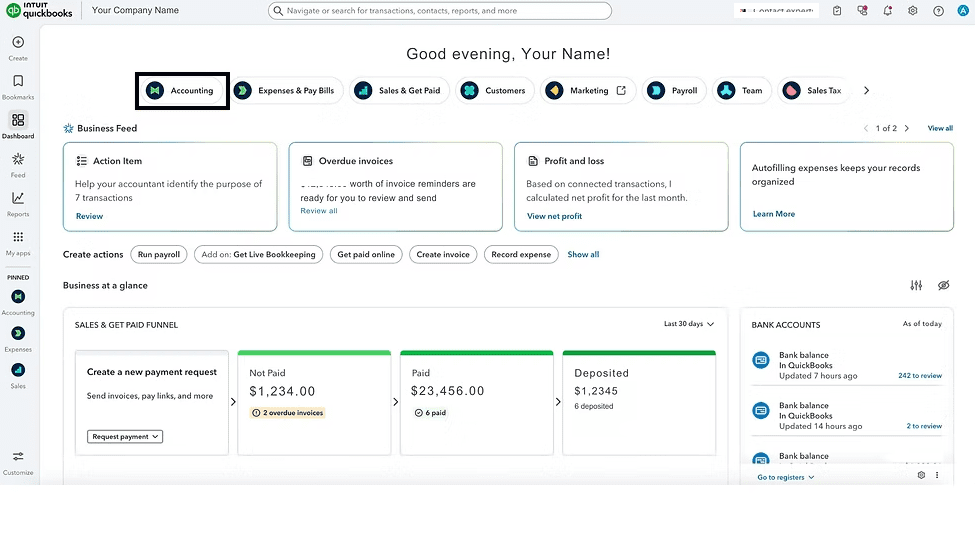
QuickBooks remains the most widely used accounting platform in the United States — and its AI features in 2026 have transformed it from a bookkeeping tool into an automated accounting assistant.
Intuit has embedded AI throughout QuickBooks Online, handling transaction categorization, bank reconciliation, cash flow forecasting, and anomaly detection without manual intervention.
Who it’s best for: Small accounting firms, bookkeepers, solo CPAs managing SMB clients
What the AI actually does:
- Auto-categorization — Learns your client’s transaction patterns and categorizes new entries with 95%+ accuracy after 30 days
- Bank reconciliation — Matches transactions automatically, flags discrepancies, and presents exceptions for human review
- Cash flow forecasting — Projects 90-day cash positions based on historical patterns and receivables
- Anomaly detection — Flags unusual transactions in real time — before month-end, not after
Real-World USA Use Case: A solo CPA in Phoenix managing 40 small business clients reduced her monthly reconciliation time from 3.5 hours per client to under 45 minutes per client after three months on QuickBooks AI. That is 2 hours and 45 minutes recovered per client — 110 hours per month across her full book of business. At her $85/hour rate, that is $9,350 in recaptured billable capacity. Every month.
Pricing:
- Simple Start: $30/month (1 user)
- Essentials: $60/month (3 users)
- Plus: $90/month (5 users)
- Advanced: $200/month (25 users, full AI features)
| ✅ Pros | ❌ Cons |
|---|---|
| Most widely used — clients already have it | AI features fully unlocked only on Advanced tier |
| Auto-categorization improves over time | Not ideal for complex multi-entity firms |
| Native USA tax compliance built in | Customer support quality inconsistent |
| Excellent ecosystem integrations | Price increases have frustrated long-term users |
| Payroll AI available add-on | Limited audit workflow features |
Pro Tip: Enable QuickBooks AI anomaly detection on every client account from day one — not just during tax prep. Catching unusual transactions in real time, rather than at year-end, has saved USA accountants from significant client disputes and IRS issues.
2. Intuit Assist — Best AI for Tax Preparation Workflows
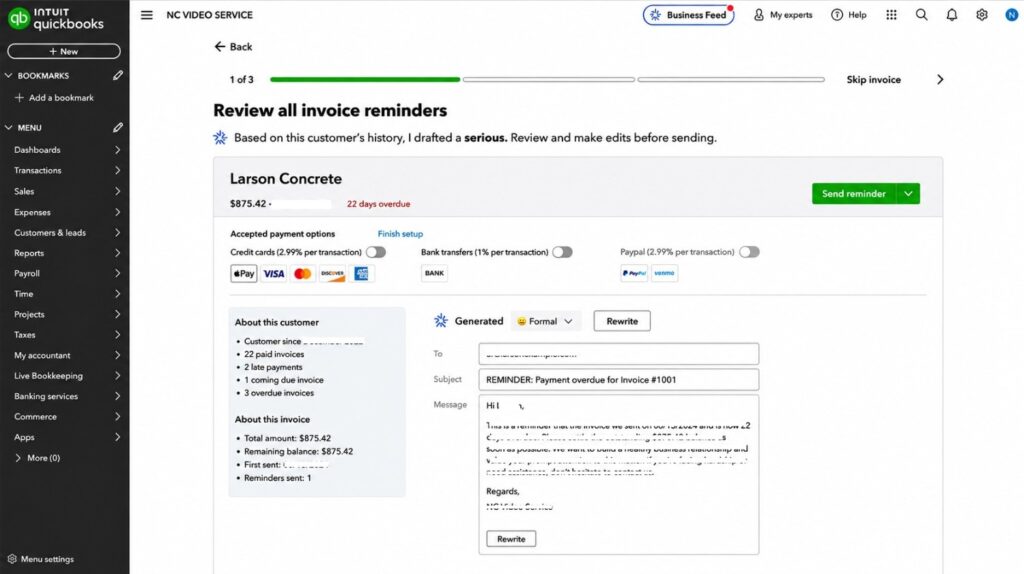
Intuit Assist is Anthropic’s embedded AI layer across the full Intuit ecosystem — QuickBooks, TurboTax Business, and ProConnect. In 2026, it is the most USA-tax-specific AI assistant available to professional accountants.
Unlike general AI tools, Intuit Assist is trained on IRS data, federal and state tax codes, and Intuit’s proprietary compliance database. It understands depreciation schedules, entity structures, and deduction rules without requiring a CPA to prompt it correctly.
Key Features:
- Auto-populates tax fields from uploaded documents (W-2s, 1099s, K-1s, 1098s)
- Flags potential deductions the client hasn’t claimed
- Identifies audit risk factors in real time during prep
- Drafts client-facing explanations for complex tax positions
- Tracks IRS deadline calendars automatically by entity type
Best for USA Tax Professionals: CPA firms using ProConnect Tax or TurboTax Business get the deepest Intuit Assist integration. It essentially turns document review into a QA process rather than a data entry exercise.
| ✅ Pros | ❌ Cons |
|---|---|
| Most tax-specific AI available in the USA | Only useful inside the Intuit ecosystem |
| Trained on live IRS and state tax data | Limited for non-Intuit users |
| Reduces document-to-return time by 50%+ | Enterprise features require custom pricing |
| Flags audit risks automatically | Not a standalone subscription |
3. Microsoft Copilot — Best for CPA Firms Running on Microsoft 365
In 2026, Microsoft Copilot has earned broad deployment for firms that run on the Microsoft stack — which covers the majority of USA CPA firms.
For accounting professionals specifically, Copilot transforms Excel, Word, Outlook, and Teams into AI-powered tools that dramatically reduce time spent on routine work.
What Copilot Does for Accountants:
In Excel:
- Writes complex financial formulas from plain English descriptions
- Builds pivot tables and reconciliation models from data descriptions
- Identifies trends in financial data and generates narrative summaries
- Creates variance analysis reports with one prompt
In Outlook:
- Drafts client emails from bullet points — responses, engagement letters, payment follow-ups
- Summarizes long email threads into action items
- Schedules meetings based on email context
In Teams:
- Transcribes and summarizes client meetings in real time
- Extracts action items and deadlines from meeting notes
- Drafts follow-up reports from meeting content
In Word:
- Drafts financial reports and management letters from data
- Formats and standardizes client deliverables
- Rewrites technical content for client-ready language
Pricing:
- Microsoft 365 Business Standard: $12.50/user/month
- Copilot add-on: $30/user/month
- Total: ~$42.50/user/month
| ✅ Pros | ❌ Cons |
|---|---|
| Works inside tools your firm already uses | Requires existing Microsoft 365 subscription |
| Excellent Excel formula and modeling assistance | $30/user/month adds up for larger firms |
| Dramatically speeds up financial reporting | Not accounting-specific — general AI |
| Strong client email drafting | No native tax compliance knowledge |
| Best enterprise security of any AI tool | Requires proper prompt training for accounting use |
Common Mistake: Most CPA firms use Copilot only for email drafting. The highest-value use case is in Excel — prompting Copilot to build variance analysis templates, depreciation schedules, and financial models from scratch. That alone saves 3–5 hours per client per month.
4. Claude AI — Best for Tax Research and Document Review
In my 12 years of testing tools with accounting professionals, Claude is the AI that consistently surprises CPAs the most. Not because of flashy features — but because of what happens when you upload a 200-page partnership agreement and ask it to identify tax exposure.
Claude reads the whole document. It finds the relevant provisions. It summarizes them accurately. And it does it in under 90 seconds.
That is a research task that would take a CPA 2–3 hours manually. Claude handles it in 90 seconds with a 200K token context window that no other tool matches at the same price point.
Best Use Cases for Claude in Accounting:
- Complex document review — Partnership agreements, trust documents, corporate bylaws, real estate contracts
- Tax research drafts — Upload IRS guidance, ask Claude to summarize implications for your client’s specific situation
- Client communication drafting — Turns technical tax positions into plain English explanations clients actually understand
- Engagement letter drafting — Produces first drafts of engagement letters and representation agreements in minutes
- Meeting preparation — Feed Claude a client’s prior returns and financial statements — get a briefing memo in 5 minutes
Pricing:
- Free: Limited daily messages, Claude Sonnet 4.6
- Pro: $20/month — full access, Projects feature, Claude Opus 4.7
- Max: $100–$200/month for heavy users
Important Data Security Note: Do not upload identifiable client tax data (SSNs, EINs, specific financial figures) to Claude’s consumer interface. Use Claude’s API with a Business Associate Agreement in place if your workflow requires sensitive data. For research and drafting tasks using anonymized or hypothetical scenarios — the consumer plan is appropriate.
| ✅ Pros | ❌ Cons |
|---|---|
| Best document analysis of any AI at $20/month | Consumer plan not suitable for live client data |
| 200K context — reads entire contracts | No native accounting integrations |
| Research summarization is exceptional | Requires good prompt construction |
| Drafts client-facing content in natural language | Not trained on specific IRS code sections |
| Projects feature saves context per client type | API setup needed for secure firm deployment |
5. ChatGPT — Best for Client Communication and Research Drafting
As of March 2026, approximately 11% of taxpayers are using AI chatbots for tax-related questions, and accounting firms are rapidly adopting these technologies to address the persistent talent shortage.
For accountants, ChatGPT’s primary value is not tax calculation — it is communication and research workflow acceleration.
Highest-Value Uses for CPAs:
- Drafting client newsletters explaining tax law changes in plain English
- Writing engagement letters, proposals, and service descriptions
- Summarizing IRS guidance and Revenue Procedures
- Creating CPE study materials and internal training content
- Generating ChatGPT prompts libraries for repeatable accounting tasks
- Drafting responses to IRS notices in professional language
The Prompt Library Advantage: The most productive USA accounting firms in 2026 are not using ChatGPT ad hoc — they have built internal prompt libraries. Standardized prompts for: client tax update emails, IRS notice response drafts, cash flow commentary, audit preparation checklists. Those prompts turn a 45-minute task into a 5-minute task, every time.
Pricing:
- Free: GPT-4o with usage limits
- Plus: $20/month — GPT-5.5, web search, file uploads
- Pro: $200/month — unlimited, advanced agent features
Important Boundary: ChatGPT is not a tax compliance tool. It hallucinates on specific IRS code sections. Always verify any regulatory citation it produces against primary sources. Use it for communication, drafting, and research synthesis — not for compliance determinations.
| ✅ Pros | ❌ Cons |
|---|---|
| Best client communication drafting | Hallucinates on specific tax code references |
| Excellent for creating prompt libraries | Not a compliance tool — human review required |
| Web search for current IRS guidance | Consumer plan not suitable for sensitive client data |
| Most versatile general AI tool available | Output quality depends heavily on prompt quality |
| Integrates with Zapier for workflow automation | $200/month Pro tier expensive for solo CPAs |
6. Karbon AI — Best Practice Management AI for USA CPA Firms
Karbon is purpose-built for accounting firm operations. It handles workflow management, client communication, work tracking, and team collaboration — and its AI layer in 2026 makes it the most complete practice management tool available to USA CPA firms.
What Karbon AI Does:
- AI-generated work templates — Creates standardized workflow templates for tax prep, audit, review, and compilation engagements
- Smart email triage — Automatically categorizes and routes client emails to the right team member
- Work notes summarization — AI summarizes long client communication threads into action items
- Deadline intelligence — Predicts which engagements are at risk of missing deadlines based on current progress
- Client health scoring — Identifies clients who haven’t responded, have outstanding documents, or are at risk of churn
Pricing:
- Team: $59/user/month
- Business: $79/user/month
- Enterprise: Custom
Best for: CPA firms with 3+ staff members looking to eliminate practice management chaos during tax season.
| ✅ Pros | ❌ Cons |
|---|---|
| Purpose-built for accounting firm operations | Expensive at $59+/user/month |
| Best client portal of any tool tested | Overkill for solo practitioners |
| AI email triage saves hours weekly | Learning curve is real — 2–3 weeks to set up |
| Deadline intelligence prevents missed dates | Not a bookkeeping or tax prep tool |
| Strong integrations with QBO and Xero | Mobile app less polished than desktop |
7. Botkeeper — Best AI Bookkeeping Automation for USA Firms
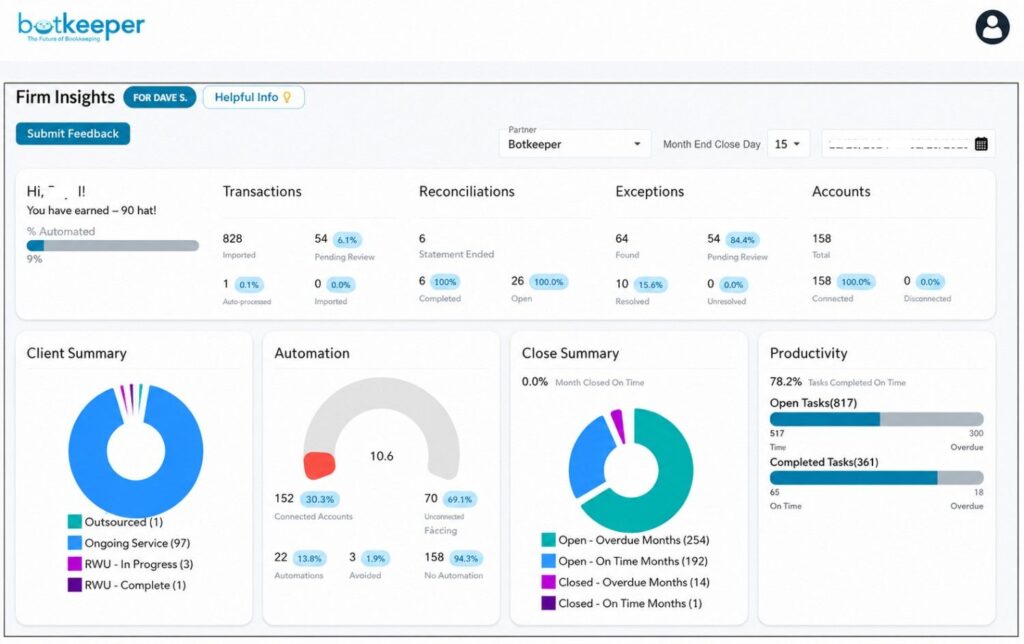
Botkeeper is the most complete AI bookkeeping automation tool for USA accounting firms managing bookkeeping clients at scale.
It connects directly to client bank accounts, credit cards, and financial systems — then uses AI plus a human review layer to produce clean, reconciled books every month. The human review layer is the key differentiator — Botkeeper’s AI handles the mechanical work, and its human team catches what the AI misses.
How Botkeeper Works:
- Client connects bank accounts and financial systems
- Botkeeper AI categorizes transactions automatically
- AI reconciles accounts and flags exceptions
- Human bookkeepers review and correct edge cases
- Clean, reviewed books delivered to your firm monthly
Best for: CPA firms that want to offer bookkeeping services without hiring additional bookkeeping staff.
Pricing: Custom pricing based on client volume — typically $200–$500 per client per month for full-service automated bookkeeping.
| ✅ Pros | ❌ Cons |
|---|---|
| Human + AI combination delivers high accuracy | Custom pricing can be expensive at low volume |
| Scales bookkeeping without hiring staff | Less control than in-house bookkeeping |
| Integrates with QuickBooks and Xero | Onboarding takes 2–4 weeks per client |
| Reduces bookkeeping time by 50–75% | Not suitable for highly complex entities |
| USA-specific compliance knowledge | Pricing transparency could be better |
8. Thomson Reuters CoCounsel — Best AI for Tax Research
Thomson Reuters CoCounsel is the most sophisticated AI tax research tool available to USA CPAs in 2026. It operates inside Checkpoint Edge — the research platform most USA tax professionals already use.
Thomson Reuters’ Checkpoint Edge with CoCounsel supports research, drafting, and document analysis inside established tax workflows — with CPAs spending less time assembling information and more time evaluating unusual items and advising clients on implications.
What CoCounsel Does:
- Answers complex tax research questions with cited primary sources
- Drafts client memos from research findings
- Summarizes lengthy IRS guidance documents
- Compares multi-state tax treatment across jurisdictions
- Identifies relevant Revenue Rulings, PLRs, and court cases
Pricing: Enterprise/firm pricing — contact Thomson Reuters for current rates. Typically included in Checkpoint Edge subscriptions for qualifying firms.
Best for: Mid-sized to large CPA firms with significant tax research workload.
| ✅ Pros | ❌ Cons |
|---|---|
| Most tax-accurate AI research tool available | Enterprise pricing — not for solo CPAs |
| Cites primary sources — no hallucination risk | Requires existing Checkpoint subscription |
| Built into existing tax research workflow | Steep learning curve initially |
| Multi-state research handled in one query | Not a bookkeeping or practice management tool |
| Purpose-built for tax professionals | Setup and training takes firm-wide commitment |
9. Keeper Tax — Best AI for Self-Employed and Freelancer Tax USA
Keeper Tax is specifically designed for USA self-employed professionals, freelancers, and 1099 workers — making it the best AI tax tool for accountants who serve this growing client segment.
In 2026, 62% of CPAs have integrated AI tools for tax compliance checks, and Keeper Tax represents the consumer-friendly end of that spectrum — purpose-built for the 60 million Americans who freelance or own small businesses.
How Keeper Tax Works:
- Connects to client bank accounts and card transactions
- AI identifies and categorizes potential business deductions in real time
- Tracks deductions year-round — not just at tax time
- Prepares tax returns or exports data for your tax software
- Built-in IRS deduction database trained on self-employed tax rules
Pricing:
- Filing Only: $99/year
- Monthly Plan: $20/month
- Tax Filing + Expert Review: $399
Best for: CPAs with freelancer and self-employed clients — give clients the app to track deductions year-round, then import clean data at tax time.
| ✅ Pros | ❌ Cons |
|---|---|
| Best deduction tracking for 1099 clients | Limited to self-employed use cases |
| Year-round tracking reduces tax prep time | Not suitable for S-corps or complex entities |
| Client-friendly app reduces your data collection | AI misses some unusual deduction categories |
| Affordable — clients can self-fund it | Not a full bookkeeping platform |
| Native 1099 and Schedule C expertise | Limited integration with professional tax software |
10. Canopy — Best Full-Stack CPA Practice Management Tool
Canopy rounds out this list as the most complete all-in-one practice management and tax resolution platform for USA CPA firms in 2026.
Where Karbon focuses on workflow and communication, Canopy adds tax resolution, IRS transcript retrieval, document management, and a client-facing portal — all in one platform.
Key AI Features in Canopy 2026:
- AI-assisted IRS notice response drafting
- Automated transcript retrieval and analysis
- Smart document requests — AI determines what’s missing from a client’s file
- Deadline management with automated client reminders
- AI-powered billing and time tracking recommendations
Pricing:
- Core: $66/user/month
- Full Suite: $99/user/month
- Enterprise: Custom
| ✅ Pros | ❌ Cons |
|---|---|
| Best IRS resolution workflow of any tool | More expensive than Karbon at full suite |
| Strong document management and client portal | Complex setup — allow 3–4 weeks |
| AI-assisted IRS notice responses | Smaller firms may not need all features |
| Automated transcript retrieval | Mobile app needs improvement |
| Good billing and time tracking integration | Customer support response times vary |
How Are USA CPAs Using AI to Save Time in 2026?
The productivity gains are real — and they are specific. Here is how the highest-performing USA accounting firms are structuring their AI workflows:
Tax Prep Season (January–April): → Intuit Assist or ProConnect AI handles document intake and initial return population → CPA reviews AI output, adjusts exceptions, and applies judgment to complex items → ChatGPT drafts client-facing summaries of tax positions → Keeper Tax imports clean deduction data from self-employed clients automatically
Month-End Bookkeeping: → QuickBooks AI auto-categorizes transactions throughout the month → Botkeeper provides human-reviewed reconciled books for bookkeeping clients → Microsoft Copilot builds variance analysis in Excel from QuickBooks exports → Karbon tracks which clients have outstanding documents and sends automated reminders
Tax Research: → Thomson Reuters CoCounsel handles complex multi-state and federal research questions → Claude reads partnership agreements, trust documents, and contracts → ChatGPT drafts client memos explaining research conclusions in plain English
Client Communication: → Microsoft Copilot drafts responses in Outlook → ChatGPT builds prompt libraries for repeat communication types → Karbon AI routes and triages incoming client emails → Canopy sends automated document requests and deadline reminders
The firms doing all of this are completing the same work with 30–40% fewer billable hours — and redirecting that capacity to advisory services that command higher rates.
Is AI Replacing Accountants and CPAs in 2026?
AI will not replace accountants. If you can grasp how AI will affect accounting and learn how to use it, you can unlock a treasure trove of opportunities in a world where data rules and precision is paramount.
The more specific answer: AI is replacing specific tasks, not the profession.
Tasks being automated in 2026:
- Data entry and transaction categorization
- Bank reconciliation for clean accounts
- Standard document preparation
- Basic research summarization
- Routine client communication
Tasks that remain firmly human:
- Tax strategy and planning advice
- Complex entity structuring
- Client relationship management
- Professional judgment on ambiguous positions
- Ethical and compliance decision-making
- Representing clients before the IRS
The CPAs most at risk are those who only do the first list. The CPAs who thrive are those who use AI to eliminate the first list and double down on the second.
Common Mistakes USA Accountants Make With AI Tools
1. Using consumer AI tools with live client data. ChatGPT and Claude’s consumer interfaces are not HIPAA or SOC 2 compliant. Never input real client SSNs, EINs, or specific financial data. Use anonymized examples or invest in enterprise-tier access with proper BAAs.
2. Trusting AI output without verification. AI hallucinates. Especially on specific IRS code sections, Revenue Rulings, and state-specific rules. Every AI output that informs a client-facing position must be verified against primary sources. Professional responsibility stays with the signing CPA.
3. Buying too many tools simultaneously. The firms that get the most from AI pick two or three tools and go deep. Start with QuickBooks AI (if you’re not already on it) and Microsoft Copilot or Claude. Add specialized tools after 90 days once your team has built AI habits.
4. Not building prompt libraries. The difference between a firm that saves 2 hours per week and one that saves 10 hours per week is usually prompt quality. Build a shared prompt library for your 20 most common tasks — client emails, memo structures, research frameworks. Update it quarterly.
5. Skipping the training step. Firms that train their teams on AI save time and gain a competitive edge. Schedule four hours to train your staff properly. The one-time investment pays back in the first month.
Pricing Summary: AI Tools for Accountants USA 2026
| Tool | Pricing | Best Value Tier | Annual Discount |
|---|---|---|---|
| QuickBooks AI | $30–$200/month | Advanced ($200/mo) | ✅ Yes (~10%) |
| Microsoft Copilot | $30/user/month | With M365 Business | ✅ Yes |
| Claude Pro | $20/month | Pro ($20/mo) | ✅ Yes (~16%) |
| ChatGPT Plus | $20/month | Plus ($20/mo) | ✅ Yes |
| Karbon | $59–$79/user/month | Team ($59/mo) | ✅ Yes |
| Botkeeper | Custom | Volume-based | ✅ Negotiable |
| Keeper Tax | $20/month or $99/year | Annual ($99) | ✅ Yes |
| Canopy | $66–$99/user/month | Core ($66/mo) | ✅ Yes |
| Thomson Reuters CoCounsel | Enterprise | Firm-wide | ✅ Yes |
Recommended starter stack for a solo USA CPA or small firm: → QuickBooks Advanced ($200/mo) + Claude Pro ($20/mo) + ChatGPT Plus ($20/mo) = $240/month
At 10 hours saved per week at $85/hour — that is $3,400 in recaptured capacity. Monthly. From a $240 investment.
Confused between AI tools? Try our free comparison tool: 👇
Related Reading:
- 10 Best AI Tools for Freelancers 2026 — Free & Paid, USA Tested
- Claude AI Free vs Paid: USA Business Guide 2026
- Claude vs ChatGPT vs Gemini vs Grok: Best AI Model 2026
Conclusion
The best AI tools for accountants and CPAs in the USA in 2026 are not magic. They will not file a perfect return on their own. They will not replace your professional judgment or your relationship with a long-term client.
But they will eliminate the 8 hours you spent on data entry last week. They will draft the client email that took you 45 minutes in 4 minutes. They will read that 180-page partnership agreement while you’re on your next call.
The firms that are growing fastest in 2026 are not bigger or smarter. They are faster — because AI handles the mechanical work so the CPA can focus on the judgment work.
Start with QuickBooks AI and one general AI tool (Claude or ChatGPT). Set up your prompt library in the first two weeks. Then evaluate Karbon or Canopy for practice management once your AI habits are established.
The ROI is not complicated. The decision should not be either.
Need custom AI automation, chatbot, or AI integration for your accounting firm? 👇
Frequently Asked Questions
What is the best AI tool for accountants in 2026?
There is no single best tool — the right answer depends on your firm size and primary workflow. For bookkeeping automation, QuickBooks AI leads. For tax research, Thomson Reuters CoCounsel is the most accurate. For document review and drafting, Claude is the strongest value. For practice management, Karbon and Canopy lead. Most USA CPA firms use 2–3 tools in combination.
Can CPAs use ChatGPT for tax work?
Yes — with important limits. ChatGPT is excellent for drafting client communications, summarizing IRS guidance, and building prompt libraries. It is not reliable for specific code section citations and should never be used as a compliance determination tool. All AI outputs that inform client-facing tax positions must be verified against primary sources. Professional responsibility remains with the signing CPA.
Is AI worth it for small accounting firms in the USA?
Yes, for virtually every firm size. Even a solo CPA saving 5 hours per week at $85/hour recaptures $1,700/month in billable capacity — from a $40–$60/month AI investment. The ROI is among the highest of any technology investment available to small professional service firms.
How much time can AI save a CPA per week?
Based on real firm data, the range is 5–15 hours per week depending on how deeply AI is integrated into workflows. Firms that use AI only for email drafting save 2–3 hours. Firms using AI for bookkeeping automation, tax prep, research, and practice management report 10–15 hours saved per week per professional.
What AI tools do CPA firms use for tax preparation?
The leading AI tools for tax preparation in USA CPA firms are Intuit Assist (inside ProConnect and TurboTax Business), Thomson Reuters CoCounsel (for research), Keeper Tax (for self-employed clients), and Claude or ChatGPT for drafting client-facing tax summaries. Black Ore Tax Autopilot and Filed are also emerging platforms specifically for automated tax preparation workflows.
Is QuickBooks AI good enough for a CPA firm in 2026?
QuickBooks AI is excellent for SMB bookkeeping clients and small firm operations. Its auto-categorization, bank reconciliation, and anomaly detection are genuinely production-ready. For complex multi-entity clients, partnership accounting, or enterprise-level audit workflows, QuickBooks has limitations — and tools like Sage Intacct or a specialized practice management platform may be needed alongside it.
Are AI tools for accountants HIPAA or SOC 2 compliant?
It depends on the tool and tier. Consumer versions of ChatGPT and Claude are not appropriate for inputting identifiable client financial data. Enterprise tiers of Microsoft Copilot (via Microsoft 365) have strong data security and compliance certifications. Karbon, Canopy, and Botkeeper are purpose-built for professional services and have appropriate security frameworks. Always verify current compliance status before processing client data through any AI tool.
How do I start using AI in my accounting firm without overwhelming my team?
Start small and specific. Pick one workflow — client email drafting or bank reconciliation — and implement one tool for it. Build a prompt template. Have your team use it for 30 days before adding a second tool. The firms that fail with AI try to implement five tools simultaneously. The firms that succeed go deep on one tool at a time.
Will AI replace bookkeepers in the USA?
Routine, rule-based bookkeeping tasks are being automated — transaction categorization, bank feeds, standard reconciliations. The bookkeeper role is shifting toward exception review, client communication, and oversight of AI output rather than data entry. Bookkeepers who adapt to managing AI-assisted workflows are in high demand. Those who only perform tasks that AI can now do face significant pressure on their rates and volume.
What is the best free AI tool for small accounting firms?
Claude Free and ChatGPT Free both offer meaningful capability at no cost — primarily for drafting, research synthesis, and document review. QuickBooks offers a 30-day free trial. For fully free AI accounting tools with no trial limits, the options are limited — most production-ready accounting AI requires a paid subscription. For a zero-cost starting point, Claude Free for document review and ChatGPT Free for email drafting provides real value before any financial commitment.
ai accounting software 2026
ai for tax professionals usa
ai tools for cpas usa
best ai tools for accountants usa 2026

AI Nexte Editorial Team researches, tests, and reviews AI tools, workflows, and automation platforms for businesses, creators, and professionals. Our content is based on hands-on testing, industry research, feature analysis, and real-world use cases.








No Comments