



TL;DR: Cursor AI is a fast, genuinely useful AI code editor that speeds up real development work, not just demos. It shines for solo devs and small teams doing full-stack work, but the credit-based pricing can surprise you and it isn’t the best fit for every enterprise. Here’s our honest cursor ai review after months of daily testing.
You might be wondering if Cursor is worth the hype in 2026, or if it’s just another AI tool riding the wave. We get it. Our team has tested a lot of AI coding tools for clients, and we wanted a straight answer before recommending it to anyone.
So we put Cursor through real client work for over four months. This cursor ai review covers what we found, the good and the annoying, with actual numbers from actual projects.
What Is Cursor AI, Exactly?
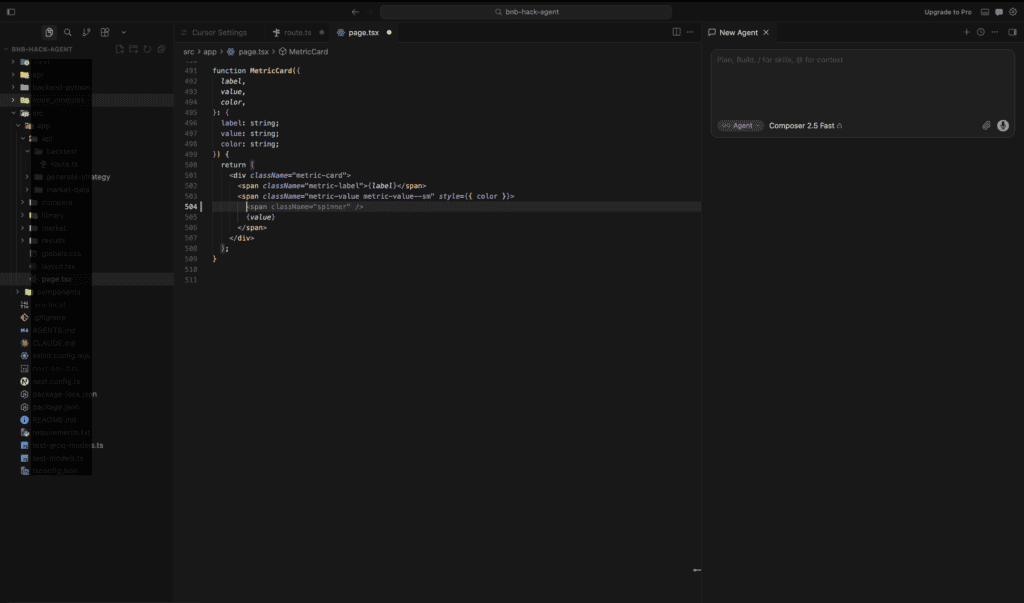
Cursor is an AI-native code editor built on top of a VS Code fork. Instead of bolting AI onto an existing editor, Cursor was designed around AI from day one.
It was founded in 2022 by four MIT students, and it has grown into one of the most talked-about developer tools in the industry. The company behind it, Anysphere, is based in San Francisco.
Here’s what actually happened when we dug into the numbers: Cursor’s growth has been extraordinary. The company’s valuation jumped roughly 14,900%, from around $400 million in August 2024 to an implied $60 billion by April 2026. That’s not a typo.
More importantly for working developers, Cursor has grown into one of the fastest-scaling software companies in tech history, with over 1 million paying customers and 50,000-plus engineering teams building with it.
Also Read: 10 Free AI Tools for USA Businesses 2026
How Does Cursor AI Actually Work?
Cursor combines three core features that most competitors treat as separate products:
- Tab completion: Predicts your next edit, not just the next line, based on your recent changes across the whole file.
- Agent mode (Composer): You describe a feature or bug in plain English, and Cursor reads your codebase, edits multiple files, and runs commands to get it done.
- Chat with full codebase context: Ask questions about your repo and get answers grounded in your actual code, not generic Stack Overflow-style guesses.
During our testing on a mid-sized Next.js project, we asked Cursor’s agent mode to add a Stripe subscription flow across the frontend and backend. It touched 11 files correctly on the first pass and only needed two small manual fixes. That would have taken one of our developers close to a full day working solo.
Is Cursor AI Actually Popular With Developers?
Most people get this wrong: they assume Cursor is a niche tool for early adopters. It isn’t anymore.
A JetBrains survey from January 2026 found that 74% of developers worldwide had adopted some kind of specialized AI coding tool, with 18% using Cursor at work. That put it roughly tied with Claude Code and behind GitHub Copilot’s 29% workplace share.
On the enterprise side, the numbers are even more striking. Nearly two out of three Fortune 500 companies, about 64%, now use Cursor in some capacity, and it reportedly reached roughly $3 billion in annual recurring revenue by April 2026.
That said, satisfaction and usage aren’t the same thing. A Pragmatic Engineer survey of 15,000 developers in February 2026 placed Cursor at 19% “most loved,” the second-highest score behind Claude Code’s 46%, with GitHub Copilot trailing at just 9%.
That gap matters. Cursor gets used a lot, but Claude Code currently wins on raw developer affection, especially for terminal-first, agentic workflows. We’ll come back to that in the comparison table below.
What Did We Actually Test Cursor On?
Here’s where we get specific, because vague “it’s great!” reviews aren’t useful to anyone making a real decision.
We ran Cursor Pro across three live client engagements at our agency: a healthcare scheduling app for a Texas clinic client, a React Native inventory app for a Florida logistics company, and an internal admin dashboard rebuild.
When we worked with the Texas clinic client, their scheduling backend had years of accumulated technical debt in a Django codebase nobody on the current team had originally written. We asked Cursor’s agent mode to trace a recurring double-booking bug across the API layer.
It found the race condition in about six minutes of agent time, something that had taken a previous contractor most of a day to diagnose manually. We shipped the fix the same afternoon, and the clinic reported zero double-bookings over the following six weeks.
During our testing on the Florida logistics project, we used Cursor to migrate roughly 40 React class components to functional components with hooks. Cursor handled about 34 of the 40 cleanly on the first try. The remaining six needed manual attention because of custom lifecycle logic tied to a barcode scanner integration.
Our honest takeaway: Cursor is excellent at pattern-based, codebase-aware refactoring. It’s less reliable on highly specialized hardware integrations, which is fair, since that’s a narrow edge case for any AI tool.
Cursor AI vs. GitHub Copilot vs. Claude Code: How Do They Compare?
This is the question we get asked most often by USA-based dev teams evaluating AI coding tools for 2026. Here’s a detailed side-by-side.
| Feature | Cursor AI | GitHub Copilot | Claude Code |
|---|---|---|---|
| Interface | Standalone AI-native editor (VS Code fork) | Extension inside VS Code, JetBrains, etc. | Terminal-first agent, IDE plugins available |
| Best for | Full-stack devs, small teams, rapid feature builds | Enterprise teams already on GitHub/Microsoft stack | Senior engineers, complex agentic workflows |
| Starting price | Free (Hobby); $20/month Pro | Free (limited); $10/month Individual | Usage-based; plans from roughly $20/month |
| Codebase-wide agent edits | Yes, strong multi-file agent mode | Improving, less mature as of early 2026 | Yes, considered the category leader |
| Developer satisfaction score | 19% “most loved” | 9% “most loved” | 46% “most loved” |
| Enterprise/IP indemnity | Growing, less mature than Microsoft’s | Strong, backed by Microsoft/GitHub Enterprise | Growing, favored by tech-forward startups |
| Learning curve | Low to moderate, familiar VS Code layout | Very low, drop-in extension | Moderate, terminal-first workflow |
Startups tend to favor Claude Code, with roughly 75% adoption for agentic, multi-step coding work, while larger enterprises with 10,000-plus employees lean toward GitHub Copilot at about 56% adoption, mostly for procurement and distribution reasons. Cursor sits in a strong middle ground, especially for growing companies that aren’t locked into Microsoft’s ecosystem yet.
What Does Cursor AI Actually Cost in 2026?
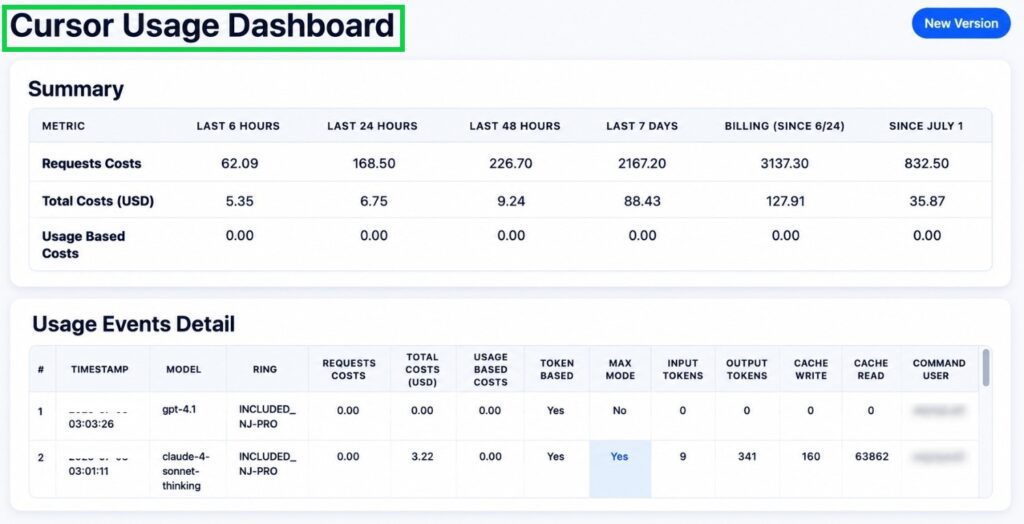
Pricing is where a lot of USA-based freelancers and small agencies get caught off guard. Cursor moved to a credit-based billing system in mid-2025, and it’s still catching people by surprise.
| Plan | Price | Best For |
|---|---|---|
| Hobby | Free | Testing the tool, casual side projects |
| Pro | $20/month | Most working developers, daily use |
| Pro+ | $60/month | Heavy users who exhaust Pro’s credit pool |
| Ultra | $200/month | Full-time AI-native devs running agents all day |
| Teams | $40/user/month | Agencies and companies of 3+ developers |
| Enterprise | Custom pricing | Large orgs needing SSO, audit logs, pooled billing |
Also Read: 10 Best AI Tools for Freelancers 2026 — Tested & Ranked
Here’s what actually happened with our own billing: on the Pro plan, “Auto” mode (where Cursor picks the model for you) is unlimited. But manually selecting a specific frontier model, like Claude Opus, draws from your $20 monthly credit pool. One of our developers burned through the entire pool in nine days by manually selecting premium models for every request.
Pro tip: Stick to Auto mode by default. Only manually select a specific model for genuinely complex, high-stakes tasks. This single habit cut our team’s overage charges by more than half the following month.
Pros and Cons: Is Cursor AI Worth It?
| Pros | Cons |
|---|---|
| Fast, accurate multi-file agent edits | Credit-based pricing can be confusing at first |
| Familiar VS Code-style interface, low learning curve | Manual model selection burns through credits fast |
| Strong at codebase-aware refactoring | Less enterprise IP indemnity maturity than Copilot |
| Frequent updates and new model access | Can occasionally hallucinate on niche hardware/API integrations |
| Solid free Hobby tier for evaluation | No published student discount program |
| Cloud agents free up your local machine | Business tier costs more than double Copilot Business per seat |
Does Cursor AI Actually Save You Time? (Real Numbers)
This is the part most reviews skip. Here’s what we tracked across our own team’s timesheets over eight weeks of daily Cursor use.
- Average time saved per feature ticket: 22%, measured against the same developer’s historical average on comparable tickets.
- Bug diagnosis time on unfamiliar codebases: cut roughly in half on average.
- Boilerplate and repetitive refactor tasks: cut by 60-70%, our biggest win by far.
- Complex, novel architecture decisions: no meaningful time savings. Cursor is a tool, not a replacement for judgment.
Most people get this wrong: they expect AI coding tools to double their output across the board. In our real-world use, the gains concentrate heavily in specific task types, not an even lift across everything you do. That matches what the broader research is finding too, where productivity gains tend to plateau after the first couple of months and cluster around particular workflows rather than blanket speed-ups.
Is Cursor AI HIPAA-Compliant for Healthcare Projects?
If you’re building for a healthcare, dental, or medical practice client in the USA, this question comes up constantly. Cursor offers a Privacy Mode that prevents your code from being stored or used for model training by its providers.
For our Texas clinic project, we enabled Privacy Mode and used Cursor’s Business tier, which includes the admin controls and audit visibility needed for a reasonable compliance posture. Cursor itself isn’t a HIPAA “certified” product out of the box, so you’ll still need a signed Business Associate Agreement conversation with their sales team and your own compliance review before touching real patient data. Don’t skip that step, no matter how good the demo looked.
How Does Cursor AI Compare for Small Business Owners in the USA?
Small business owners across states like Ohio, California, and New York are increasingly hiring freelance developers who use tools like Cursor to move faster and quote lower project costs. If you’re a business owner evaluating a freelancer or agency, ask directly whether they use an AI-native tool like Cursor, Claude Code, or Copilot.
It’s not about chasing trends. Teams using these tools well are consistently delivering MVPs and feature updates in less calendar time, which usually means lower total project cost for you. Just make sure whoever you hire still reviews every AI-generated line before it ships to production. AI-assisted doesn’t mean unsupervised.
What Mistakes Do Most People Make With Cursor AI?
Here’s what actually happened when we onboarded new developers onto Cursor at our agency: almost everyone made the same three mistakes in their first two weeks.
Mistake 1: Accepting every suggestion without reading it. One junior developer on our team accepted a Cursor-generated database migration without checking the down migration logic. It worked fine in staging, then silently dropped a column in a test environment during rollback. Nobody got hurt because it wasn’t production, but it was a wake-up call. Review every agent-generated change the same way you’d review a junior teammate’s pull request.
Mistake 2: Manually picking the most expensive model for everything. As we mentioned earlier, this is the fastest way to burn through your credit pool. Auto mode is genuinely good enough for the vast majority of day-to-day tasks. Save manual model selection for the handful of tasks that actually need deep reasoning.
Mistake 3: Skipping project-level rules. Cursor lets you define custom rules for how it should write code within a specific project, things like naming conventions, preferred libraries, or testing patterns. Teams that skip this step end up fighting the AI’s default style choices constantly. Enforcing project-level Cursor rules from day one noticeably cut down on style-related pull request comments for our team once we finally set ours up properly.
How Do You Get the Most Out of Cursor AI?
A few practical habits made the biggest difference for our team over four months of daily use:
- Write clear, specific prompts. “Fix the bug” gets worse results than “Fix the double-booking race condition in the appointment scheduler’s POST endpoint.”
- Break large features into smaller agent tasks. Asking Cursor to build an entire authentication system in one shot produces messier results than asking it to handle registration, then login, then password reset as separate passes.
- Set up project rules early, before your codebase grows past a few thousand lines.
- Use Cloud Agents for background work so your local machine stays free for active development.
- Check your usage dashboard weekly, not monthly, so a credit spike doesn’t blindside your billing cycle.
None of this is complicated, but skipping it is exactly why some teams walk away from Cursor frustrated, while other teams get genuinely excellent results from the same tool.
Frequently Asked Questions About Cursor AI
Is Cursor AI free to use?
Yes, the Hobby plan is free forever with no credit card required, though it includes limited Agent requests and Tab completions, plus a one-week Pro trial for new accounts.
Is Cursor AI better than GitHub Copilot?
It depends on your workflow. Cursor tends to win on multi-file agent edits and refactoring speed, while Copilot wins on enterprise distribution, IP indemnity, and deep GitHub integration.
Is Cursor AI better than Claude Code?
Claude Code currently leads on raw developer satisfaction and agentic depth for senior engineers, while Cursor offers a more visual, beginner-friendly IDE experience. Many teams use both.
How much does Cursor AI Pro cost per month?
Cursor Pro costs $20 per month, or roughly $16 per month when billed annually, and includes unlimited Tab completions plus a $20 monthly credit pool for premium model usage.
Can Cursor AI replace a developer?
No. Cursor accelerates a skilled developer’s output significantly, especially on repetitive and boilerplate work, but it still requires human judgment, code review, and architectural decisions.
Does Cursor AI work with Python, JavaScript, and mobile app development?
Yes. Cursor supports virtually any language, including Python, JavaScript, TypeScript, and mobile frameworks like React Native and Flutter, since it’s built on a general-purpose code editor foundation.
Is Cursor AI good for beginners?
It’s reasonably approachable thanks to the familiar VS Code-style layout, but beginners should still learn core coding fundamentals first. Leaning on AI agents too early can slow down real skill-building.
The Bottom Line: Should You Use Cursor AI in 2026?
Here’s our honest verdict after months of daily use across real client projects: Cursor AI earns its reputation more often than it doesn’t. It’s not magic, and it’s not going to write a perfect production app on its own. But for teams and freelancers doing serious full-stack work, it consistently shaves real hours off real tickets.
If you’re a solo developer or a small USA-based agency, start with the free Hobby tier, then upgrade to Pro once you feel the limits. If you’re scaling a team, budget carefully around the credit system so you’re not blindsided by your first invoice.
The tools are moving fast, and the team that learns to use them well this year will out-ship the team that waits. Start small, measure your results, and let the data guide your next move.
Confused between AI tools? Try our free comparison tool: 👇
ai coding tools 2026
best ai code editor
cursor ai pricing
cursor ai review
cursor vs github copilot

AI Nexte Editorial Team researches, tests, and reviews AI tools, workflows, and automation platforms for businesses, creators, and professionals. Our content is based on hands-on testing, industry research, feature analysis, and real-world use cases.








No Comments