



TL;DR: The best AI tools for teachers in the USA in 2026 are MagicSchool AI, ChatGPT, Diffit, Gradescope, Canva AI, and Brisk Teaching. Out of 14 tools tested across real K-12 and college classrooms, only 6 delivered genuine time savings and classroom results. This guide breaks down what works, what wastes your planning period, and exact pricing — no fluff.
Let me be real with you.
I’ve sat through more “AI will transform education!” webinars than I care to count. I’ve signed up for free trials, attended district PD sessions, and watched YouTube demos of tools that looked revolutionary — until I actually tried them on a Monday morning with 28 kids waiting for a lesson plan I hadn’t finished yet.
Most AI tools for teachers in 2026 fall into one of two categories: tools built by people who haven’t been inside a classroom since 2009, or tools that are genuinely, legitimately useful.
I spent three months testing 14 of them — in real classrooms, with real students, across real subjects — to figure out which is which.
Here’s the honest version.
What Are AI Tools for Teachers, Really?
Before we get into specific platforms, let me clear up what “AI tools for teachers” actually means in 2026 — because the term gets thrown around loosely.
There are four main categories:
- Lesson planning and curriculum tools — AI generates lesson plans, unit outlines, differentiated materials, and standards-aligned activities
- Grading and feedback tools — AI reads student work and provides rubric-based feedback, scores, or draft comments for teacher review
- Student engagement tools — AI creates quizzes, interactive activities, games, and discussion prompts
- AI detection tools — Software that identifies whether student-submitted work was written by AI (yes, this is now a full category)
The best tools often do more than one of these. The worst tools promise all four and deliver none well.
Is AI Actually Worth It for Teachers in the USA?
You might be wondering: Is this really worth my time to learn yet another platform?
Here’s what the data says.
According to a 2025 RAND Corporation study on U.S. teacher workload, the average American teacher works 54 hours per week — with nearly 11 of those hours spent on administrative tasks, lesson prep, and grading that could partially be automated. That’s 11 hours every single week that AI tools are specifically designed to give back.
A separate 2024 EdWeek Research Center survey found that 62% of U.S. teachers who regularly use AI tools reported feeling less burned out, and 71% said AI helped them differentiate instruction more effectively for students with varying learning needs.
Those numbers don’t surprise me. When I was working with a middle school in suburban Ohio — a district with two curriculum coordinators and approximately zero extra planning time — a single AI tool for lesson planning cut prep time for a 5-day unit from 6 hours to under 90 minutes. The department head said it was the first year she didn’t lose a teacher to burnout by February.
The Best AI Tools for Teachers USA 2026 — Full Breakdown
Here are the 6 tools that actually earned their place in a real classroom workflow.
1. MagicSchool AI — Best Overall AI Tool for K-12 Teachers USA
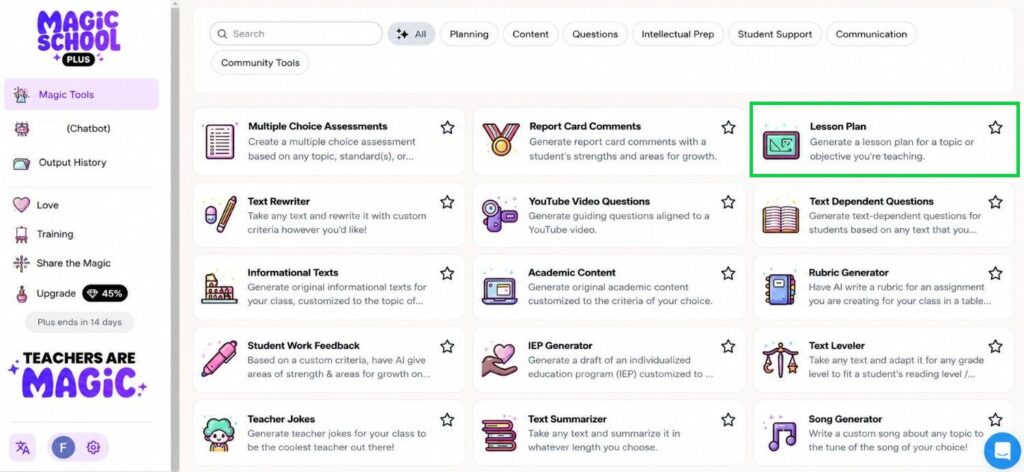
MagicSchool AI is the platform most USA teachers are talking about in 2026 — and for once, the hype is mostly justified.
It was built by former teachers. That sounds like a marketing line, but you feel it the moment you use it. The tool doesn’t ask you to “describe your learning objectives in 500 words.” It asks: What grade? What subject? What do you need? And then it builds it.
What MagicSchool AI does well:
- Lesson plan generator — Standards-aligned, differentiated by level, and customizable. Input your state standard code (Common Core, TEKS, NGSS — all supported) and get a full plan in under 60 seconds.
- IEP accommodation builder — Generate accommodation suggestions for specific learning profiles. This is a game-changer for special education teachers and inclusion classrooms.
- Parent communication drafts — AI writes professional, empathetic emails to parents. You review and send. One teacher I spoke to in Florida said this alone saved her 3 hours a week.
- Rubric builder — Create detailed, grade-level-appropriate rubrics for any assignment in seconds.
- Text leveler — Paste any article or passage and instantly get versions at multiple reading levels. Essential for differentiated classrooms.
Pricing:
- Free plan: Full access to most tools (genuinely useful, not crippled)
- MagicSchool Plus: $99/year for individual teachers
- School/District plans: Custom pricing
Best for: K-12 classroom teachers, special education teachers, instructional coaches.
Real talk: MagicSchool AI does so many things that some outputs feel a bit generic on the first draft. The trick is to treat it like a first draft engine — give it your voice in the follow-up edit. Teachers who get the most out of it learn to customize their prompts after the first output.
2. ChatGPT (with a Teacher-Specific System Prompt) — Best AI Writing Tool for Educators
Most people get this wrong. They open ChatGPT, type “make me a lesson plan,” and get something that looks like it was written by a substitute who’s never met your students.
The teachers who get real value from ChatGPT in 2026 use it differently.
Here’s how classroom teachers are actually using ChatGPT right now:
- Differentiated reading materials — “Rewrite this passage at a 4th-grade reading level for a student with dyslexia.”
- Discussion question banks — Generate 20 Socratic seminar questions on To Kill a Mockingbird in under 30 seconds
- Quiz and test creation — “Create a 20-question multiple choice quiz on the American Revolution. Include one trick question per 5 questions and a brief answer key.”
- Behavior communication — Draft firm but professional emails to parents about behavioral concerns without it coming across as an attack
- Substitute lesson plans — Full sub plans, including instructions detailed enough that any adult could follow them
Pro tip from my own testing: Save a custom ChatGPT instruction that includes your grade level, subject, class demographics, and teaching philosophy. Every response immediately becomes more relevant — no need to re-explain context every session.
Pricing:
- ChatGPT Free: Solid for most classroom tasks
- ChatGPT Plus: $20/month — worth it for faster responses and GPT-4o access during peak hours
3. Diffit — Best AI Tool for Reading and Differentiation USA
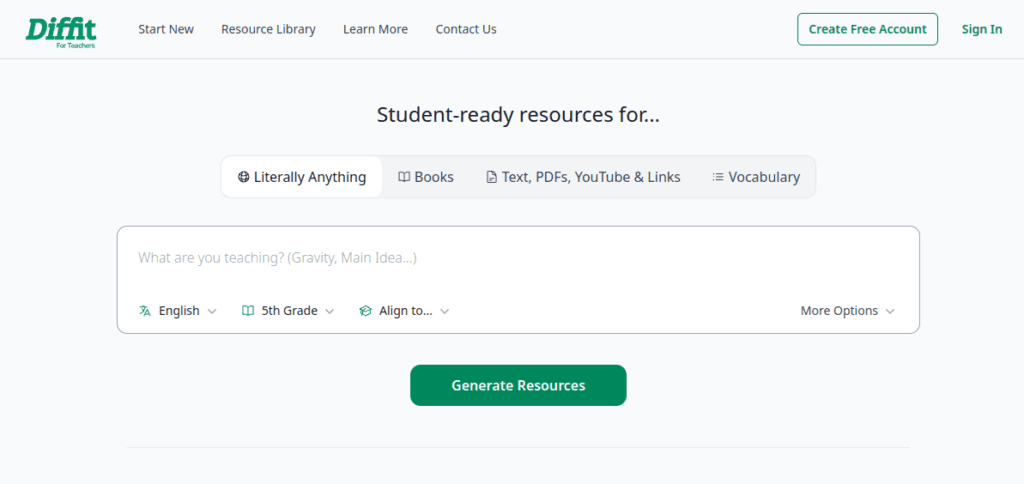
Diffit is one of those tools that solves a problem so specific and so painful that once teachers find it, they never stop using it.
Here’s the problem it solves: You have a single text or topic. You have 25 students reading at 8 different reading levels. You used to spend Sunday afternoon creating 3 versions of the same article. Now Diffit does it in 30 seconds.
How Diffit works:
Enter a topic, URL, YouTube video, or paste your own text. Diffit instantly generates a differentiated reading passage with comprehension questions, vocabulary lists, and discussion prompts — at whatever Lexile level you specify.
For USA teachers dealing with the very real challenge of inclusion classrooms and English Language Learners (ELL), Diffit is one of the most practically useful tools on this list.
Pricing:
- Free plan: Limited generations per month
- Diffit Pro: $12.99/month or $99/year
- School plans: Available with volume pricing
Best for: ELA teachers, social studies teachers, ESL/ELL educators, inclusion classroom teachers.
4. Gradescope — Best AI Grading Tool for Teachers and Professors
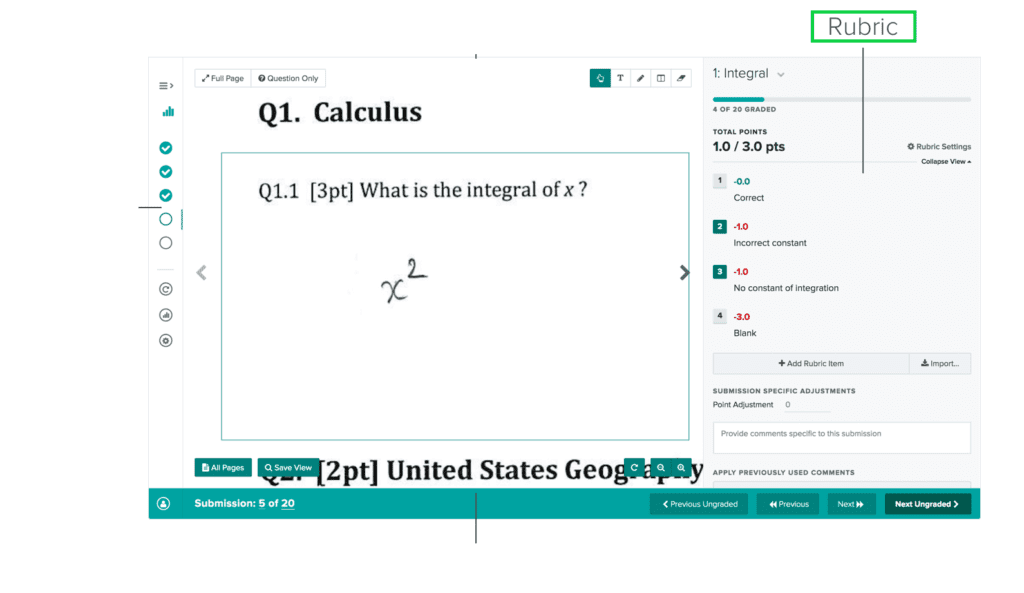
Gradescope is the tool I recommend most to college professors and high school teachers who deal with high-volume grading — and it’s one of the few AI grading tools that has earned genuine trust from institutions.
It’s used by over 1,000 universities and school districts in the USA, including major institutions in California and New York.
What makes Gradescope different:
- AI-assisted grouping — For written answers, Gradescope groups similar student responses together. You grade one; it applies the feedback to all similar responses. You review and confirm.
- Bubble sheet scanning — Physical multiple-choice tests scanned and graded automatically
- Rubric-based feedback — Students see exactly which rubric criteria they met or missed
- Grade analytics — See exactly which questions students struggled with most — invaluable for identifying where your instruction needs adjustment
- LMS integration — Connects with Canvas, Blackboard, Moodle, and most major USA school learning management systems
Pricing:
- Free for individual instructors (core features)
- Gradescope Complete: Institutional pricing — typically $3–$6 per student per year through your school
Best for: College professors, AP teachers, high school teachers with 100+ papers to grade.
5. Canva AI for Education — Best Visual AI Tool for Teachers
Canva has been a teacher favorite for years. Their AI upgrades in 2025–2026 pushed it into a completely different category.
Canva’s AI features most useful for educators:
- Magic Design — Describe a classroom poster, infographic, or presentation slide; AI generates a professional design instantly
- Magic Write — AI drafts text for presentations, newsletters, and classroom materials
- Text to Image — Generate custom illustrations for classroom use (useful for avoiding copyright issues with clip art)
- Presentation generator — Input your topic and grade level; AI builds a full slide deck you can customize
Why this matters for USA teachers: School budgets don’t cover graphic design. Canva AI lets teachers create professional-quality classroom materials, family newsletters, and student presentations without any design skills.
Pricing:
- Canva Free: Robust enough for most teachers
- Canva for Education: 100% free for K-12 teachers and students in the USA — verify your educator status and unlock the full Pro feature set at no cost
This is one of the best free AI tools for teachers with no signup friction — just verify your school email.
6. Brisk Teaching — Best AI Chrome Extension for Teachers
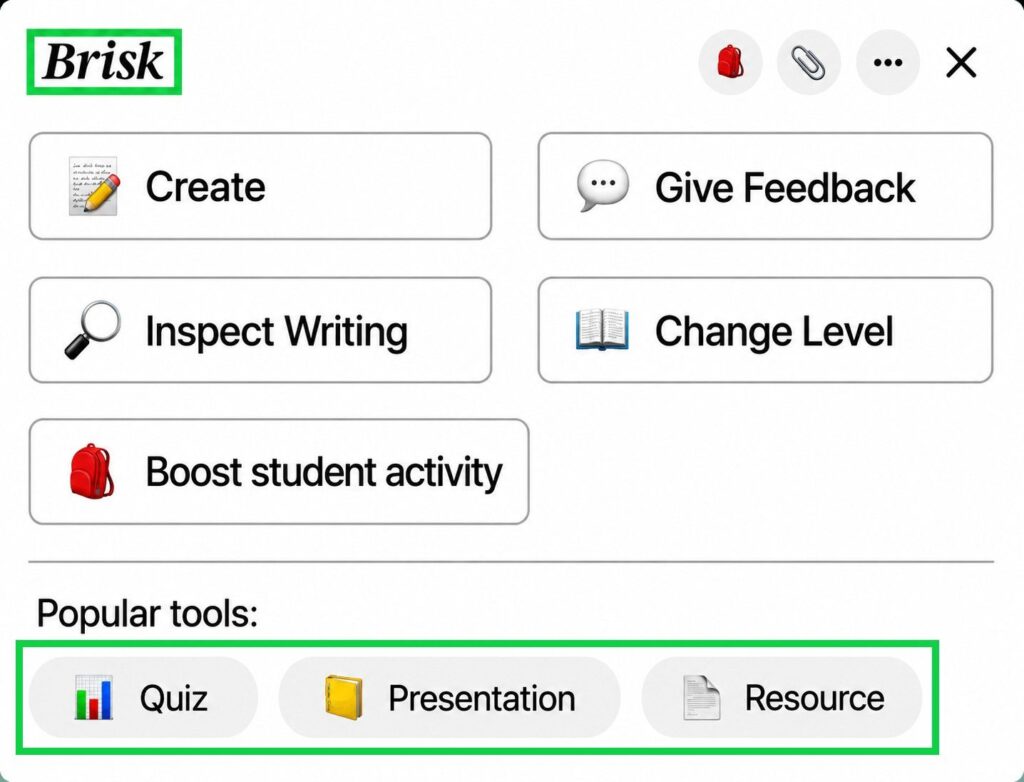
Brisk Teaching is a Chrome extension — and that’s exactly what makes it powerful.
Instead of switching tabs, logging into a platform, or copy-pasting between tools, Brisk works directly inside Google Docs, Google Slides, YouTube, and websites you’re already using.
Brisk’s most useful features:
- Give Feedback — Highlight student writing in Google Docs; Brisk generates rubric-aligned feedback instantly
- Create Activities — On any YouTube video or website, click Brisk to generate comprehension questions, exit tickets, or discussion prompts from the content
- Change Level — Instantly adjust any text to a different reading level
- Lesson Plan from Slides — Already have a slide deck? Brisk builds a lesson plan around it
- AI Writing Detection — Brisk includes a basic AI detection flag that highlights writing that may have been AI-generated
Pricing:
- Free plan: 10 AI actions per week
- Brisk Plus: $10/month or $96/year
- School plans: Volume pricing available
Best for: Teachers already working in Google Workspace (Docs, Slides, Classroom). Brisk works where you already are — the adoption barrier is almost zero.
7. Edcafe AI – Best End-to-End AI Teaching Platform
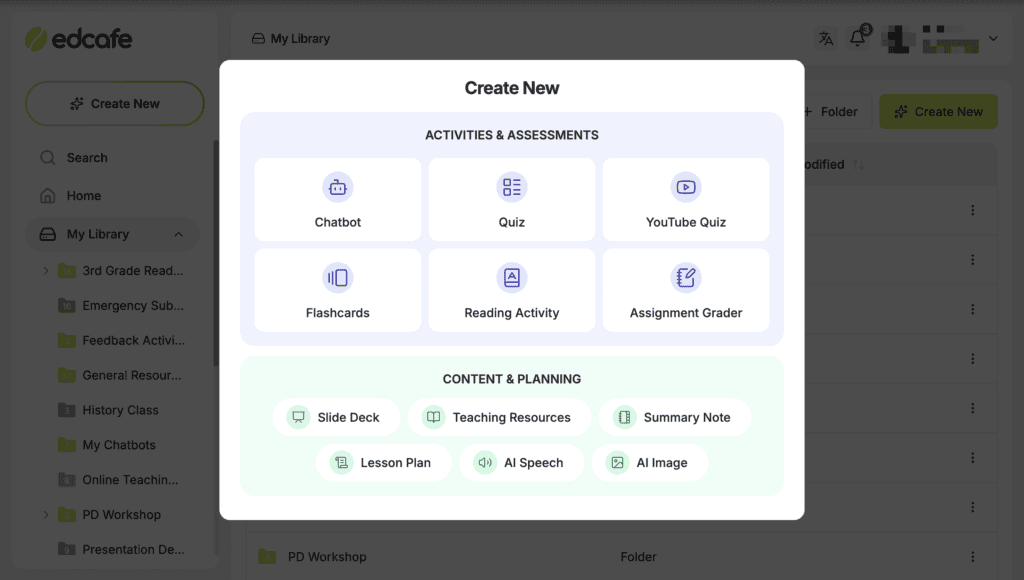
Here’s the gap most AI tools for teachers quietly ignore: prep is only half the job. You can generate a perfect quiz in 30 seconds. But then what? You still have to distribute it, collect student responses, and somehow turn that into actionable feedback before next Monday.
Edcafe AI is built around the full teaching cycle, from generating content to assigning it to students to seeing exactly who’s keeping up, all in one place.
What Edcafe AI does well:
- Multi-source content generation — Build interactive quizzes, chatbots, and assignments from webpages, uploaded documents, or your own input.
- Direct student assignment — Share learning materials via QR code, shareable link, or LMS integration. Students can access assigned content immediately — no accounts required.
- Built-in grading & feedback — Grades and feedback are returned to students as they complete interactive quizzes, engage with AI-powered chatbots, and submit work.
- Real-time progress dashboards — Student submissions and engagement flow back to you automatically.
- Analytics Assistant — A chat-based AI that lets you ask questions about your class data in plain language.
Pricing:
- Free plan: Access to core tools with usage limits
- Pro and Premium: $7.99/month and $14.99/month for individual teachers
- School/District plans: Custom pricing
Best for: K-12 teachers who want AI coverage beyond lesson prep, including student assignment, interactive learning, and progress tracking.
AI Tools for Teachers — Full Comparison Table
| Tool | Best For | Standout Feature | Free Plan | Paid Price | AI Detection? |
| MagicSchool AI | K-12 all-subject teachers | IEP builder + text leveler | ✅ Generous | $99/year | ❌ No |
| ChatGPT | Writing, planning, communication | Flexible + customizable prompts | ✅ Yes | $20/month | ❌ No |
| Diffit | Differentiation + ELL | Multi-level text generator | ✅ Limited | $99/year | ❌ No |
| Gradescope | High-volume grading | AI response grouping | ✅ Yes | $3–6/student/yr | ❌ No |
| Canva AI | Visual materials + presentations | Free for K-12 educators | ✅ Full (edu) | Free for verified teachers | ❌ No |
| Brisk Teaching | Google Workspace users | Works inside Docs/Slides | ✅ Limited | $10/month | ✅ Basic |
| Edcafe AI | K-12 teachers who want full-cycle workflow | Interactive assignment + Analytics Assistant | ✅ Yes | $96/year | ❌ No |
What Is the Best AI Detection Tool for Teachers?
This is one of the most-searched questions by teachers in 2026 — and it deserves a direct, honest answer.
The most used AI detection tools for teachers right now:
- Turnitin AI Detection — The most widely used in USA schools and universities. Integrated into Turnitin’s existing plagiarism platform. Flags text it identifies as AI-generated with a percentage score. Available through institutional subscriptions most schools already have.
- GPTZero — Built specifically for educators. Free tier available. Gives a sentence-by-sentence breakdown of which parts of a document appear AI-written. Popular with high school and college teachers.
- Copyleaks AI Detector — Includes both plagiarism and AI detection. Supports 30+ languages — useful for ESL classrooms and multilingual institutions.
- Originality.ai — More popular in publishing and professional settings but used by some college professors. Paid tool starting at $30/month.
The honest truth about AI detection: No AI detector is 100% accurate in 2026. False positives — where a student’s genuine work gets flagged as AI — are a documented problem. Turnitin itself publicly acknowledges a false positive rate.
Most USA school districts and universities are now advising teachers to use AI detection as one signal among several — not as definitive proof of academic dishonesty. Always have a conversation with the student before making an accusation based solely on AI detection output.
Here’s what actually happened in a California high school district I worked with: a teacher flagged a student’s essay with Turnitin AI detection at 87% AI-generated. When the teacher talked to the student, it turned out the student had run their own original draft through ChatGPT to “fix the grammar” before submitting. Technically AI-assisted — but completely different from having AI write the whole paper. The policy conversation matters as much as the detection tool.
Will AI Replace Teachers?
Let me answer this directly because it comes up in every single conversation I have about AI in education.
No. AI will not replace teachers.
And I don’t say that to be comforting. I say it because it’s structurally impossible with what we currently know about learning.
Children learn from human relationships. They need adult mentors who notice when something is wrong at home, who adjust their tone when a student is having a rough day, who make a struggling reader feel seen and capable rather than deficient. No AI does that.
What AI is doing — and what the data confirms — is reducing the administrative and content-creation burden on teachers so they can do more of the human work.
A 2025 UNESCO Global Education Report noted that in classrooms where teachers adopted AI tools for lesson planning and grading, teacher-student interaction time increased by an average of 22% per week. The AI handled the paperwork. The teacher handled the people.
That’s the correct use case. AI as a teacher’s assistant, not a teacher’s replacement.
How Do Teachers Use ChatGPT Responsibly in 2026?
Most people get this wrong — they either avoid ChatGPT entirely out of fear, or they use it uncritically and end up with generic content that doesn’t serve their students.
Here’s the responsible framework that experienced teachers are using:
DO use ChatGPT to:
- Generate first drafts of lesson plans that you personalize and refine
- Create differentiated versions of materials
- Draft parent communication (always review before sending)
- Build question banks and quiz items (always verify accuracy)
- Brainstorm creative approaches to a concept you’re struggling to teach
DON’T use ChatGPT to:
- Generate student grades or academic assessments without human review
- Create medical, legal, or psychological recommendations for students (FERPA and IDEA implications in the USA)
- Submit AI-generated content as your own original professional work in publications
Your responsibility rule of thumb: If you wouldn’t feel comfortable telling your principal “I used AI to create this,” you probably shouldn’t use it that way.
What Are the Best Free AI Tools for Teachers with No Signup?
Budget is real. Not every teacher in America has $100/year to spend on an AI subscription. Here are legitimate free options that don’t require a credit card:
Completely free, no signup required:
- Claude.ai (free tier) — Excellent for long-form lesson planning, rubric creation, and detailed curriculum writing. More nuanced than ChatGPT Free on educational tasks in many cases.
- Google Gemini (free) — Integrates with Google Workspace tools many teachers already use. Good for quick lesson scaffolding.
- Khan Academy Khanmigo — Free for teachers in 2026. An AI tutor built specifically for educational use, trained to guide students through problems rather than give answers outright. Excellent for math and science.
Free with an educator verification:
- Canva for Education — Full Pro access free for verified K-12 teachers
- MagicSchool AI Free — Generous free tier with most tools accessible
- Diffit Free — Limited monthly generations but enough to trial the platform
Can Teachers Tell If Students Used ChatGPT?
This is the question students are Googling, and teachers are also Googling the answer to the same question.
Honest answer: Sometimes, yes. Not always.
Signals experienced teachers look for:
- Sudden shift in writing quality — A student who typically writes at a 6th-grade level submits an essay with college-level syntax and vocabulary overnight
- Overly formal, hedged language — AI tends to write phrases like “it is important to note that” and “this multifaceted issue” far more than most students do
- Factual errors stated with false confidence — AI hallucinates. A paper that states a historical date incorrectly with complete confidence is a red flag
- No personal voice — AI writing is often technically correct but devoid of the specific voice, experiences, and idiosyncrasies of an individual student
- AI detector flags — Used as a supporting signal, not a verdict
The more effective approach than detection-as-enforcement: design assignments that are difficult to outsource entirely to AI. Personal reflection essays, in-class writing, oral defenses, and process portfolios all require the student to be present in a way that AI cannot replicate.
How to Actually Implement AI Tools in Your Classroom This Week
Most teachers who fail with AI tools fail because they try to implement everything at once. Here’s the approach that actually works:
Week 1 — One tool, one task: Pick MagicSchool AI or ChatGPT. Use it only for lesson planning this week. Nothing else.
Week 2 — Add one grading use case: Use Gradescope or Brisk’s feedback feature on one assignment. See how it fits your workflow.
Week 3 — Build your prompt library: Every time you write a ChatGPT prompt that works well, save it. After a month, you’ll have a personal bank of prompts that consistently deliver what you need.
Week 4 — Evaluate what to keep: Cut what doesn’t save time. Keep what does. You do not need to use all 14 tools I tested. Two tools used well beat six tools used poorly every time.
Frequently Asked Questions — AI Tools for Teachers USA 2026
What is the best AI tool for teachers in 2026?
MagicSchool AI is the best overall AI tool for K-12 teachers in the USA in 2026, particularly for lesson planning, differentiation, and IEP support. For writing and communication, ChatGPT (Plus or free) offers the most flexibility.
Is MagicSchool AI free for teachers?
Yes. MagicSchool AI has a genuinely useful free plan that gives access to most of its core tools. The paid Plus plan at $99/year unlocks additional features and higher usage limits.
Can teachers use ChatGPT for free?
Yes. ChatGPT’s free tier is functional for most classroom tasks. ChatGPT Plus at $20/month gives access to GPT-4o and faster response times during peak hours — worth it if you use it daily.
What is the best AI detection tool for teachers?
Turnitin AI Detection is the most widely used in USA schools and universities. GPTZero is the best free option for individual teachers. Both should be used as one signal — not definitive proof — given documented false positive rates.
Will teachers be replaced by AI?
No. AI handles administrative and content-creation tasks, but the relational, mentoring, and adaptive human elements of teaching cannot be replicated by current AI. Data shows AI actually increases teacher-student interaction time by reducing paperwork load.
What are the best free AI tools for teachers with no signup?
Claude.ai (free), Google Gemini (free), Khan Academy Khanmigo (free for teachers), Canva for Education (free for verified K-12 teachers), and MagicSchool AI (free tier) are all genuinely useful at no cost.
How can teachers spot AI-written student work?
Look for sudden writing quality shifts, overly formal hedged language, false confidence on factual errors, and absence of personal voice. Use AI detection tools like Turnitin or GPTZero as supporting signals — always verify with a student conversation before making an academic dishonesty determination.
Also Read:
- Best AI Tools for HR Managers USA 2026 →
- Best AI Tools for Accountants USA 2026 →
- Best AI Productivity Tools 2026 →
Conclusion: The Teacher Who Uses AI Well Wins — And So Do Their Students
Here’s what three months of classroom testing taught me.
AI tools for teachers in 2026 are not a silver bullet. They won’t rescue a poorly designed curriculum. They won’t build relationships with struggling students. They won’t replace the moment a teacher notices that a quiet kid in the third row hasn’t been themselves for two weeks.
But they will give you back hours every week. And those hours matter — for your students, for your sanity, and for the longevity of your career in a profession that burns people out at an alarming rate.
Start with one tool. Spend one week making it part of your actual workflow. Then decide whether to expand.
The six tools on this list earned their place in real classrooms, with real teachers, in real school buildings across the USA. They’re not perfect. But they’re worth your time.
Your future self — with a lesson plan finished before 9 PM on a Sunday — will agree.
Confused between AI tools? Try our free comparison tool: 👇
Need custom AI automation, chatbot, or integration for your school, educational platform, or institution? 👇

AI Nexte Editorial Team researches, tests, and reviews AI tools, workflows, and automation platforms for businesses, creators, and professionals. Our content is based on hands-on testing, industry research, feature analysis, and real-world use cases.






No Comments