



Too much homework and too little time is a common problem for students. Assignments and lectures and exams often pile up in the same week. Many students now turn to AI tools for students 2027 to manage this workload. These 6 tools can help you save 10 or more hours a week when you use them for the right tasks. In this guide you will find a quick comparison table and a full review of each tool. Every review covers what the tool does and its top features and how to use it and pricing and a pro tip. The list includes top AI tools for students 2027 for homework and writing and flashcards and notes and research. Prices and limits change often so check each official page before you subscribe.
Quick Comparison: Best AI Tools at a Glance
The table below compares every tool in this list. Ratings are editorial scores out of 5 based on ease of use and value for students.
| Tool | Best for | Free or paid | Rating | Official site |
| Chatgpt | Homework help and exam prep | Free and paid | 4.8/5 | chatgpt.com |
| Grammarly | Essay writing and grammar check | Free and paid | 4.6/5 | grammarly.com |
| Quizlet.ai | Flashcards and practice tests | Free and paid | 4.5/5 | quizlet.com |
| Notion Ai | Notes and organization | Free and paid | 4.5/5 | notion.com/product/ai |
| Otter.ai | Lecture transcription and notes | Free and paid | 4.4/5 | otter.ai |
| Perplexity Ai | Research with real sources | Free and paid | 4.7/5 | perplexity.ai |
1. ChatGPT: Best for Homework Help and Exam Prep
What is ChatGPT? ChatGPT is an AI chatbot from OpenAI. You type a question or a task in plain language and it writes back an answer. It sits on almost every list of top AI tools for students 2027 because one tool covers so many jobs. If you prefer a Google option, read our guide on Gemini AI free tools.
Top 3 Features for Students
- Explains hard topics in simple language and adjusts to your level.
- Creates practice questions and short summaries for revision.
- Helps outline essays and checks the logic of your arguments.
How to Use for Study
Give the tool a clear role and a clear task. A prompt that works well:
Act as a biology tutor. Ask me 10 multiple choice questions on cell structure one at a time and tell me more advanced features. Set up like this, ChatGPT works as a quiz partner, which makes it one of the better AI tools for pre exam practice.
Pricing
The free plan has usage limits. ChatGPT Plus costs $20 per month and gives higher limits and access to more advanced features.
Pro Tip
Paste your own class notes into the prompt so the answers match your course. Ask the tool to explain its reasoning, that way you can catch mistakes.
Pros and Cons
Pros: Explains topics quickly. Works for many subjects. Has a free plan.
Cons: Can give wrong answers with confidence. Free usage has limits. May not match your syllabus unless you add notes.
Our Experience
The best results came when one message held the subject, the level and the format. Vague prompts got broad answers, so we kept ours specific and checked facts against class material.
2. Grammarly: Best for Essay Writing and Grammar Check
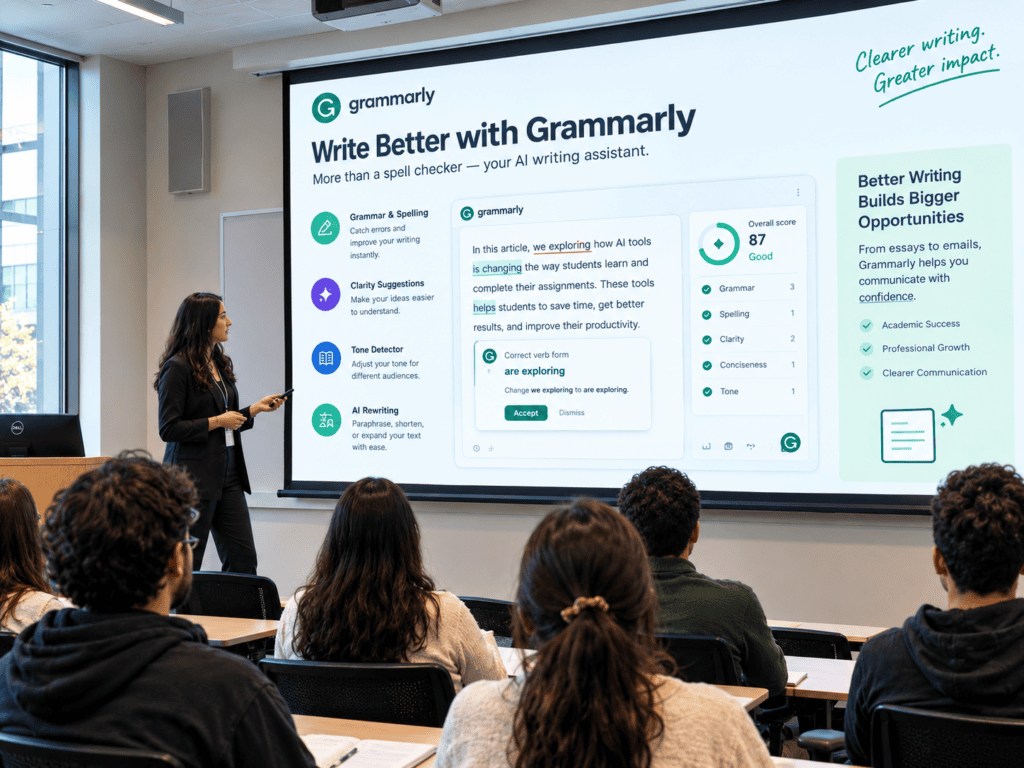
What is Grammarly? Grammarly is an AI writing assistant that reviews grammar, spelling, clarity and tone. It works in browsers and many writing apps. Students use it for essays, lab reports and emails to professors.
Top 3 Features for Students
- Grammar and spelling checks that catch errors as you type.
- Clarity and conciseness suggestions that make sentences easier to read.
- Tone detection and AI rewriting that adjust text for different readers.
How to Use for Assignments
Write your draft first, then paste it into the editor or use the browser extension. Go through the suggestions by category and accept the ones that keep your meaning. Dismiss the rest. Read the final version once more before you submit.
Pricing
A free plan covers basic checks. Advanced suggestions and AI features need a paid plan, so check the official page for current prices.
Pro Tip
Use Grammarly after you finish the draft, not while you write. Your ideas keep moving and you edit with a clear head.
Pros and Cons
Pros: Finds errors quickly. Suggests clearer sentences. Offers a useful free plan.
Cons: Advanced features are paid. Some changes can alter your meaning. Some schools restrict AI rewriting.
Our Experience
We ran a lab report paragraph through it as a final check. It caught a verb agreement error and flagged a few wordy sentences. A couple of tone suggestions did not fit, so we dismissed them.
3. Quizlet.ai: Best for Flashcards and Practice Tests
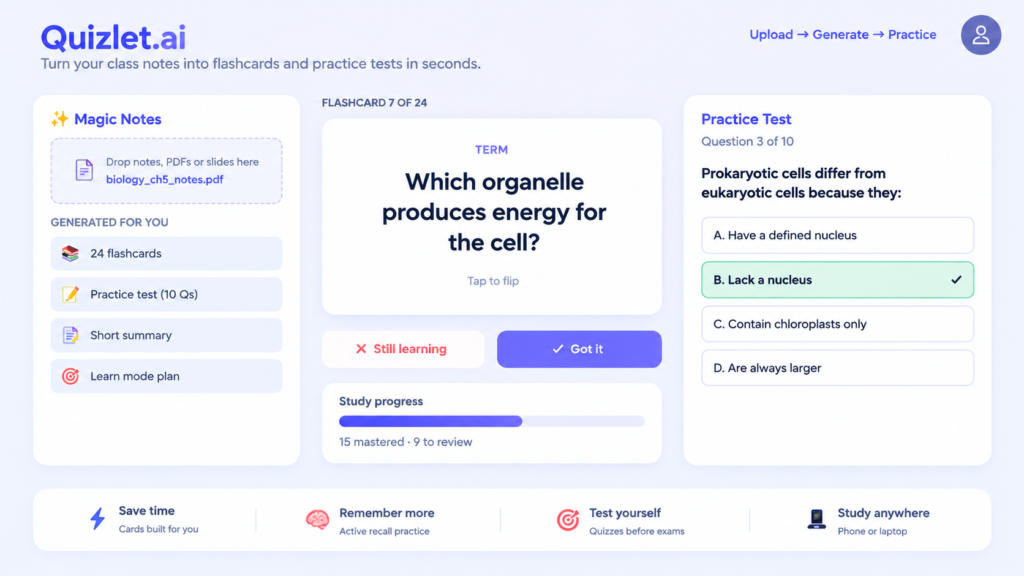
What is Quizlet.ai? Quizlet is a well-known study platform, and its AI features let you turn your own notes into flashcards, practice tests and study sessions. Instead of typing out every card by hand, you upload the material and get a first set to work from.
Top 3 Features for Students
- Magic Notes builds flashcards and practc e questo ns from your notes.
- Practc e tests and Learn mode push you to test yourself instead of re-reading.
- A large library of study sets and mobile apps for review on the go.
How to Use for Revision
Upload or paste the notes from one chapter and let Quizlet generate a set of cards. Read through them and fix anything that looks wrong. Study in short sessions over several days, then take a practice test to see what did not stuck. This makes it a good option among AI tools for pre exam practice.
Pricing
The free plan has limited features. The AI tools need Quizlet Plus, which costs around $7.99 per month or $35.99 per year at the tm e of writing. Check the official page for current prices and student offers.
Pro Tip
Write the cards yourself for the topics you find hardest. Making them is part of the learning. Let the AI handle the easier chapters.
Pros and Cons
Pros: Saves hours of card making. Good for actv e recall. Works on phone and laptop.
Cons: The best AI features need a paid plan. Sets made by other users can contain errors. Not built for step by step math problems.
Our Experience
Our rule for any generated flashcards is to skim every card before studying it. Auto-made cards are a quick start, but a few will be vague or slightly off, and it is easier to fix them now than to memorize a wrong answer.
4. Notion AI: Best for Notes and Organizat on.
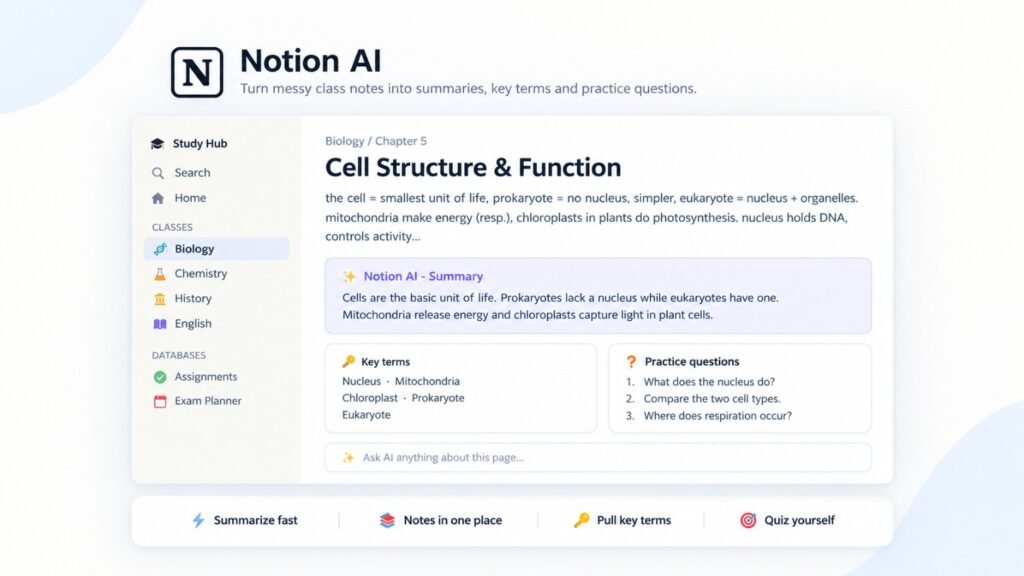
What is Notion AI? AI works inside the Notion workspace that many students already use for class notes. It can summarize long pages, pull out key points and rewrite rough notes into cleaner study material.
Top 3 Features for Students
- Summaries of long pages and documents.
- Key term lists and acto n items pulled from your notes.
- Question generation that works as one of the AI tools for pre exam practice.
How to Use for Notes
Create a page for each subject and paste your class notes into it. Select the text and ask Noto n AI for a summary. Then ask for key terms with simple definito ns and a few questo ns on each chapter. Save the results in a study database.
Pricing
Notion has a free plan for individuals, and students with a school email can usually get the Plus plan free.Full AI features are tied to a paid plan (currently Business), so check the official pricing page before count on them.
Pro Tip
Keep one template for every class with sections for summary, key terms and questions. Each new lecture then goes much faster.
Pros and Cons
Pros: Keeps notes in one place. Fast summaries. Free plan for individuals.
Cons: Full AI features can cost extra. Summaries can miss small details. Setup takes tmie.
Our Experience
We tested Notion AI on biology notes about cell structure. The summary captured the main ideas but missed some smaller points, so we added those by hand.
5. Otter.ai: Best for Lecture Transcript on and Notes
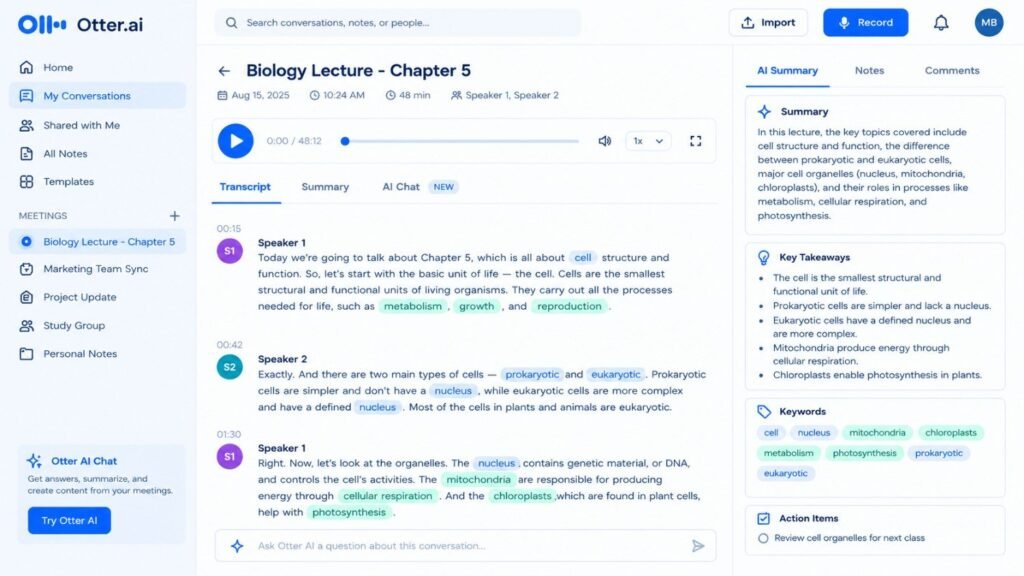
What is Otter.ai? Otter.ai records conversations and turns them into text. The screen above shows a biology lecture with a full transcript and speaker labels. It also adds a summary, key takeaways and a keyword list.
Top 3 Features for Students
- Live and recorded transcripto n with speaker labels.
- AI summaries and keyword lists for quick revision.
- An AI chat that answers questo ns about a recording.
How to Use for Lectures
Ask your instructor for permission to record. Press record at the start of class or import an audio file. Afterclass, read the summary first and then search the transcript for terms you need to review.
Pricing
A free plan has monthly limits on transcription time. Paid plans raise those limits and add more features.
Pro Tip
Put a phone or microphone close to the speaker. Clear audio makes the biggest difference to accuracy.
Pros and Cons
Pros: Saves manual note taking. Searchable transcripts. Helpful summaries.
Cons: Accuracy depends on audio. Technical terms may need correction. Free minutes are limited.
Our Experience
We reviewed a recording of about 48 minutes on cell structure. The transcript was mostly accurate, with a few organelle names needing correction. The summary worked well as a quick revision outline.
6. Perplexity AI: Best for Research with Real Sources
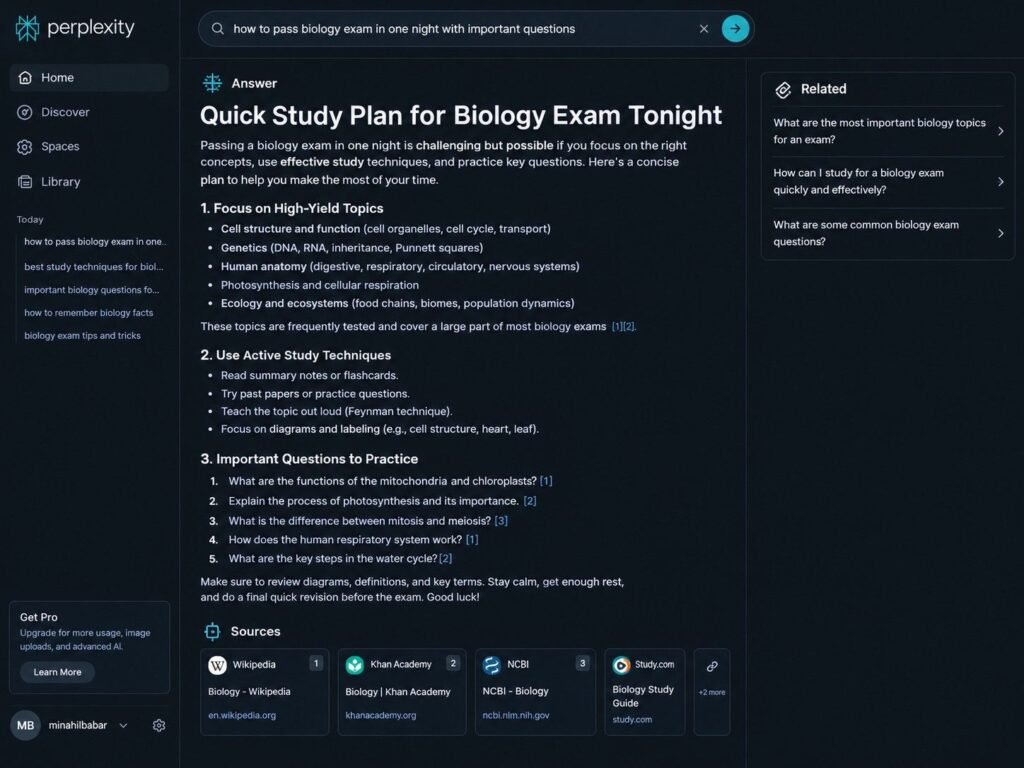
What is Perplexity AI? Perplexity AI is an answer engine. You type a question and it returns a written answer with numbered sources. It is one of the top AI tools for students 2026 for research because you can open each source and check the claim yourself.
Top 3 Features for Students
- Numbered sources beside each answer.
- Follow up questo ns that let you go deeper into a topic.
- Related questo n suggesto ns that show what else to study.
How to Use for Research
Type a specific question, such as the difference between mitosis and meiosis. Read the answer and open at least one source to confirm the main points. Ask follow up questions, then write the confirmed points in your own words.
Pricing
A free version is available with limited use of advanced features. A paid Pro plan adds more advanced searches.
Pro Tip
Prefer academic and official sources from the list. If a source looks weak, search again with a more specific question.
Pros and Cons
Pros: Shows sources. Clear explanations. Supports follow up questions.
Cons: Source quality varies. Advanced features are limited on the free version. Answers can be general on complex topics.
Our Experience
We asked for a quick biology study plan and opened the Khan Academy and NCBI links to confirm the details. The answer was a useful startingg point, although some of the advice was general.
All Official Links in One Place
If any of these tools caught your eye, here is every official site together.
Tool | Official link |
| ChatGPT | htps://chatgpt.com |
| Grammarly | https://www.grammarly.com |
| Quizlet.ai | https://quizlet.com |
| Notion AI | https://www.noton.com/product/ai |
| Otter.ai | https://oter.ai |
| Perplexity AI | https://www.perplexity.ai |
Which AI Tool Should You Choose? Final Buying Guide
The right choice depends on the task that costs you the most tm e. Use this quick guide.
- For Homework: ChatGPT
- For Writting: Grammarly
- For Flashcards and Revision: Quizlet.ai
- For Notes: Noto n AI and Otter.ai
- For Research: Perplexity AI
Students who want to try new AI tools for students 2026 can start with the free plans and add a paid plan only when a limit becomes a real problem. Picking the right mix depends on your course load and our weak areas. If your main goal is testing yourself before exams, choose one of the AI tools for pre exam practc e such as ChatGPT or Quizlet.ai and use it every few days.
Final Verdict: My Top 3 Picks for Students
ChatGPT is the most flexible tool for homework and exam prep. Perplexity AI is the best choice when you need answers with sources. Notion AI is the best pick for keeping notes organized. Together they cover the most common study problems with very litl e setup.
FAQs: Frequently Asked Questions.
Which is the best free AI tool for students?
ChatGPT and Perplexity AI are strong free choices because they handle explanations and research. Grammarly, Quizlet.ai and Otter.ai also offer useful free plans with limits. The best pick depends on your task, so start with one tool and test it for a week.
Can AI help me pass an exam in one night?
I can summarize your notes and quiz you, which makes a short revision session more organized. Treat it as support and not as a replacement for understanding. Steady study over several days gives better results than one night.
Are these AI tools safe for college assignments?
They are safe when you follow your school policy and use them for support such as ideas, feedback and editing. Do not submit AI text as your own work. Always check facts and cite sources. Avoid uploading private information.
Which AI tool gives sources and citations?
Perplexity AI shows numbered sources beside every answer so you can open and check them. Always confirm that a source is real and reliable before you cite it in graded work.
Conclusion
These 6 tools cover homework, writting, flashcards, notes and research. Pick one or two that match your biggest problem and build from there. Choosing among AI tools for students 2027 gets easier when you test each tool on a real assignment, and starting small makes it easier still.
Which tool is your favorite? Comment below and share this guide with your classmates.
For more
reviews and comparisons visit AI Nexte or read our guide on AI tools for teachers.

AI Nexte Editorial Team researches, tests, and reviews AI tools, workflows, and automation platforms for businesses, creators, and professionals. Our content is based on hands-on testing, industry research, feature analysis, and real-world use cases.








No Comments