



The best AI cybersecurity tools for small business in 2026 are Microsoft Defender for Business (best value), CrowdStrike Falcon Go (best protection), and Huntress (best managed option). Choose based on headcount, budget, and compliance needs like HIPAA. Most small teams can get strong AI-driven protection for under $10 per user each month. Skip the free antivirus. It won’t stop modern phishing or ransomware. You run a small business. You wear ten hats. Cybersecurity was never supposed to be one of them. But here’s the problem. Attackers don’t care that you have 12 employees and no IT department. They actually prefer it. I’ve watched small business owners in Texas, Florida, and Ohio make the same mistake. They assume they’re “too small to target.” Then a fake invoice lands in an inbox, and everything changes. This guide fixes that. You’ll learn which AI cybersecurity tools for small business are worth your money. You’ll see real prices in USD, honest pros and cons, and the mistakes to avoid.
No jargon. No sales fluff. Let’s get into it.
Why Are Small Businesses Getting Hit So Hard in 2026?
Small businesses are easy targets. That’s the blunt truth. Big companies have security teams, budgets, and 24/7 monitoring. You probably have a router, a few laptops, and a shared Microsoft 365 login. Attackers know this. And they now use AI to move faster than ever.
Here’s what the latest data says:
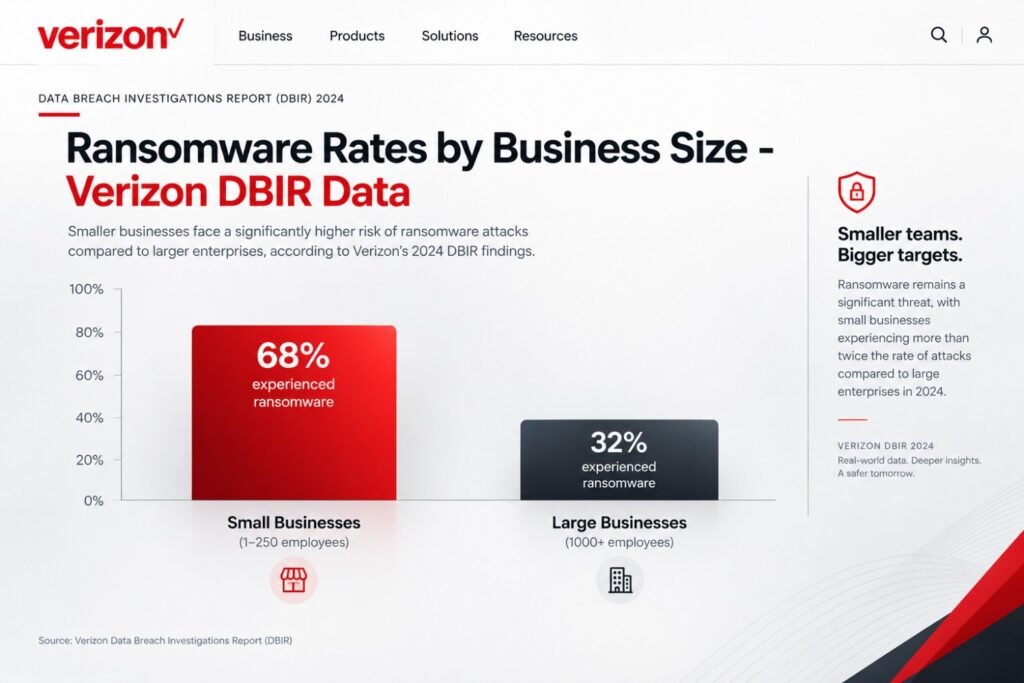
- Ransomware is exploding in small firms. The Verizon 2025 Data Breach Investigations Report found ransomware in 88% of small business breaches, compared with 39% at larger organizations. Read the Verizon DBIR.
- Fraud losses keep climbing. The FBI’s 2024 Internet Crime Report logged over 859,000 complaints and roughly $16.6 billion in reported losses. Phishing and spoofing topped the list. See the FBI IC3 report.
- Breaches cost a fortune in the US. IBM’s 2025 Cost of a Data Breach Report put the average US breach at over $10 million. Small firms won’t see that number, but even 1% of it could close your doors. Review the IBM report.
You might be wondering, “Does that really apply to my 8-person shop?” It does. Attackers automate their scans. A bot doesn’t check your company size before it tests your login page. The U.S. government says the same thing. The CISA website publishes free guidance because small organizations are heavily targeted and under-protected.
Most people get this wrong: they think cybersecurity is a luxury. It’s really a basic operating cost, like insurance or payroll software.
What Makes AI Cybersecurity Tools Different From Old-School Antivirus?
Old antivirus works like a bouncer with a photo list. If your face isn’t on the list, you walk in. That worked in 2010. It fails today. Modern attacks change constantly. Malware rewrites itself. Phishing emails look perfect because attackers use AI writing tools too. AI-powered endpoint security for small businesses works differently. It watches behavior, not just file names.
Here’s the simple version:
- Behavioral detection. The tool notices when a program acts strangely, like encrypting 500 files in 30 seconds.
- Anomaly spotting. It learns what normal looks like on your network, then flags the weird stuff.
- Automatic response. It can isolate an infected laptop before you even read the alert.
- Language analysis. For email, it reads tone, urgency, and sender patterns to catch scams.
Think of it like a security guard who knows your staff. A stranger in a hoodie sneaking in at 2 a.m. gets noticed fast. The big win for small teams is automation. You don’t have a security analyst. The AI becomes one. If you like automating repetitive work, you’ll enjoy our guide on AI workflow automation for small business. The same logic applies to security alerts.
What Should You Look for Before Buying AI Security Software?
Don’t buy the flashiest dashboard. Buy what you’ll actually use.
Here’s my checklist. I give it to every owner who asks.
- Automatic remediation. The tool should stop threats on its own, not just send alerts.
- Easy deployment. You should install it across all devices in a day, not a month.
- Clear reporting. You need plain-English summaries, not 40-page logs.
- Email protection. Phishing causes most small business incidents.
- Compliance support. HIPAA, PCI DSS, or state privacy laws like the CCPA may apply to you.
- Transparent pricing. Per-user or per-device pricing beats “contact sales” mystery quotes.
- Human backup. A managed detection option helps when nobody is watching at 3 a.m.
Pro tip: Match the tool to your people, not your wishlist. A brilliant tool that nobody configures is worse than a simple one that’s fully deployed.
The NIST Cybersecurity Framework for small businesses is a great yardstick. It organizes security into five jobs: Identify, Protect, Detect, Respond, and Recover. Any tool you pick should cover at least three of those.
Which AI Cybersecurity Tool Is Best for Small Businesses?
There’s no single winner for everyone. But there are clear winners for specific situations. Below are five platforms I’d seriously consider. Each one works as easy-to-use AI security software for small businesses, with different strengths.
1. Microsoft Defender for Business: Best Overall Value
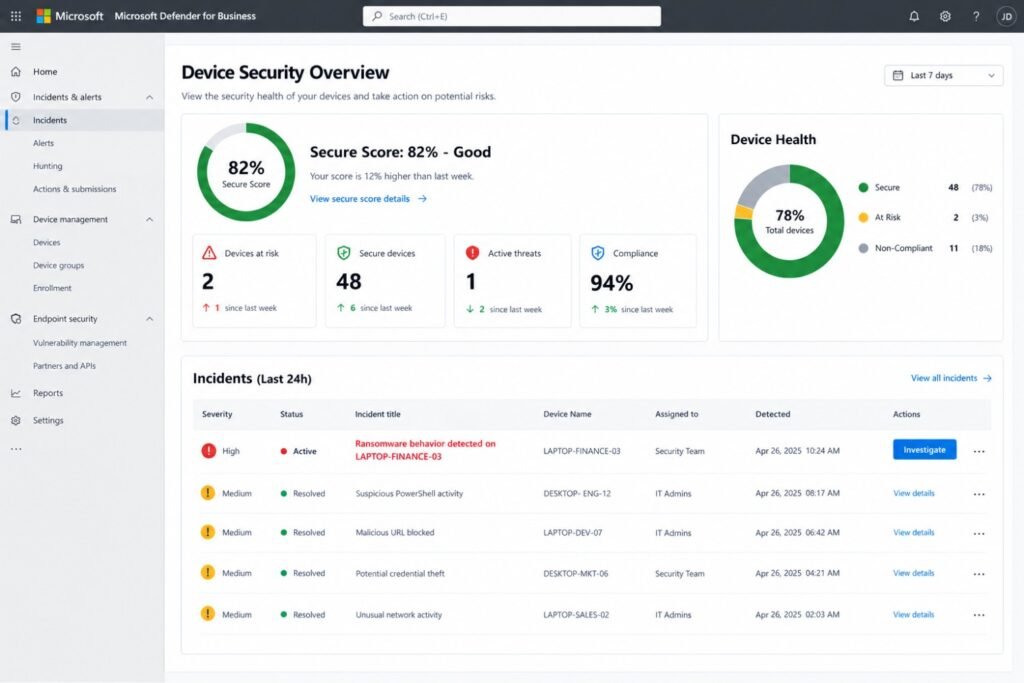
If you already use Microsoft 365, start here. Defender for Business is built for companies with up to 300 users. It includes next-gen antivirus, endpoint detection and response (EDR), and automated investigation. It costs about $3 per user per month on its own. It’s also bundled into Microsoft 365 Business Premium at around $22 per user monthly.
What I like:
- Works natively with Windows, Teams, and Outlook
- Automated investigation cuts alert fatigue
- Strong value if you’re already paying for Microsoft
What to watch:
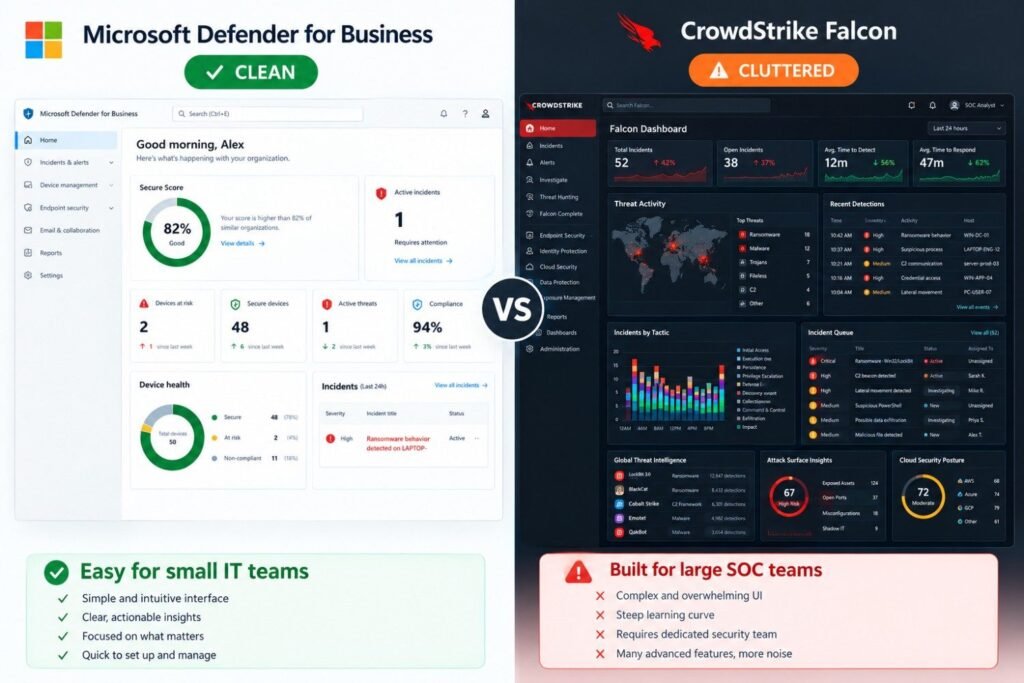
- Setup menus can feel confusing at first
- Mac and mobile coverage is good but not perfect
2. CrowdStrike Falcon Go: Best Protection Strength
CrowdStrike is a household name in enterprise security. Falcon Go brings that engine to small teams. Pricing starts around $60 per device per year for the entry tier. That works out to about $5 monthly per device. Its AI engine analyzes threats in the cloud, so the agent on your laptop stays light. Setup is fast, and the console is cleaner than most.
What I like:
- Excellent threat detection track record
- Lightweight agent that won’t slow down laptops
- Simple, guided onboarding
What to watch:
- Higher tiers add cost quickly
- Fewer built-in email tools than Microsoft
3. SentinelOne Singularity: Best for Autonomous Response
SentinelOne leans heavily into automation. Its AI can kill a malicious process and roll back encrypted files. That rollback feature matters. Imagine ransomware hits one laptop. The tool reverses the damage without a restore from backup. Entry pricing typically starts around $70 per endpoint per year, though packages vary by reseller.
What I like:
- Autonomous remediation and rollback
- Strong behavioral AI
- Good fit for teams without a security person
What to watch:
- Advanced features need a higher tier
- Pricing often runs through resellers, so quotes differ
4. Huntress: Best Managed Option for Tiny Team
Huntress is different. It pairs software with real human analysts who watch your environment. That’s a big deal if nobody on your team knows security. When the tool spots something suspicious, a person reviews it and tells you exactly what to do. Huntress is usually sold through IT partners. Expect roughly $3 to $6 per endpoint monthly, depending on the package.
What I like:
- Human-in-the-loop monitoring
- Detects hidden persistence tricks attackers use
- Great for owners who want peace of mind
What to watch:
- Often requires going through a managed service provider
- Less control for hands-on tech teams
5. Bitdefender GravityZone Business Security: Best Budget Pick
Bitdefender offers strong detection at a friendly price. It’s a solid choice for affordable AI cybersecurity tools for small businesses that need coverage without a big spend. Expect around $35 to $50 per device per year for small packs.
What I like:
- Consistently strong lab test scores
- Cheap, with clean device management
- Easy rollout for 5 to 25 devices
What to watch:
- Fewer advanced investigation tools
- Reporting is basic compared to Microsoft or CrowdStrike
How Do These Tools Compare Side by Side?
Here’s the full breakdown in one table. Save it or screenshot it.
| Feature | Microsoft Defender for Business | CrowdStrike Falcon Go | SentinelOne Singularity | Huntress | Bitdefender GravityZone |
|---|---|---|---|---|---|
| Best for | Microsoft 365 shops | Strongest detection | Automated rollback | No IT staff | Tight budgets |
| AI detection | Strong | Excellent | Excellent | Strong plus human review | Strong |
| Auto-remediation | Yes | Yes | Yes, with rollback | Guided plus managed | Yes |
| Setup difficulty | Moderate | Easy | Easy to moderate | Easy | Easy |
| Email protection | Add-on (Office 365 plan) | Limited | Limited | Add-on available | Add-on |
| Starting price (USD) | ~$3/user/month | ~$60/device/year | ~$70/device/year | ~$3–$6/endpoint/month | ~$35–$50/device/year |
| HIPAA-friendly | Yes, with BAA | Yes, with proper config | Yes, with proper config | Yes, with partner | Yes, with proper config |
| Ideal team size | 5–300 | 5–100 | 5–200 | 3–50 | 3–50 |
Note: A vendor’s compliance support doesn’t make you compliant on its own. You still need proper policies and signed agreements.
What Do These Tools Really Cost in the US?
Pricing is where owners get surprised. Let’s make it simple. Here’s a quick estimate for a 15-person business with 15 devices. Prices change, so confirm with each vendor before buying.
| Tool | Approx. Monthly Cost | Approx. Annual Cost |
|---|---|---|
| Microsoft Defender for Business | $45 | $540 |
| CrowdStrike Falcon Go | $75 | $900 |
| SentinelOne Singularity | $88 | $1,050 |
| Huntress (via partner) | $45–$90 | $540–$1,080 |
| Bitdefender GravityZone | $44–$63 | $525–$750 |
Now compare that to the cost of one incident. A single ransomware recovery for a small firm can run tens of thousands of dollars once you count downtime, forensics, and lost clients. Spending $600 to $1,000 a year looks pretty cheap in that light.
Quick tip: Ask your cyber insurance provider about discounts. Many US insurers lower premiums if you run EDR and multi-factor authentication. Some now require both.
What Are the Best AI Phishing Protection Tools for Small Businesses?
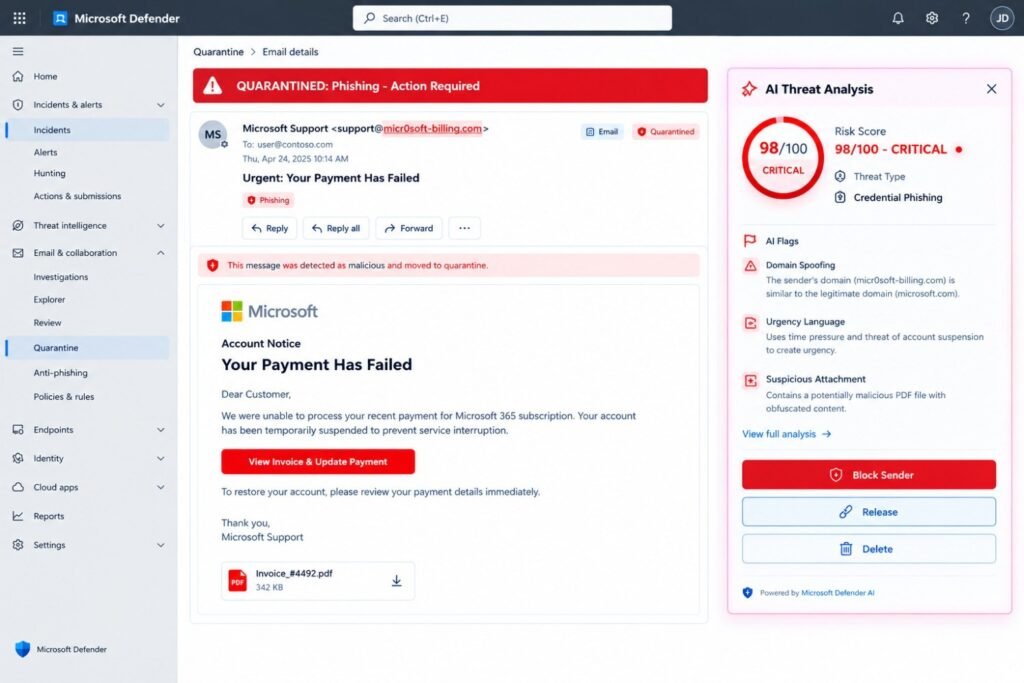
Phishing is where most attacks start. So let’s give it its own section. AI phishing protection tools for small businesses read the meaning of an email, not just the links. They spot fake urgency, odd sender behavior, and spoofed domains.
Here are two strong options:
- Microsoft Defender for Office 365 (Plan 1): about $2 per user monthly. It scans links, attachments, and impersonation attempts. It’s a natural add-on if you use Outlook.
- Check Point Harmony Email & Collaboration: a cloud-based tool that sits inside your inbox, catching what built-in filters miss. Pricing is quote-based, but small teams often land in the mid-single digits per user monthly.
Both use machine learning to catch socially engineered emails. These are the ones that look perfectly normal. Here’s what actually happened to one business I’ll describe below. Their old filter let a fake “invoice overdue” email through. It used the real vendor’s name, tone, and logo. No typos. No red flags. Humans fall for these. Software shouldn’t.
The FTC’s small business cybersecurity guidance also recommends training employees to spot phishing. Use both: tools plus training.
What Does This Look Like in the Real World?
Theory is nice. Stories stick. Here are two realistic scenarios that show how these tools play out.
Case 1: The 14-Person Dental Clinic in Texas
Picture a dental practice in the Dallas area. Fourteen staff. Patient records stored in the cloud. HIPAA applies every single day. They relied on a free antivirus and a basic email filter. Cost: $0. Confidence: high. Reality: not great. One Monday, the front desk got a “dental supply invoice” email. It looked legitimate. A staff member clicked the link and entered her password. Within hours, the attacker was inside her mailbox, forwarding patient emails to an outside address. The cleanup took nine days. They paid for forensic help, notified affected patients, and reviewed their HIPAA obligations. The total bill landed near $27,000, and several patients left.
After that, they switched to Defender for Business plus Defender for Office 365. Total cost: about $70 monthly. In the next 90 days, the system quarantined 212 phishing emails. Staff reported 6 more. None caused harm. That’s a roughly $27,000 lesson versus a $840-a-year fix.
Case 2: The 22-Person Accounting Firm in Ohio
Now picture a Columbus accounting firm during tax season. They bought SentinelOne but left it in “alert only” mode.
That was the mistake. The tool flagged around 40 alerts daily. Nobody had time to read them. After two weeks, people ignored the dashboard completely. Then a real threat appeared. A malicious script tried to spread across two machines. The alert sat unread for hours. They fixed it by switching to auto-remediation and tuning the policies. Daily alerts dropped from about 40 to 3. Anything serious was now handled automatically.
Lesson learned: A tool in “monitor only” mode is a smoke detector with no battery. Turn on automatic response, then review the weekly summary.
Which Tool Fits Your Type of Business?
Different industries face different rules and risks. Here’s how I’d match them.
Healthcare and dental practices (HIPAA): Pick a tool that offers a Business Associate Agreement. Microsoft is a strong choice here. Add email protection and encrypted backups.
E-commerce stores in California or Florida: You handle card data, so PCI DSS matters. Protect your checkout, admin logins, and plugins. Our roundup of the best AI tools for ecommerce pairs nicely with a good endpoint tool.
Law firms and accounting firms in New York: Client confidentiality is your product. Choose Huntress or CrowdStrike for stronger detection and human oversight.
Remote-first startups: Pick a cloud-managed tool like CrowdStrike or Defender. You need protection that follows laptops home, to coffee shops, and across Wi-Fi networks.
Tiny teams of 3 to 5 people: Start with Bitdefender or Defender. Keep it simple and affordable.
Too many apps already? That’s normal. Consider trimming your stack with ideas from our list of the best AI productivity tools in 2026. Fewer tools means fewer gaps.
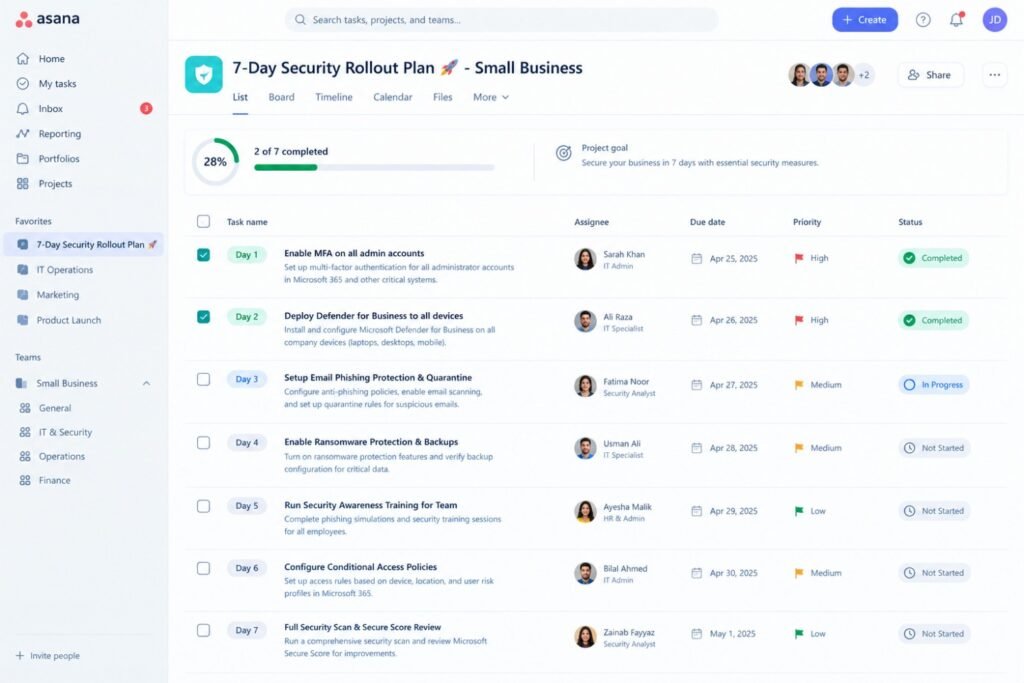
How Do You Set Up AI Security in 7 Days?
You don’t need a month. Here’s a realistic one-week plan.
Day 1: Take inventory. List every laptop, phone, and server. You can’t protect what you can’t see.
Day 2: Turn on multi-factor authentication. Do this for email, banking, and cloud apps. It blocks most password theft.
Day 3: Choose your tool. Use the comparison table above. Start a free trial if one is available.
Day 4: Deploy to a pilot group. Install on three or four devices first. Watch for conflicts.
Day 5: Roll out to everyone. Push the agent to the rest of your devices.
Day 6: Turn on auto-remediation and email protection. Don’t leave it on monitor-only. Remember the Ohio story.
Day 7: Train your team. Run a 20-minute session on spotting phishing. Show real examples.
To keep things on track, use a simple checklist. Our guide to the best free AI task management tools in 2026 can help you assign and track each step.
Are There Common Mistakes to Avoid?
Yes. I’ve seen these over and over.
- Buying the tool and never configuring it. Defaults rarely give full protection.
- Skipping backups. Even the best tool can’t undo every disaster. Keep offline or immutable backups.
- Ignoring updates. Unpatched software is an open door.
- Forgetting personal devices. If staff check work email on phones, those phones need protection.
- Relying on one layer. No tool is perfect. Stack tools with training, backups, and MFA.
Light humor moment: If your password is “Company123!”, the AI can only do so much. It’s smart, not magic.
Do small businesses really need AI cybersecurity tools?
Yes. Attackers use automation to scan thousands of businesses at once. Your size doesn’t protect you. AI tools match that speed by detecting and stopping threats without waiting for a human to notice.
What is the cheapest AI cybersecurity tool for a small business?
Microsoft Defender for Business at about $3 per user monthly is hard to beat. Bitdefender GravityZone is another low-cost option. Cheap isn’t the same as free, though. Free tools usually lack behavioral AI and automated response.
Can AI security tools replace an IT person?
Not entirely. They handle detection and response well. But you still need someone to manage users, patch systems, and make decisions. For many tiny teams, a managed option like Huntress fills that gap.
Will these tools slow down my computers?
Modern cloud-based agents are light. CrowdStrike is known for a small footprint. Still, test on a few devices first. Older laptops with 4 GB of RAM can struggle with any security software.
Should I worry about attackers using AI against me?
Yes, and it’s already happening. AI helps criminals write flawless phishing emails and clone voices for fake phone calls. A good rule: verify any money request by calling a known number, not the one in the message.
Final Thoughts: Your Best Move Starts Today
Here’s the bottom line.
You don’t need a huge budget to get strong protection. You need the right tool, set up properly, and a team that knows the basics. If you use Microsoft 365, start with Defender for Business. If you want top-tier detection, try CrowdStrike Falcon Go. If nobody on your team handles security, look at Huntress. And if money is tight, Bitdefender is a smart choice. The best AI cybersecurity tools for small business aren’t the most expensive ones. They’re the ones you deploy, configure, and actually trust. Don’t wait for the scary email. Pick a tool this week. Turn on multi-factor authentication today. Future you will be very glad you did. You’ve built your business with real effort. Protect it like it matters, because it does.
Confused between AI tools? Try our free comparison tool: 👇
Need custom AI automation, chatbot, or integration for your business, medical practice, dental clinic, or app?👇
AI cybersecurity tools
best AI security software
endpoint security software
phishing protection
small business cybersecurity

AI Nexte Editorial Team researches, tests, and reviews AI tools, workflows, and automation platforms for businesses, creators, and professionals. Our content is based on hands-on testing, industry research, feature analysis, and real-world use cases.








No Comments