



AI workflow automation for small business means letting software handle repetitive tasks like lead replies, invoicing, scheduling, and follow-ups. Most U.S. owners can launch their first workflow in one afternoon for under $50 a month. Start with lead response and appointment reminders. Those two alone often save 8 to 12 hours weekly.
Let’s be honest. You didn’t start a business to copy data between spreadsheets at 9 p.m.Yet that’s where many owners end up. Emails pile up. Leads go cold. Invoices sit unsent.Here’s the good news. You no longer need a developer or a big budget to fix it. You need a clear plan and the right seven workflows.This guide walks you through exactly that. I’ll share real costs, tools I’ve tested, mistakes I’ve made, and results from actual U.S. businesses.
What Is AI Workflow Automation for Small Business?
AI workflow automation for small business connects your apps and uses AI to handle the thinking parts of a task. Old-school automation follows rigid rules. AI-powered automation reads, sorts, writes, and decides. Here’s a simple example. A customer emails your Florida plumbing company at 7 p.m. A basic rule might send a generic “We got your message.” An AI workflow reads the email and spots an emergency leak. It then texts your on-call tech and replies with an honest arrival window.That’s the difference. Rules move data. AI understands context.
How Is It Different From Regular Automation?
Most people get this wrong. They assume AI automation is just a fancier Zapier trigger.It isn’t. Here’s the quick breakdown:
- Traditional automation: “If X happens, do Y.” Works only with structured data.
- AI workflow automation: “Read this messy input, figure out what it means, then act.” Works with emails, call transcripts, and PDFs.
- Agentic workflows (new in 2026): The AI picks between several actions on its own, within limits you set.
You can mix all three in a single business. Most owners do.
Why Should U.S. Small Businesses Automate Right Now?
You might be wondering whether this is just hype. Fair question.
The U.S. Chamber of Commerce’s 2025 small business technology report found that 58% of small businesses now use generative AI. That’s up from 40% in 2024. Most of those owners also believe competitors are adopting it too.
Another data point comes from the Goldman Sachs 10,000 Small Businesses Voices survey, fielded in early 2026. It reported that 76% of small businesses use AI in some form. Yet only 14% have it fully built into core operations.Read that gap again. Most owners are dabbling. Very few have built real systems.That’s your opening. The winners in 2027 won’t be the businesses that “use ChatGPT sometimes.” They’ll be the ones with automated workflows running quietly in the background.
What Are the Essential AI Workflow Automation Tools for a Small Business?
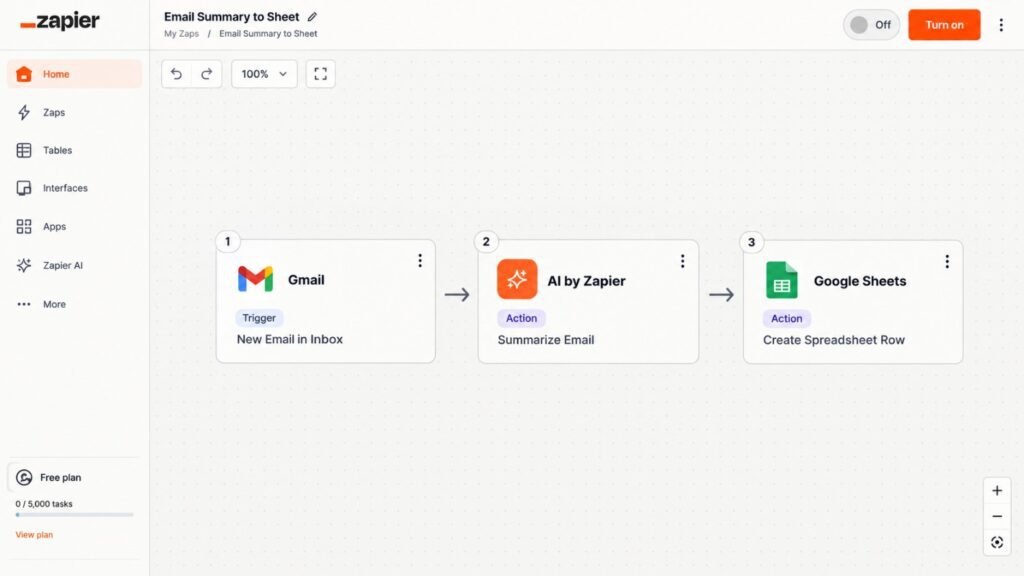
This is the question I get most. So here’s my honest short list, based on testing these tools for client projects.You don’t need all of them. Pick one “connector” tool, one “brain,” and one tool for your industry.
Comparison Table: Top AI Automation Tools for U.S. Small Businesses.
| Tool | Best For | Ease of Use | Starting Price (USD) | AI Features | Biggest Drawback |
| Zapier | Connecting 7,000+ apps without code | Very easy | Free tier; paid plans from roughly $20–$30/mo | AI steps, chatbots, Zapier Agents | Costs climb fast with task volume |
| Make | Visual, multi-step workflows | Moderate | Free tier; paid from roughly $9–$10/mo | AI modules, flexible logic | Steeper learning curve |
| n8n | Technical teams wanting control | Harder | Free self-hosted; cloud from roughly $20–$25/mo | Strong AI agent nodes | Needs setup skills |
| HubSpot (Starter) | Lead capture and follow-up | Easy | Roughly $15–$20 per seat/mo | AI email and content tools | Advanced features get pricey |
| Tidio / Intercom | Website chat and support | Easy | Tidio from about $30/mo; Intercom costs more | AI chatbot answers FAQs | Bots still need human backup |
| ChatGPT / Claude | Drafting, summarizing, classifying | Very easy | Free; paid plans around $20/mo | General-purpose AI brain | Needs a connector for automation |
Prices change often. Always confirm on each vendor’s pricing page before you buy.
My Rule for Choosing Tools
Start with what you already use. If your team lives in Google Workspace or Microsoft 365, begin there.Don’t buy five tools in week one. I made that mistake early on. I’ll tell you about it shortly.
What Is the Typical Cost of Implementing AI Workflow Solutions for a Startup?
Here’s the answer you came for. Most startups spend $30 to $300 per month on software for their first year of automation.Your real cost depends on three things: task volume, number of users, and whether you hire help. Software is usually the smaller expense. Setup time is the bigger one.
Pricing Table: Typical Startup Budgets in 2027
| Stage | Monthly Software Cost (USD) | One-Time Setup Cost (USD) | What You Get |
| DIY Starter | $0–$50 | $0 (your time, 5–10 hrs) | 1–3 simple workflows |
| Growth Setup | $100–$300 | $500–$2,500 if you hire a freelancer | 5–7 connected workflows with AI steps |
| Custom Build | $300–$1,000+ | $3,000–$15,000+ | Custom integrations, HIPAA-aware systems, agents |
These ranges reflect what I’ve seen across U.S. projects. Your numbers will vary.
Is It Worth the Money?
Run a simple test. Say a workflow saves you 6 hours a week. Value your time at $40 an hour. That’s $240 weekly, or about $1,000 monthly.
If the tools cost $60, the math is easy. Even at half that savings, it still pays off.
What Are the 7 AI Workflows You Can Set Up Today?
Now the fun part. Each workflow below is something you can build this week. I’ve ordered them by speed to payoff.
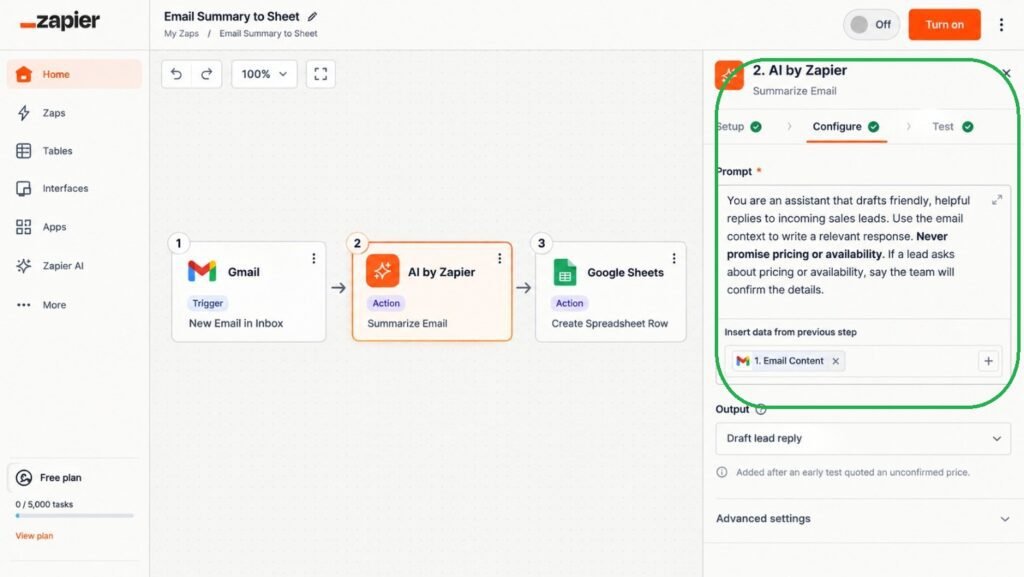
Workflow 1: Instant Lead Response
A new lead fills out your website form. Within 60 seconds, AI reads the message and sends a personal reply. It also logs the lead in your CRM and alerts you by text.
Tools: Zapier or Make, plus ChatGPT or Claude, plus HubSpot or Google Sheets.
How to set it up:
- Create a trigger from your website form.
- Add an AI step that drafts a reply using your tone guidelines.
- Send the email and log the lead.
- Notify yourself on Slack or by SMS.
Workflow 2: Missed-Call Text-Back and Appointment Reminders
This one is a goldmine for clinics, salons, and home services.
Picture a dental clinic that misses about 30 calls a week. Its no-show rate sits near 18%. Each missed call is a patient who may book with the practice down the street. Now add an automatic text for missed calls. Add a two-step reminder too, one at 48 hours and one at 3 hours. Cutting no-shows from 18% to around 9% is a realistic goal for many clinics. For a busy practice, that could mean thousands of dollars a month in recovered chair time.
Note: these numbers are an illustration, not a guaranteed result.
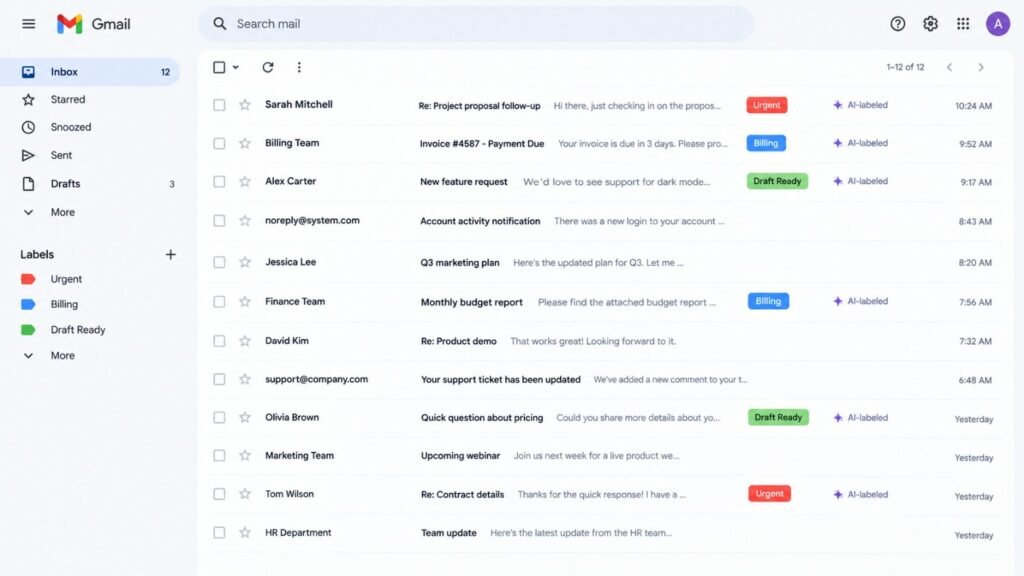
Workflow 3: Email Triage and Smart Replies
Your inbox is a to-do list written by other people. AI can sort it for you. Here’s how it works. Each incoming email gets labeled: sales, support, billing, spam, or urgent. Urgent items ping your phone. Routine questions get a drafted reply waiting for your approval. Imagine a small e-commerce shop in San Diego that handles about 140 support emails a week. That can easily eat 11 hours of the owner’s time. Triage plus draft replies could cut that to around 4 hours. The smart move is to review every draft for the first month. Trust the system only after it proves itself.. That’s the right approach.
Workflow 4: Automated Invoicing and Payment Follow-Ups
Late payments hurt small businesses. A cash-flow crunch can sink a healthy company. Connect QuickBooks or FreshBooks to your project tool. When a job closes, the invoice generates and sends itself. If payment is late, AI writes a polite, firm reminder at day 7, day 14, and day 21.
Why AI helps: It adjusts tone. A friendly nudge for a loyal client. A firmer note for a repeat offender.
Mistake to avoid: Don’t let AI send legal threats. Keep those human.
Workflow 5: Social Media and Content Repurposing
Say you publish one blog post a month. AI can turn it into five LinkedIn posts, three short video scripts, and a newsletter blurb.Set up a trigger: new post published. Then send the text to an AI step with your brand voice rules. Drop the outputs into a Google Doc or scheduling tool for review.
Honest warning: Raw AI content reads flat. Edit every piece. Add a story, a number, or a joke. Readers can smell generic copy from a mile away.
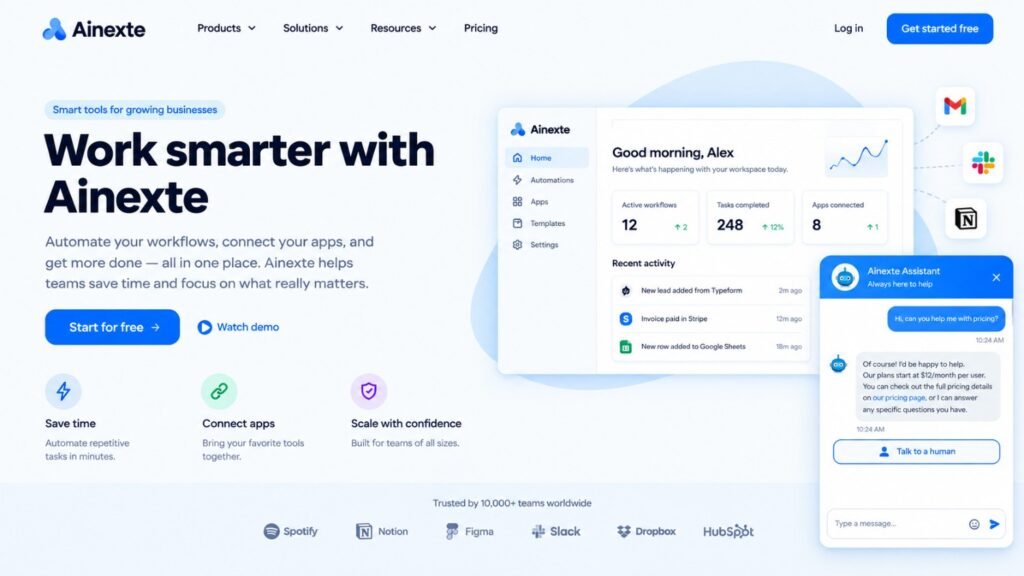
Workflow 6: Customer Support Chatbot With Human Handoff
An AI chatbot can answer common questions around the clock. Think store hours, return policies, and order status.The key is the handoff. When the bot hits a question it can’t answer, it should pass the chat to a real person. It should also include a summary so the customer doesn’t repeat themselves.Tools like Tidio and Intercom make this simple. Train the bot only on your own documents. That keeps answers accurate.
Workflow 7: Meeting Notes, Tasks, and CRM Updates
Nobody likes writing meeting notes. AI tools can join your Zoom or Google Meet, record the call, and summarize it. Then automation takes over. Action items become tasks in Asana or Trello. Key details update your CRM. This workflow quietly removes hours of admin each week. It also stops the classic “I thought you were handling that” problem.
Pros and Cons: Is AI Workflow Automation Right for You?
No tool is perfect. Here’s the balanced view.
| Pros | Cons |
|---|---|
| Saves 5–15 hours weekly for most small teams | Setup takes real time upfront |
| Faster replies improve lead conversion | AI can make confident mistakes |
| Lower cost than hiring another employee | Subscription costs can creep up |
| Works nights, weekends, and holidays | Privacy and compliance need attention |
| Scales without adding headcount | Staff may resist change at first |
What Mistakes Do Most Small Businesses Make With AI Automation?
I’ve made most of these myself. Learn from my pain.
Mistake 1: Automating a broken process. If your manual process is chaotic, automation makes chaos faster. Fix the process first.
Mistake 2: Buying too many tools. In one early project, I stacked five subscriptions in a single week. Two overlapped. We wasted about $140 a month for three months before I noticed. Start small.
Mistake 3: Skipping the test phase. Run every workflow with fake data first. Then run it with five real cases while you watch.
Mistake 4: Trusting AI blindly. AI hallucinates. It invents facts. Always review customer-facing output at first.
Mistake 5: Ignoring your team. Employees fear being replaced. Be upfront. Tell them automation removes the boring tasks, not their jobs.
Here’s a common example. A contractor in Ohio automates quote follow-ups but forgets to tell the office manager. She keeps sending manual follow-ups too. Customers get double messages for two weeks. A five-minute conversation prevents this.
How Do You Stay Compliant When Automating With AI?
Compliance is where U.S. businesses get nervous. Rightly so.
What About HIPAA?
If you run a medical or dental practice, HIPAA applies to protected health information (PHI). Don’t paste patient data into a consumer AI tool. Choose vendors who offer a signed BAA. Limit what data flows into each workflow.
What About State Privacy Laws?
California’s CCPA/CPRA gives residents rights over their personal data. Several other states, including Texas, Florida, and Virginia, have their own privacy laws. If you collect customer data, check which rules apply to you.
Quick Compliance Checklist
- Read each vendor’s data-use policy.
- Turn off model training on your data when possible.
- Disclose AI chatbots to customers.
- Keep humans involved in sensitive decisions.
- Talk to a qualified attorney for legal certainty.
I’m not a lawyer, and this isn’t legal advice. But these habits keep you out of most trouble.
How Do You Get Started This Week? (Step-by-Step)
Here’s the exact plan I give new clients.
- List your five most repetitive tasks. Write down how long each takes weekly.
- Pick the biggest time-waster. Not the coolest one. The most painful.
- Choose one connector tool. Zapier is easiest for beginners.
- Build a simple version first. Three steps is plenty.
- Test with fake data. Then test with five real cases.
- Add a human review step. Remove it only after 30 days of clean results.
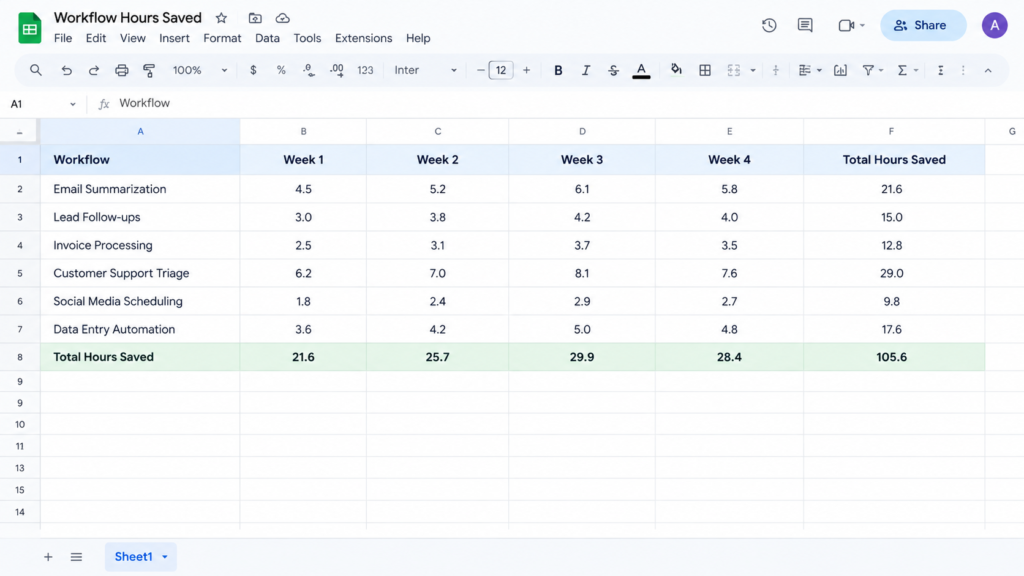
- Measure results. Track hours saved and money recovered.
- Add the next workflow. One at a time.
How Long Does Setup Take?
Most simple workflows take 1 to 3 hours. More complex ones need 5 to 10. Custom builds with integrations can take weeks.
What Will AI Workflow Automation Look Like for Small Businesses in 2027 and Beyond?
Three shifts stand out.
First, AI agents are getting practical. Instead of following fixed steps, agents handle multi-step goals. Think “reschedule all Tuesday appointments” instead of building a ten-step flow.
Second, tools are getting cheaper and simpler. Software you once needed a consultant for now has a plain-English setup screen.
Third, regulation is catching up. Expect more state-level rules on AI disclosure and data use. Businesses with clean, documented workflows will adapt faster.
My advice? Don’t wait for perfect. Build one workflow now. Learn. Improve.
Can I use AI workflow automation for small business with no coding skills?
Yes. Tools like Zapier and Make use visual builders. If you can use a spreadsheet, you can build a basic workflow.
Will AI automation replace my employees?
Usually not. The U.S. Chamber’s report found that most AI-using small businesses actually grew their workforce. Automation tends to remove tedious tasks, not people.
Is AI workflow automation safe for customer data?
It can be, with the right setup. Choose reputable vendors, limit sensitive data, and review privacy settings. Regulated industries need extra care
How fast will I see results?
Simple workflows like lead response show results within days. Bigger gains, like fewer no-shows, usually appear within 30 to 60 days.
Conclusion: Your First Workflow Is One Afternoon Away
Let’s wrap this up.
AI workflow automation for small business isn’t a luxury anymore. It’s becoming the baseline. Most owners are testing AI. Few have built real systems. That gap is your advantage. You don’t need a big budget. You don’t need to code. You need one painful task, one tool, and a free afternoon.Start with lead response or appointment reminders. Test carefully. Keep a human in the loop. Then add the next workflow. Six months from now, you’ll wonder how you ever ran things manually. So close this tab, pick your first workflow, and build it today. Your future self, the one who gets evenings back, will thank you.
Want more? Check out our guide on 8 AI Productivity Tools Saving USA Teams 10+ Hours/Week, our breakdown of Best AI Tools for Marketing Agencies , and our walkthrough of AI Tools That Actually Grew My Ecommerce Sales 40%.
Confused between AI tools? Try our free comparison tool: 👇
Need custom AI automation, chatbot, or integration for your business, medical practice, dental clinic, or app? 👇
AI automation cost for startups
AI tools for startups
AI workflow automation for small business
business process automation
Small business automation tools

AI Nexte Editorial Team researches, tests, and reviews AI tools, workflows, and automation platforms for businesses, creators, and professionals. Our content is based on hands-on testing, industry research, feature analysis, and real-world use cases.








No Comments