



Let me be upfront with you — I’ve spent a ridiculous amount of time (and honestly, a fair bit of money) testing AI content tools for my clients. Restaurant owners in Texas, boutique shops in Ohio, a dog grooming business in Florida. You name it, I’ve probably tried to build a content workflow for it.
And here’s the thing about 2026: the market for free AI tools for content creation has exploded. There’s a new “best” tool every other week. Half of them overpromise. A lot of them watermark your videos, cap your exports at like 480p, or charge you the moment you want anything actually useful.
So when I started using FlexClip seriously earlier this year, I was honestly kind of skeptical. I’d tried it briefly back in 2024, wasn’t blown away, moved on. But a client — a small event planning company in Nashville — needed a full content stack on a tight budget, and someone in my mastermind group mentioned FlexClip had gone through a major AI overhaul.
I went back in. And wow. It’s genuinely different now.
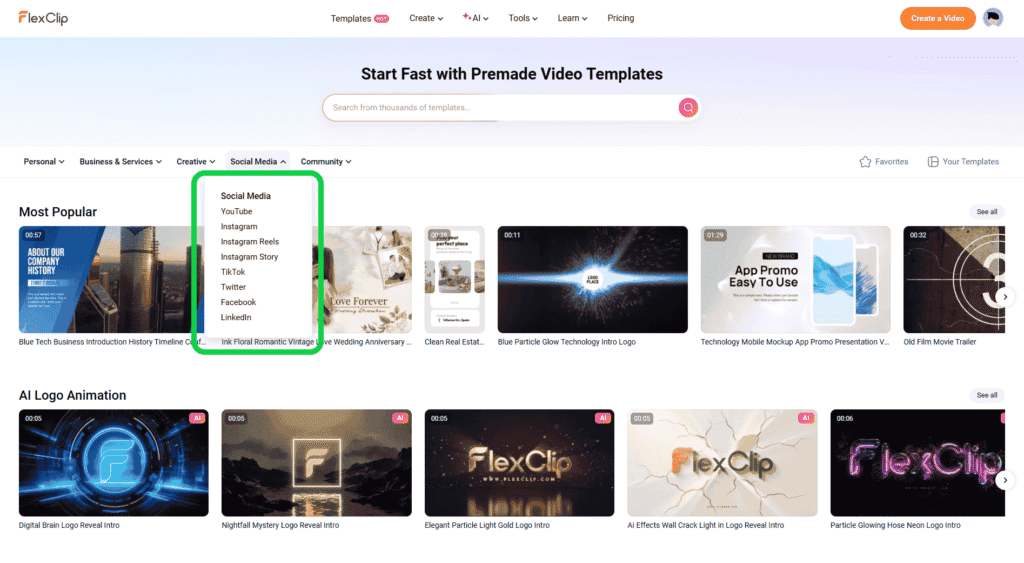
FlexClip has become, in my opinion, one of the most complete free AI content creation tools available for small business owners in the USA. We’re talking AI video generation from text, voice overs, subtitle generation, meme making, YouTube thumbnails, slideshows, background removal — all inside one dashboard. No need to juggle 12 different apps and remember 12 different passwords.
This review is going to be thorough. I’ll break down each tool, share what I personally tested, give you honest pros and cons, and compare FlexClip against the tools I know you’re already considering — CapCut, Canva, InVideo, and others. I’ll also answer the 12 questions I get asked most often about free AI video and content tools.
If you want the complete picture of AI tools available in 2026, I’d recommend also checking out my pillar guide on the best free AI tools for small business content creation — it gives you the full landscape beyond just FlexClip.
Let’s get into it.
| Feature | FlexClip | CapCut | Canva | InVideo AI | Pictory |
| AI Text to Video | ✅ Free tier | ✅ Free tier | ❌ Limited | ✅ Paid mostly | ✅ Paid |
| AI Voice Generator (Free) | ✅ Multiple voices | ✅ Basic | ✅ Limited | ✅ Limited | ❌ |
| AI Subtitle Generator | ✅ Free | ✅ Free | ❌ | ✅ | ✅ |
| Meme Generator | ✅ Built-in | ❌ | ✅ Basic | ❌ | ❌ |
| YouTube Thumbnail Maker | ✅ AI-powered | ✅ Basic | ✅ Templates | ❌ | ❌ |
| Slideshow Maker | ✅ AI-assisted | ✅ | ✅ | ❌ | ❌ |
| Background Remover | ✅ Free | ✅ Free | ✅ Paid | ❌ | ❌ |
| Watermark-Free Export (Free) | ✅ (with limits) | ❌ Watermarked | ✅ | ❌ | ❌ |
| GIF Maker | ✅ | ✅ | ✅ | ❌ | ❌ |
| All-in-One Dashboard | ✅ | Partial | Partial | ❌ | ❌ |
| USA Small Biz Friendly | ⭐⭐⭐⭐⭐ | ⭐⭐⭐⭐ | ⭐⭐⭐⭐ | ⭐⭐⭐ | ⭐⭐⭐ |
The table tells most of the story. FlexClip is the only tool that genuinely consolidates all of these capabilities under one roof — including several features that competitors either don’t offer or lock behind paid plans.
Detailed Breakdown of FlexClip Tools
AI Text to Video Generator
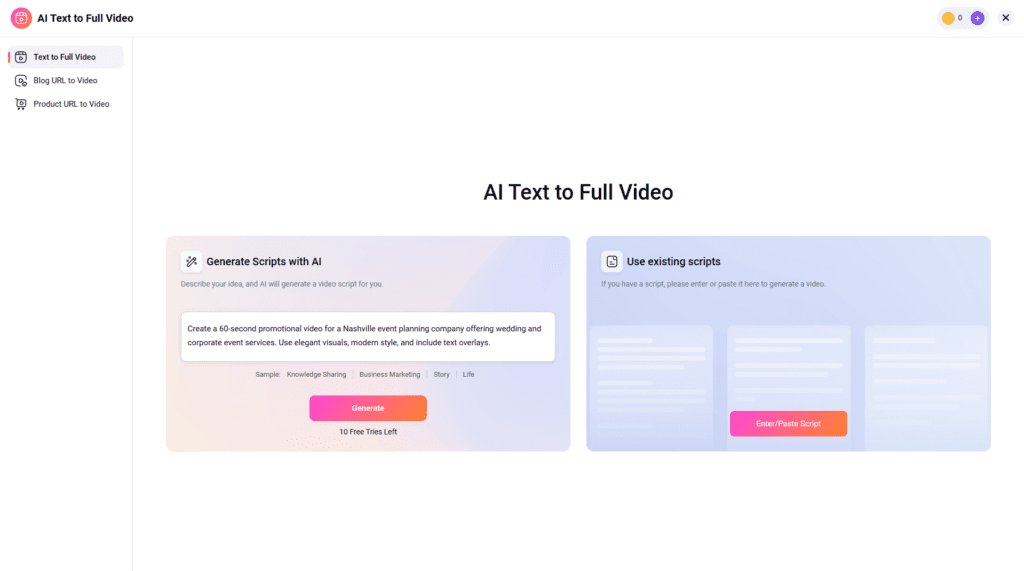
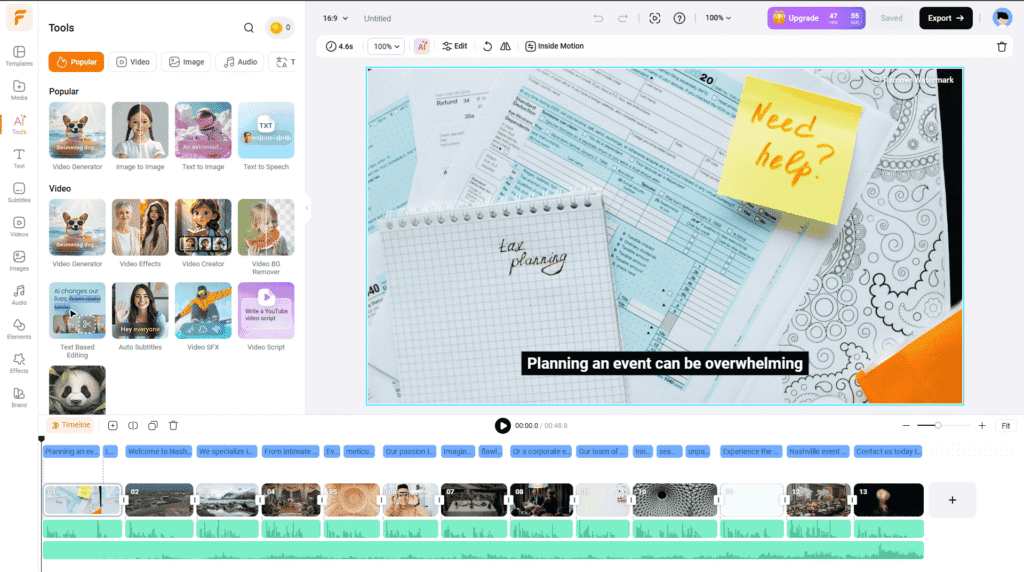
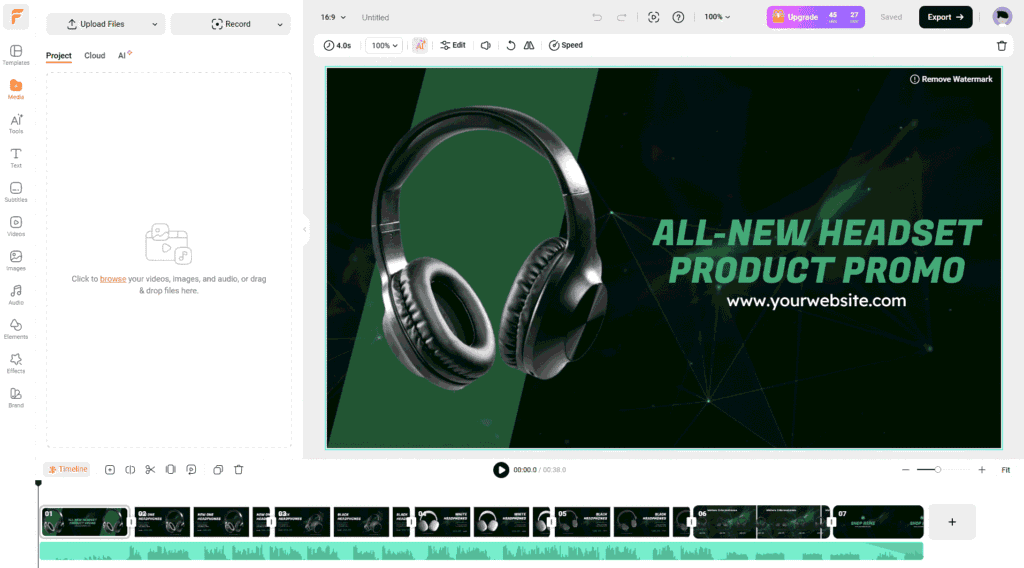
FlexClip’s AI text to video generator lets you type a script or prompt and the tool builds out a video — pulling stock footage, matching scenes, adding transitions. For free. In minutes.
This is honestly one of the best free AI text to video generators I’ve tested at this price point (i.e., $0). The outputs aren’t perfect — you’ll want to tweak scene selections — but the baseline is shockingly good compared to where these tools were even 18 months ago.
USA Small Business Use Cases:
- A local real estate agent who needs quick property listing videos without hiring an editor
- A food truck owner posting 30-second promos on Instagram Reels
- A personal trainer creating educational content for YouTube without appearing on camera
I Personally Tested: I used the free AI video generator from text feature to create a 60-second explainer video for a Nashville event planner client. Wrote a 100-word prompt describing their services, chose a style, hit generate. In about 90 seconds I had a rough video with stock footage, music, and on-screen text. Made maybe 10 manual edits. Client approved it same day. That used to take me 2–3 hours in Premiere.
Pros
- Fast generation, genuinely usable output
- Free tier allows multiple exports
- Good stock footage library built in
- Works well for social media–sized videos (Reels, Shorts, TikTok)
Cons:
- Free tier has resolution and export limits
- Scene selection can be inconsistent — sometimes picks irrelevant clips
- Not ideal for very niche or industry-specific prompts
👉 Try FlexClip AI Text to Video Free
AI Voice Generator & Text to Speech
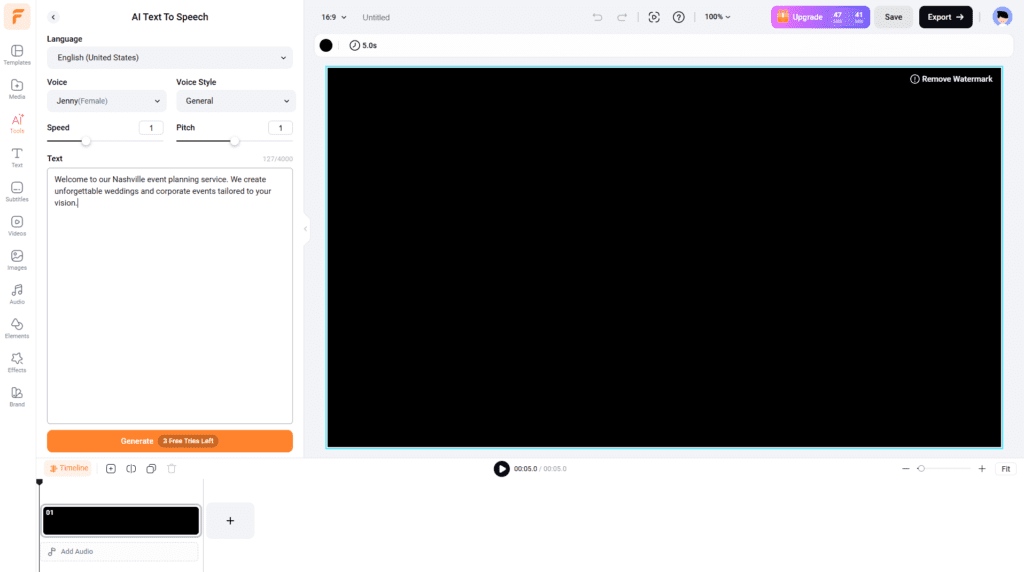
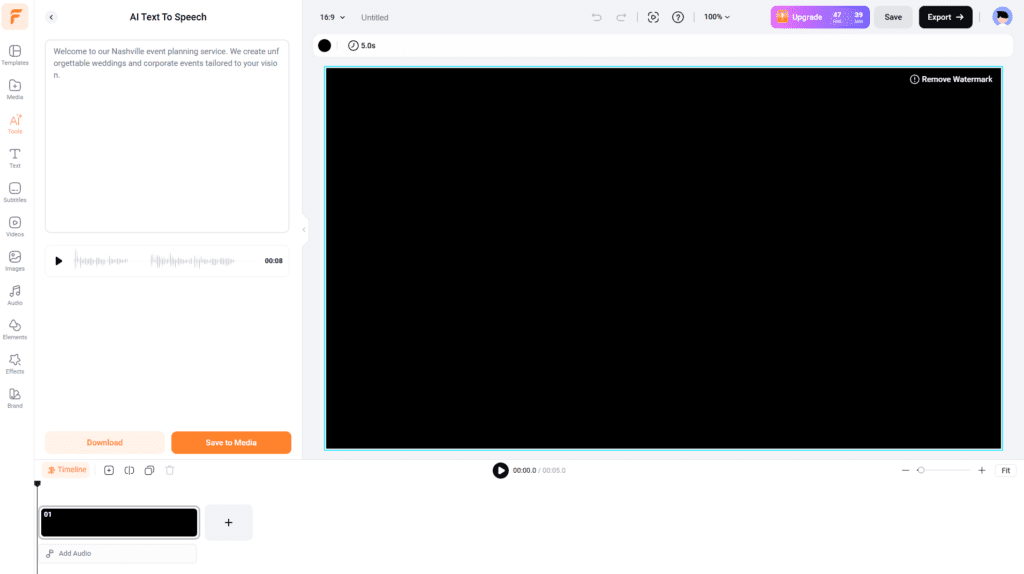
FlexClip offers one of the cleaner AI voice generator free experiences I’ve found. The voices sound natural — not that robotic drone you get from older TTS engines. You get multiple accents, genders, and styles.
For anyone looking for a free AI voiceover generator that doesn’t sound like a 2015 GPS system, this is a solid pick.
USA Small Business Use Cases:
- E-commerce stores narrating product demos without hiring voice actors
- Law firm educational content (explainer videos, FAQs) — voice sounds professional
- Coaches and consultants adding narration to presentation-style content
I Personally Tested: Tested the AI text to speech generator free feature for a Florida-based dog grooming client. They wanted voiceovers for short Reels but the owner hated the sound of her own voice on camera. Used FlexClip’s American English female voice — warm, natural tone. She actually asked me if I’d hired a real voice actor.
I also compared it side-by-side against ElevenLabs (paid) and the gap is noticeable on long-form content, but for 15–60 second social clips? FlexClip’s free AI audio generator does the job.
Pros:
- Multiple free voices including US English accents
- Speed and pitch controls
- Integrates directly into video editor
- Good for free AI voiceovers on social content
Cons:
- Character limits on free plan
- Long-form narration (5+ minutes) still sounds less natural than premium tools
- Voice customization options thinner than ElevenLabs or PlayHT
AI Subtitle Generator
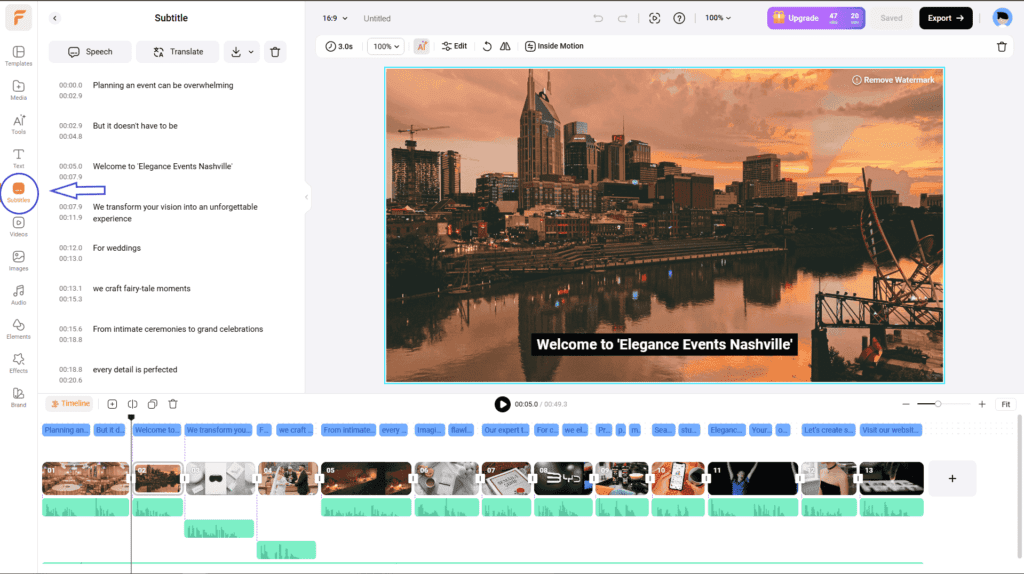
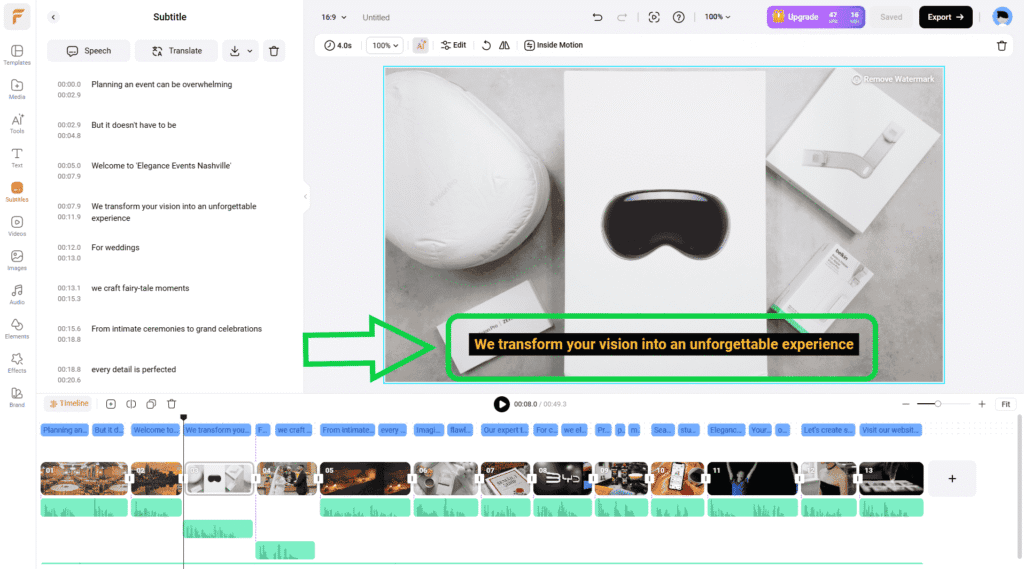
Automatic subtitle generation — it transcribes your audio and drops subtitles directly onto the video. Accuracy is solid. Editing is simple. This is genuinely one of the better free AI subtitle generators available right now.
85% of social video is watched without sound. Subtitles aren’t optional anymore, they’re the baseline. And doing them manually in a timeline is painfully slow.
USA Small Business Use Cases:
- Any business posting on LinkedIn, Instagram, or TikTok
- Businesses targeting bilingual communities (FlexClip supports multiple languages)
- Accessibility compliance for businesses serving broader audiences
I Personally Tested: Ran a 3-minute interview-style clip through the AI subtitle generator for video. Accuracy was around 92–94% — comparable to Rev.com for short clips. Needed about a dozen manual corrections. Styled the subtitles, burned them in, done. The whole process took maybe 8 minutes for a 3-minute video. That’s genuinely fast.
Pros:
- High accuracy for clear audio
- Style customization (font, color, size, position)
- Works as both a video subtitle generator and text animation maker free of sorts
- Multiple language support
Cons:
- Accuracy drops with heavy accents or background noise
- No speaker differentiation on free tier
AI Meme Generator
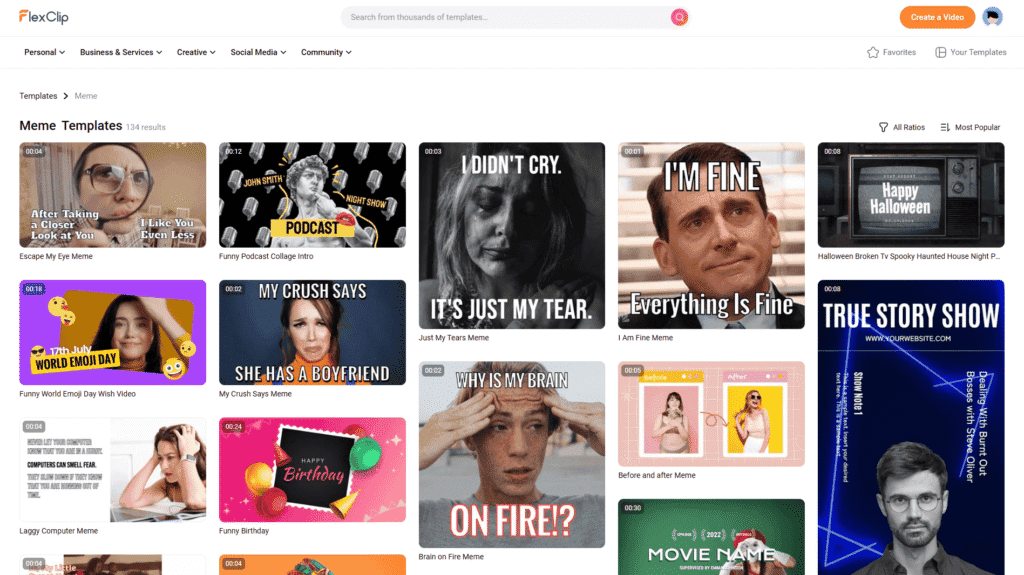
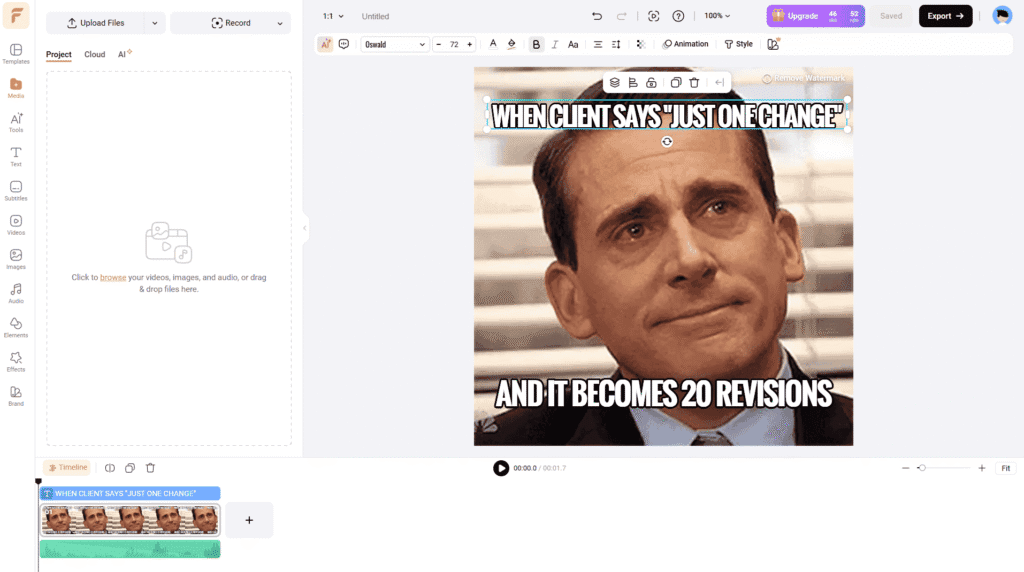
Yes, FlexClip has a meme generator. And it’s actually good. The AI meme generator free feature lets you generate memes from templates or create custom ones — and for small businesses trying to stay relevant on social media without paying a social media manager $3,000/month, this matters.
USA Small Business Use Cases:
- Retail shops running Instagram/TikTok engagement campaigns
- Restaurants doing “it’s Friday” or holiday-themed posts
- Any brand trying to stay culturally relevant without a big marketing team
I Personally Tested: Used it for a small Texas BBQ restaurant client who wanted to lean into humor on social. Created a series of AI generated memes using current trending formats. Engagement on their Instagram went up noticeably the first week. Nothing groundbreaking, but easy, fast, and free.
Pros:
- Large template library
- Fast generation, easy customization
- Integrates with broader social content workflow
Cons:
- Trend templates can lag a few days behind what’s actually viral
- Limited AI suggestion quality for very niche humor
YouTube Thumbnail Maker
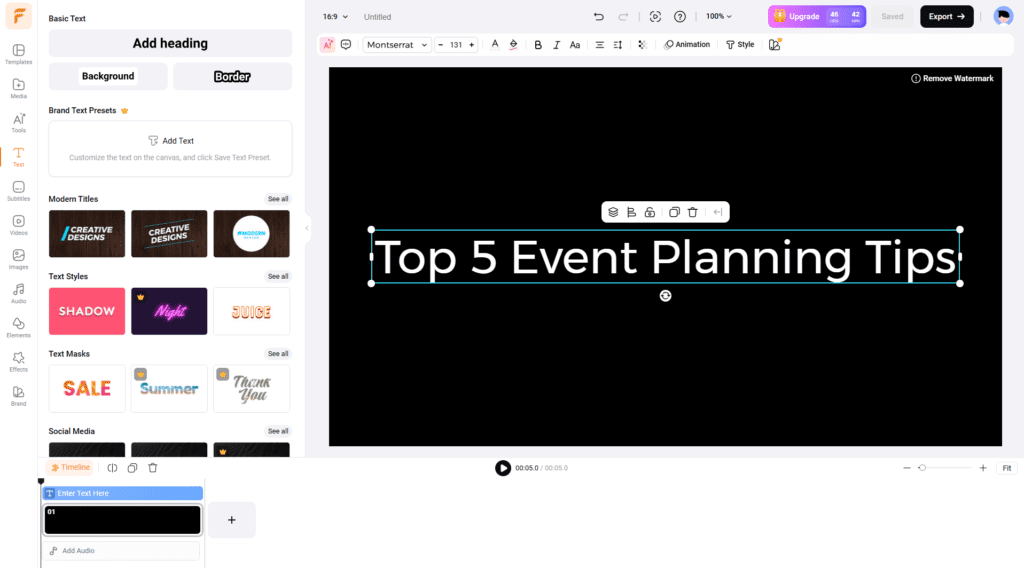
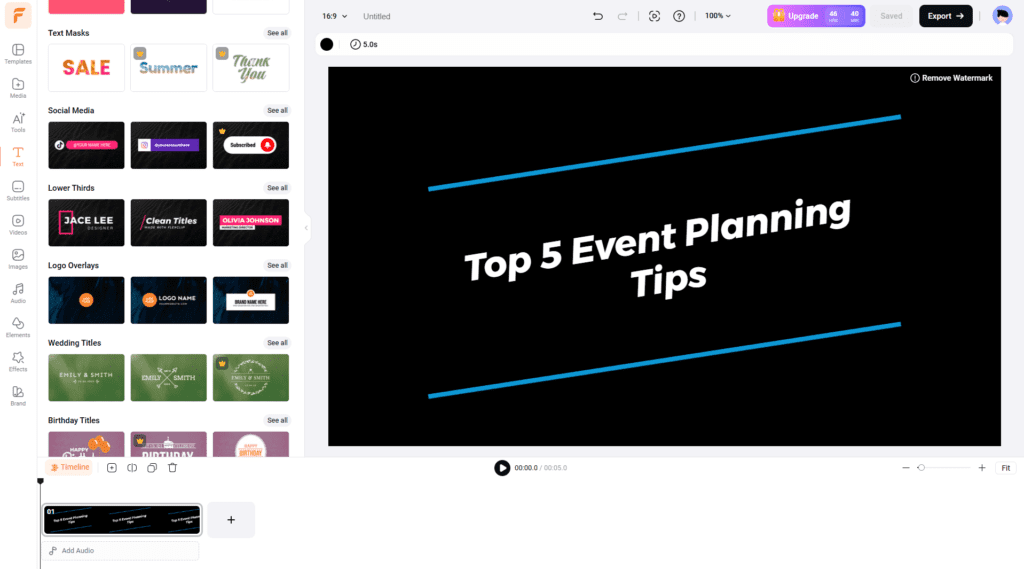
This is one of FlexClip’s hidden strengths. The AI YouTube thumbnail maker generates click-worthy thumbnails fast — with AI-suggested layouts, text placement, and background options. It’s one of the better free YouTube thumbnail maker tools I’ve used, especially compared to doing it manually in Canva.
USA Small Business Use Cases:
- Any small business running a YouTube channel (seriously, even a 500-subscriber channel benefits from good thumbnails)
- Coaches, consultants, and educators posting regular video content
- Service businesses using YouTube for SEO-driven explainer content
I Personally Tested: Built thumbnails for a 5-video YouTube series for a Chicago-based financial coaching client. The AI thumbnail maker for YouTube suggested contrast-heavy layouts that actually looked more professional than what the client had been making manually. CTR on one video went up from 3.1% to 4.8% — not a controlled experiment but still notable.
Pros:
- Fast AI layout generation
- Built-in text effects and animations
- Works as a free animated text generator for thumbnail titles
- No Canva subscription needed
Cons:
- Some templates feel generic without customization
- Doesn’t auto-pull video metadata from YouTube (yet)
Background Remover & Transparent Image Maker
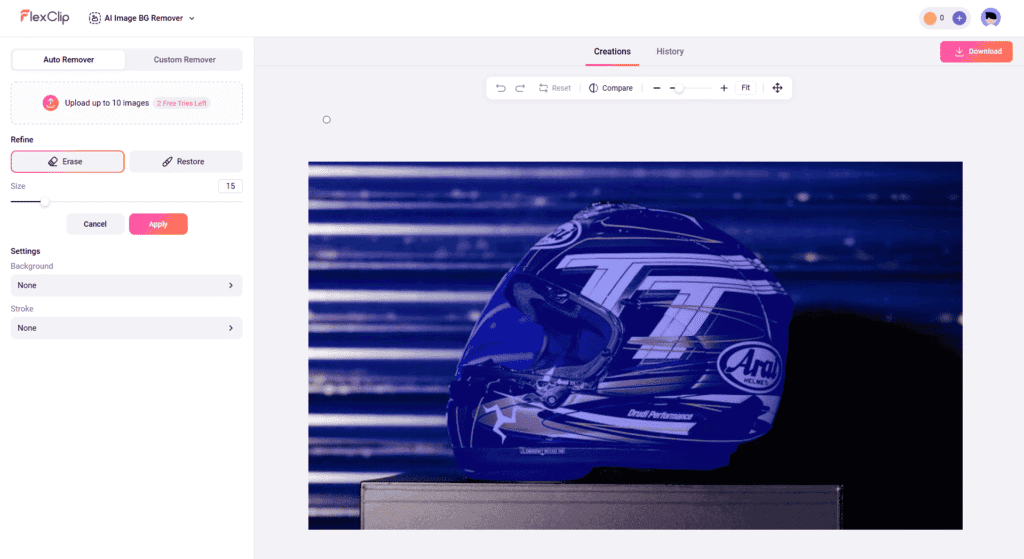
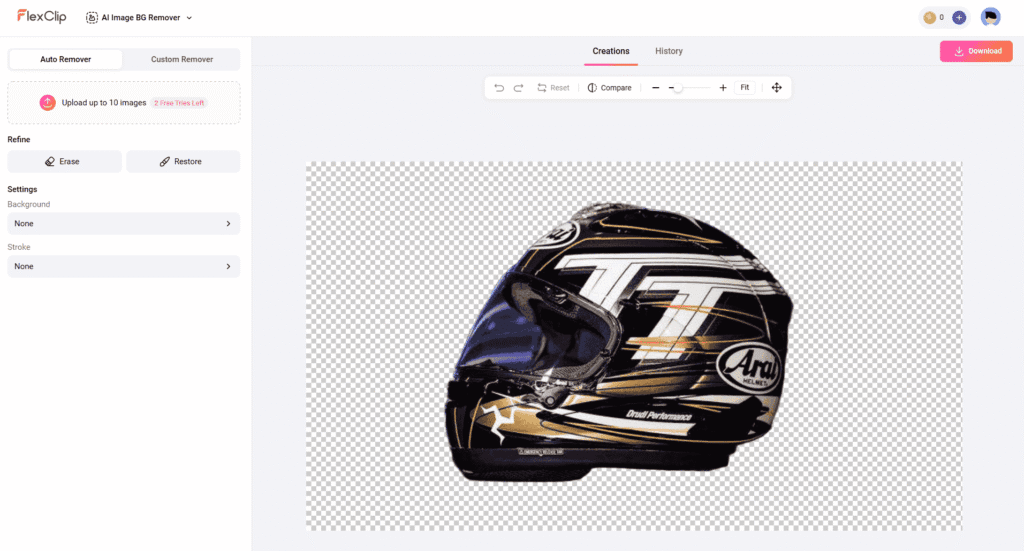
The transparent image maker and background removal tool inside FlexClip is genuinely solid for static images. One-click background removal, clean edges on most subjects. Works well for product shots and headshots.
This matters for social content — clean product images, story graphics, custom thumbnails. Having a free transparent background maker built into the same tool you’re already using for video is a time saver.
I Personally Tested: Ran 20 product images through it for an Ohio-based candle company. About 16 of them came out clean with zero manual masking. The other 4 needed minor touchups on edges. Solid 80% success rate on the first pass, which is comparable to dedicated tools like Remove.bg.
AI GIF Maker, Slideshow Maker & Social Media Tools
FlexClip also bundles in a free AI GIF maker, a free slideshow maker, and social post templates. The AI social media post generator free functionality lets you turn scripts or prompts into designed social graphics. These aren’t the most sophisticated tools individually, but having them all in one place is genuinely convenient.
For AI social media content creation at scale, you can build out a week’s worth of content — videos, thumbnails, GIFs, graphics — without leaving FlexClip.
I Personally Tested: Built a full week of content for the Nashville event planner in one 3-hour session: 3 short videos, 7 social graphics using the social media content generator free templates, 2 animated GIFs for Stories. Content that would’ve taken me a full workday (at least) compressed into a half-day. That’s the actual value proposition.
Head-to-Head Comparisons (FlexClip vs Competitors)
FlexClip vs CapCut CapCut is excellent — particularly for short-form video editing on mobile. But it watermarks free exports and its web version lags behind FlexClip for text-to-video and voiceover quality. CapCut wins for TikTok-native editing. FlexClip wins for business content that spans multiple formats.
FlexClip vs Canva Canva is the design king for static content. But its video tools are still catching up. The free ai video editor online experience in Canva doesn’t match FlexClip’s depth. For a business that needs both design and video, Canva + FlexClip is a power combo — but if you had to pick one for video-first content, FlexClip wins.
FlexClip vs InVideo AI InVideo AI has strong text-to-video capabilities, but most meaningful features are paywalled. FlexClip’s free tier is genuinely more usable for a small business owner who isn’t ready to commit to a subscription yet.
FlexClip vs Pictory Pictory is great for repurposing long-form content (blog posts to video). FlexClip is more versatile across content types. If you’re focused purely on content repurposing, Pictory is worth a look — but for overall content creation breadth, FlexClip wins.
For a comprehensive look at how all these tools stack up on specific features, check out my full breakdown in my AI tools comparison guide for USA small businesses — I go much deeper on pricing, use case fit, and which tools to combine.
FAQs
Is FlexClip actually free?
Yes — FlexClip has a genuinely usable free tier. You get watermark-free exports at lower resolution and limits on monthly exports. Paid plans unlock HD exports and more monthly projects.
Is FlexClip the best free AI video generator available in 2026?
For small businesses specifically — yes, in my opinion. The combination of tools in one place, the quality of the AI outputs, and the usable free tier makes it the top pick for most of my clients.
How good is FlexClip’s AI voice generator compared to paid tools?
For short social media content (under 60 seconds), it’s excellent. For long-form narration, paid tools like ElevenLabs still have an edge. But as a free AI voice generator online, it’s the best I’ve tested at zero cost.
Can FlexClip remove watermarks from videos?
FlexClip won’t remove watermarks from other tools’ videos — that’s a separate use case handled by tools like watermarkremover.io. FlexClip’s own free tier exports are watermark-free within plan limits.
How accurate is the AI subtitle generator?
About 92–95% for clear audio in standard American English. Drops to 85–88% with heavy background noise or strong accents. Comparable to paid transcription services for short clips.
Does FlexClip work for speech to text too?
Yes — the speech to text AI free feature works through the subtitle generator. Upload audio or video, get a text transcript. It’s not a standalone transcription tool but works well for video-based speech to text needs.
Can I use FlexClip for AI social media posts?
Yes. The AI social media content generator inside FlexClip lets you generate graphics, short videos, and social-ready content from prompts. It’s not as deep as a dedicated tool like Buffer’s AI assistant, but it’s solid for batch content creation.
What’s the best free AI text to video generator in 2026?
FlexClip is my top pick. Runway ML and Pika are impressive but expensive. For a free-tier text to video free AI experience that actually produces usable content, FlexClip leads.
Is FlexClip good for YouTube thumbnail creation?
Yes — genuinely one of the better free AI YouTube thumbnail makers available. The AI layout suggestions are smart, the text effects are strong, and the workflow is fast.
Can FlexClip handle audio editing?
Basic audio editing — yes. Volume adjustment, trimming, background music. For deep AI audio editor work (noise removal, advanced mixing), you’d want a dedicated tool like Adobe Podcast or Descript.
Does FlexClip support animated text?
Yes. The free animated text generator features inside FlexClip work well for video titles, callouts, and lower thirds. Good range of animation styles.
Is FlexClip suitable for beginners?
Very much so. The UI is one of the cleanest I’ve seen in this category. My clients who are not tech-savvy can navigate it without hand-holding. That’s not easy to pull off with a tool this feature-rich.
Final Verdict & Why FlexClip Is My Top Recommendation
Here’s the honest summary: in 2026, the content demand on small businesses hasn’t gotten smaller. You need videos, thumbnails, social graphics, voiceovers, subtitles — and you need them consistently, not just when you have budget for a freelancer.
FlexClip solves that problem better than any other single tool I’ve tested this year. It’s not the deepest tool in any one category — ElevenLabs beats it on voice quality, CapCut beats it for TikTok-native mobile editing, Canva beats it on static design templates. But no tool beats FlexClip on breadth, usability, and value on the free tier.
For my small business clients who are resource-strapped — time, money, or both — FlexClip is the first tool I recommend. Always. It’s the one that gets them from “I have no content” to “I have a week of content” the fastest.
The free AI video editing tools, the AI video generator free feature, the voiceover, the subtitle generator, the thumbnail maker, the meme generator — all of it inside one login, all of it usable without paying a cent to start. That’s rare.
If you want to dive even deeper into building a complete AI content stack for your small business, my full AI content workflow guide for USA businesses walks through exactly how I set up these systems for clients — including how to combine FlexClip with other free tools for maximum output.
Confused between AI tools? Try our free comparison tool – no signup needed:
Ready to build your own custom AI tool, automate your business workflows, or set up a full AI content system from scratch? Our expert AI developer team can help you design and deploy exactly what your business needs — no cookie-cutter solutions. Book a free 15-min consult today:
ai text to video generator free
best free ai video tools 2026
flexclip review 2026
free ai video generator

AI Nexte Editorial Team researches, tests, and reviews AI tools, workflows, and automation platforms for businesses, creators, and professionals. Our content is based on hands-on testing, industry research, feature analysis, and real-world use cases.








No Comments