



The best AI data analysis tools for small business in 2026 are Looker Studio (free), Zoho Analytics ($30/month), Power BI ($14/user), and Julius AI. Pick based on where your data lives, not on feature lists. Most owners can get a working dashboard in one afternoon. Expect to spend $0 to $135 monthly for a five-person team. You might be wondering whether you really need this. Fair question. Most small business owners I hear from already sit on a goldmine of data. It’s in QuickBooks, Shopify, a CRM, and a few messy spreadsheets. Nobody has time to dig through it. That’s the gap AI closes. You ask a plain-English question and get a chart back in seconds.
This guide covers seven tools, real USD pricing, mistakes to avoid, and a 7-day setup plan. Prices were checked in late 2026, but vendors change them often. Confirm on each pricing page before you buy.
What Are AI Data Analysis Tools for Small Business?
AI data analysis tools for small business are software products that use machine learning and natural language to find patterns in your data. You connect a spreadsheet, accounting app, or store. Then you ask questions like “Which product lost money last quarter?” IBM describes AI analytics as using machine learning to automate data prep, spot patterns, and surface insights faster. That’s the core idea. Traditional business intelligence (BI) tools made you build every chart by hand. AI-powered data analytics for small businesses flips that. The tool drafts the chart, flags the weird spike, and sometimes forecasts next month.
What Can They Actually Do?
- Answer questions typed in plain English
- Build dashboards from spreadsheets or live apps
- Flag anomalies, like a sudden refund spike
- Forecast sales, cash flow, or inventory
- Write summaries you can paste into a report
What Can’t They Do?
They can’t fix bad data. Garbage in, garbage out. They also can’t replace your judgment about what the numbers mean.
Why Are Small Businesses Adopting AI Analytics in 2026?
Because the tools got cheap, and the competition got faster. The U.S. Chamber of Commerce’s small business technology research reports that roughly 58% of small businesses now use generative AI. That’s up from 40% in 2024. Adoption nearly tripled in two years. Here’s the twist, though. The U.S. Census Bureau’s Business Trends and Outlook Survey uses a stricter definition. It showed AI use among all U.S. businesses at roughly 17% to 20% from December 2025 through May 2026. Both numbers are true. They measure different things. The takeaway is simple. Many owners are experimenting, but few have built a real analytics habit. That’s your opening.
What Does This Mean for Your Shop?
If a competitor in your town reads weekly dashboards and you check bank balances, they’ll spot problems earlier. Not magic. Just faster feedback.
How Do You Choose the Right Tool? (5-Question Checklist)
Choose based on where your data lives, who needs access, and what you’ll pay per seat.
Most people get this wrong. They compare feature grids. Instead, answer these five questions in order:
- Where is my data? Google Sheets, Microsoft 365, Zoho, Shopify, or a database?
- Who needs to see dashboards? Just you, or your whole team?
- Do I handle regulated data? Think patient records or payment details.
- What’s my real monthly ceiling? Include every seat, not just the first.
- Who will maintain this? If the answer is “nobody,” choose the simplest tool.
Pro tip: Write your three most important business questions first. Examples: “Which customers are about to churn?” and “What’s my true margin by service?” Then test each tool against those questions during the free trial.
Which Are the Best AI Data Analysis Tools for Small Business?
Here’s the quick comparison. Detailed reviews follow the table.
| Tool | Best For | Starting Price (USD) | AI Strength | Ease of Use | Watch Out For |
|---|---|---|---|---|---|
| Looker Studio | Google Sheets and Ads users | Free | Gemini features in paid tier | Easy | Limited modeling |
| Zoho Analytics | Zoho CRM/Books shops | Free; $30/mo Basic | Ask Zia chat queries | Easy-Medium | Less compelling outside Zoho |
| Power BI | Microsoft 365 teams | $14/user/mo | Copilot (needs Fabric capacity) | Medium | Every viewer needs a license |
| Julius AI | Fast chat-based analysis | Free tier; paid plans vary | Chat-to-chart | Very Easy | Message limits |
| Tableau | Visual-heavy reporting | $15/user/mo (Viewer) | Pulse, Tableau Next | Medium-Hard | Creator seat costs $75 |
| Qlik Cloud | Growing teams with bigger data | About $300/mo (10 users) | Associative engine | Medium | Higher entry cost |
| ChatGPT/Claude/Gemini | One-off analysis of exports | About $20/mo | Flexible Q&A | Very Easy | No live dashboards |
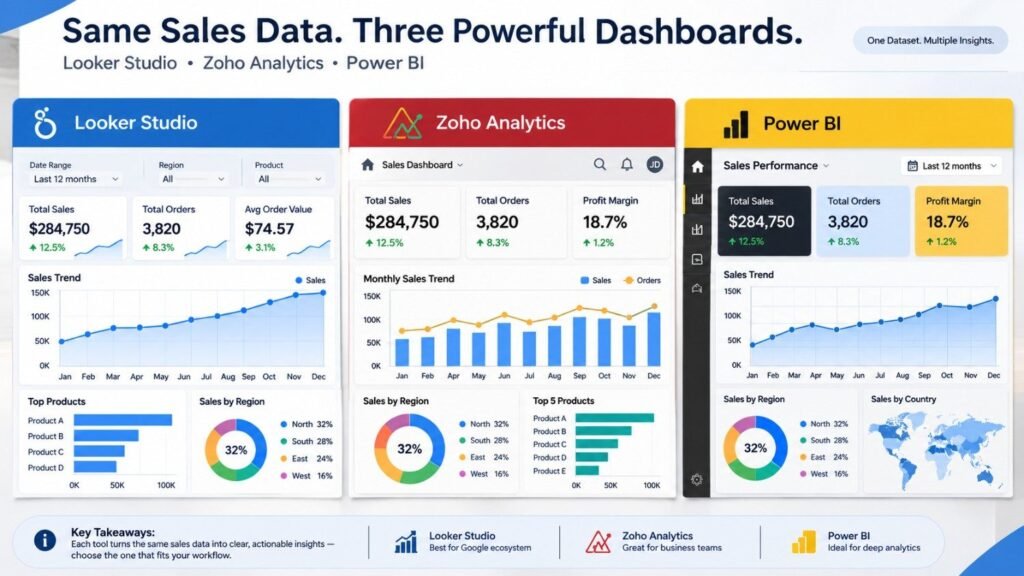
1. Looker Studio: Best Free Option
Looker Studio is Google’s reporting tool. Details live on the Google Cloud product page. It connects natively to Google Sheets, Google Analytics, and Google Ads.
Why it wins: Zero cost to start. A restaurant owner in Florida can chart weekly sales from a Sheet in under an hour.
The catch: It’s a visualization layer, not a data modeling engine. Complex joins get painful.
2. Zoho Analytics: Best Value for Small Teams
Zoho Analytics runs a free plan for two users. Paid annual plans have been listed at about $30/month (Basic) and $60/month (Standard). Its Ask Zia assistant lets you type questions in plain English. If you already use Zoho CRM or Books, connection takes minutes.
The catch: Outside the Zoho ecosystem, it feels less polished than Power BI.
3. Microsoft Power BI: Best for Microsoft 365 Shops
Power BI Desktop is free. Sharing needs Power BI Pro at $14 per user monthly. Premium Per User is $24. Microsoft raised both prices in April 2025.Microsoft’s Copilot introduction explains how it drafts reports from prompts. Here’s the part few people mention. Copilot isn’t included with Pro or Premium Per User. It requires paid Fabric capacity. That’s a pricing surprise worth knowing before you budget.
4. Julius AI: Best for Chat-Style Analysis
Julius works like a conversation. Upload a CSV, ask “Why did March revenue drop?” and it writes the code and draws the chart. It offers a free tier with a small monthly message cap. Paid plans have been listed in roughly the $20 to $45 monthly range. Check julius.ai/pricing for current numbers.
Best for: Owners who hate dashboards and just want answers.
5. Tableau: Best for Presentation-Quality Visuals
Tableau pricing is role-based. Viewer runs $15, Explorer $42, and Creator $75 per user monthly, billed annually. Someone must hold a Creator seat to build anything. For a five-person team with one builder, that’s $135 monthly. Tableau’s visuals are gorgeous. Its learning curve is real.
6. Qlik Cloud Analytics: Best for Growing Data Volume
Qlik’s capacity-based pricing has been listed at about $300 monthly for 10 users and 10 GB of data. That suits a company outgrowing spreadsheets, like a Texas distributor with several systems. It’s overkill for a two-person shop.
7. General AI Assistants: Best for Quick, One-Off Analysis
Tools like ChatGPT, Claude, and Gemini can analyze an exported spreadsheet for about $20 monthly per seat. Upload, ask, get insights. They don’t give you live, refreshing dashboards. Think of them as a smart intern, not a reporting system.
How Much Do AI Data Analysis Tools Cost? (2026 Pricing)
Expect $0 to $300 monthly for most small teams. The per-seat price hides the real cost.
Here’s what a five-person team might pay:
| Tool | Free Tier? | Entry Paid Plan | Est. Monthly Cost (5 People) |
|---|---|---|---|
| Looker Studio | Yes | Pro tier (optional) | $0 |
| Zoho Analytics | Yes (2 users) | $60/mo Standard (5 users) | About $60 |
| Power BI Pro | Desktop only | $14/user | $70 |
| Tableau | No | $75 Creator + 4 × $15 Viewer | $135 |
| Qlik Cloud | Trial | About $300 (10 users) | About $300 |
| General AI assistants | Limited | About $20/user | About $100 |
Prices are USD, billed annually where noted, and based on vendor listings at the time of writing. Always verify.
Looking for affordable AI analytics tools for small business? Start with Looker Studio or Zoho. Both let you test seriously before paying anything.
Pro tip: Count viewers, not just builders. A cheap builder seat can balloon once your manager, bookkeeper, and sales lead all need access.
What Do Real-World Results Look Like?
Two composite examples show how this plays out. The numbers are illustrative of typical outcomes, not guarantees.
Example 1: The Three-Chair Dental Practice in Ohio
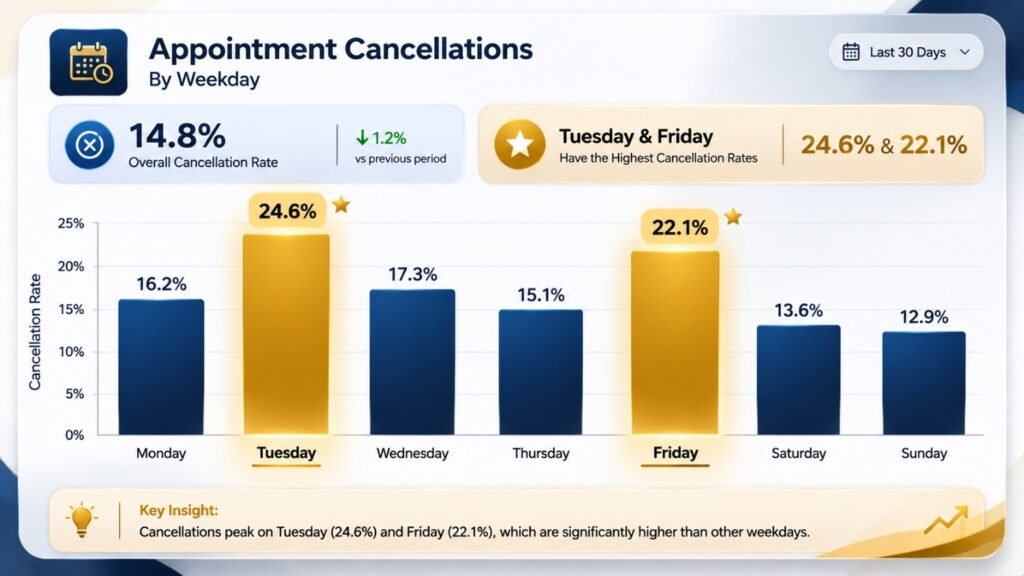
Picture a dental office in Columbus. The owner suspected hygiene appointments were being underbooked. She had no proof. She exported 14 months of scheduling data from her practice software. After removing patient names, she uploaded the file to an AI analysis tool. She asked, “Which weekdays have the most canceled hygiene slots?” The answer: Tuesdays and Fridays accounted for 61% of cancellations. Cancelled slots averaged 9 per month at roughly $140 each. She added text reminders on those days and a short waitlist. Within three months, cancellations dropped from 9 to 5 monthly. That’s about $560 recovered monthly, for a tool costing under $50.
The lesson: She de-identified the data first. That matters under HIPAA, which we’ll cover shortly.
Example 2: The Shopify Candle Brand in Texas
Now consider an online candle seller in Austin doing about $38,000 monthly. She felt busy but not profitable. She connected store data to a dashboard and asked, “Which products have the lowest margin after ad spend?” Her bestselling candle, 22% of units sold, was barely breaking even. Shipping and discount codes ate the profit. She raised the price by $3 and removed the stacked discount code. Revenue dipped about 4%, but profit rose by roughly $1,900 monthly.
The mistake she made first: She trusted the AI’s first answer without checking it. The tool had counted refunded orders as sales. Her numbers were inflated for two weeks. She caught it only when the bank balance didn’t match. If your store runs on Shopify, see our guide to the best AI tools for Shopify stores.
What Mistakes Should You Avoid?
Most failures come from process, not software. Here are the five I see most often:
- Skipping data cleanup. Duplicate rows and mixed date formats wreck AI answers.
- Never verifying outputs. Always spot-check one number against your bank or accounting system.
- Buying the “enterprise” plan early. You’ll use 10% of it.
- Building 30 charts nobody reads. Aim for one dashboard with six numbers.
- Uploading sensitive data to the wrong tool. More on that next.
Here’s what actually happens in most small firms. Someone builds an impressive dashboard. Six weeks later, nobody opens it. Fix that by scheduling a 15-minute Monday review.
Is It Safe to Use AI Analytics With Customer or Patient Data?
Safe only if you choose the right plan and control what you upload.
If you run a medical or dental practice, HIPAA applies. Consumer chat tools generally aren’t set up for protected health information. Before uploading anything, you’d want to confirm:
- The vendor will sign a Business Associate Agreement (BAA)
- The specific product, not just the company, is covered by it
- Data isn’t used to train public models
Other U.S. rules matter too:
- California: The CCPA gives residents rights over their data.
- Texas: The Texas Data Privacy and Security Act applies to many businesses.
- New York: The SHIELD Act requires reasonable data safeguards.
When in doubt, remove names, emails, and ID numbers before upload. This isn’t legal advice. Ask your attorney or compliance officer for your specific situation.
How Can You Set Up AI Analytics in 7 Days?
Follow this simple plan. It works for most businesses under 25 employees.
- Day 1: Write your top three business questions.
- Day 2: Gather data into one spreadsheet or connected app.
- Day 3: Clean duplicates and fix date formats.
- Day 4: Start a free trial of two tools.
- Day 5: Ask each tool the same three questions. Compare accuracy.
- Day 6: Build one dashboard with six key numbers.
- Day 7: Share it with your team and schedule a weekly review.
[Add Screenshot 4: A simple six-metric dashboard (revenue, margin, top product, refund rate, new customers, cash on hand)]
Want to take it further? Pair analytics with automation. Our guide to AI workflow automation for small business shows how to act on insights automatically. And if customer data drives your strategy, check the best AI CRM tools for small business.
What Are the Pros and Cons of AI Analytics Tools?
| Pros | Cons |
|---|---|
| Answers in seconds instead of hours | Wrong answers can look very convincing |
| Low-cost entry, often free to start | Per-seat costs grow quickly |
| No coding needed for most tasks | Data cleanup is still your job |
| Spots patterns humans miss | Privacy risks with sensitive data |
| Forecasts help cash flow planning | AI features sometimes require pricier tiers |
Looking for low-cost AI business analytics tools? The pros clearly win if you verify outputs and protect data.
Do I need a data warehouse to use these tools?
No. Most small businesses don’t. Google Sheets or an Excel file works fine for early analysis. Excel caps at 1,048,576 rows per sheet, which most small firms never reach. Move to a database only when files slow down or multiple systems need merging.
Why isn’t Copilot working in my Power BI Pro account?
It’s a common surprise. Copilot isn’t bundled with Pro or Premium Per User. It requires paid Fabric capacity. If your budget is tight, test Zoho’s Ask Zia or Julius first. They include AI chat in their standard plans.
Can AI replace a data analyst for my business?
Not fully. AI handles routine questions well. It struggles with context, like why a one-off promotion skewed your numbers. A smart approach is using AI daily and hiring a fractional analyst quarterly for a sanity check.
What’s the cheapest way to start today?
Export your data to Google Sheets. Connect it to Looker Studio for dashboards. Then paste a sample (with sensitive info removed) into a general AI assistant for deeper questions. Total cost: $0 to $20 monthly.
How do I know if the AI got the numbers wrong?
Run the “one-number test.” Pick one result, like last month’s revenue. Compare it to your accounting software. If they differ by more than 1% to 2%, investigate before trusting any other output.
How long before I see a return?
Many owners report their first useful insight within the first week. Financial payback usually follows when you act on one finding, like the pricing fix or the cancellation reminders above.
Are free plans enough for a real business?
For a solo owner or two-person team, often yes. Zoho’s free plan covers two users, and Looker Studio is free. Upgrade when you hit row limits, need more users, or need scheduled refreshes.
Final Thoughts: Start Small, Act Fast
You don’t need a data team. You need one good question and one clean spreadsheet. Pick a tool from this list. Run it for seven days. Verify one number. Then act on one insight. That single step puts you ahead of most competitors. The businesses winning with AI data analysis tools for small business aren’t the biggest. They’re the ones that actually look at their numbers every week. Your data is already there. Go ask it something.
Confused between AI tools? Try our free comparison tool: 👇
Need custom AI automation, chatbot, or integration for your business, medical practice, dental clinic, or app? 👇
Affordable AI analytics tools
AI business intelligence tools 2026
AI data analysis tools for small business
Power BI vs Tableau vs Zoho Analytics
Small business data analytics

AI Nexte Editorial Team researches, tests, and reviews AI tools, workflows, and automation platforms for businesses, creators, and professionals. Our content is based on hands-on testing, industry research, feature analysis, and real-world use cases.








No Comments