



Stop paying for CRM features you’ll never use. The 2027 winners: HubSpot (easiest), Zoho (cheapest), Pipedrive (best pipelines), Freshs ales (built-in calling), Salesforce Starter (best for scaling). Real AI starts around $14 to $50 per user monthly. Skip the guesswork: clean your data, pick one, and pilot it for 30 days before another lead slips away. Your best lead emailed on Friday afternoon. You replied Monday morning. By then, they had hired someone else. If that stings, you’re not alone. Most small teams juggle leads across a spreadsheet, two inboxes, and one very optimistic sticky note.
That’s the problem AI CRM tools for small business were built to fix. They log calls, draft follow-ups, score leads, and nudge you before deals go cold. But search “best CRM softwares” and you’ll drown in near-identical listicles. Few explain what a six-person HVAC shop in Texas or a dental clinic in Ohio actually needs. This guide does. You’ll get October 2026 USD pricing, honest pros and cons, HIPAA and privacy notes, and a pick-by-business guide. Want the wider automation picture first? Start with our guide to AI workflow automation for small business.
What Are AI CRM Tools for Small Business (and Do You Need One)?
An AI CRM is customer relationship software with built-in intelligence. It stores contacts and deals, then uses AI to handle the boring parts.
Here’s what that looks like in daily use:
- Auto data entry: Emails, calls, and meetings log themselves.
- Lead scoring: The system ranks who is most likely to buy.
- Draft follow-ups: AI writes the first version of your email.
- Duplicate cleanup: Messy records merge automatically.
- Next-best-action nudges: You see exactly who to call today.
You might be wondering: is this just a regular CRM with a chatbot sticker? Sometimes, yes. Native AI lives inside the data model. Bolt-on AI sits on top and guesses. Always ask which one you’re buying. Do you need one? If you track more than 30 active leads, miss follow-ups, or lose notes when someone quits, the answer is yes.
Why Are More U.S. Small Businesses Switching to AI CRMs in 2027?
The numbers explain the rush. A July 2026 Thryv survey found that AI adoption among U.S. small businesses climbed to 66%, up from 55% a year earlier. Yet 70% of owners said they need more training to use it well. Goldman Sachs’ small business survey, fielded in early 2026, shows a similar gap. Roughly 76% of owners use AI in some form, but only 14% have it fully embedded in core operations. Here’s what that means. Most businesses own AI tools. Few have built them into daily work. A CRM is one of the fastest places to close that gap, because every lead and customer already touches it. Most people get this wrong, though. They buy the tool, skip the setup, and blame the software six months later. We’ll fix that below.
How Do You Choose the Best CRM Software for Your Team?
Every CRM management software recommendation sounds confident. Few show their filter. Here’s mine:
- True cost per seat. AI features often hide in higher tiers or paid add-ons.
- Setup time. Can one person finish it in a week?
- Native AI. Does it work out of the box, or need consultants?
- Integrations. It should connect to Gmail or Outlook, QuickBooks, and your website forms.
- Compliance. Handling patient data? You need a signed BAA. More on that shortly.
- Room to grow. Switching CRMs at 25 employees is painful and expensive.
Pro tip: Score each tool from 1 to 5 on these six points. Count cost and setup time double. A boring spreadsheet beats a flashy demo every time.
What Are the Best AI CRM Tools for Small Business in 2027?
Here’s the short list. I focused on tools small teams can afford and launch without an IT department. Prices are per user, per month, billed annually unless noted.
| Tool | Starting Price | AI Highlights | Free Plan | Best For | Ease of Use |
|---|---|---|---|---|---|
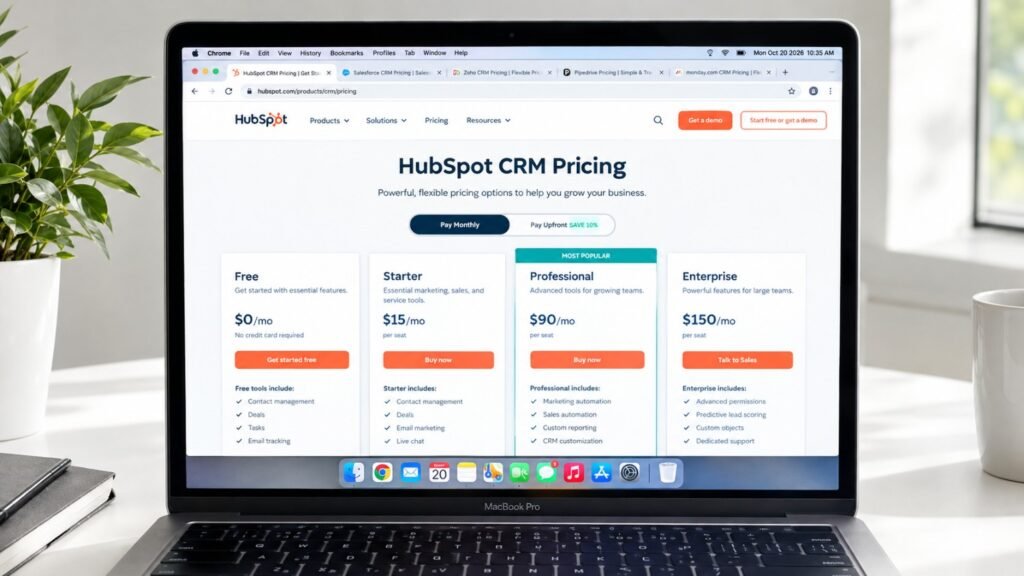
| HubSpot Smart CRM | $20 (Starter) | Breeze assistant, data agent, auto-enrichment, duplicate merging | Yes | All-around ease | Very easy |
| Zoho CRM | $14 | Zia AI scoring and predictions (full assistant on Enterprise) | Yes (3 users) | Budget-conscious teams | Moderate |
| Pipedrive | $14 | AI sales assistant, AI-built reports | No (trial only) | Visual sales pipelines | Very easy |
| Freshsales | $9 | Freddy AI scoring, built-in phone | Yes (3 users) | Call-heavy teams | Easy |
| Salesforce Starter Suite | $25 | Agentforce (paid add-on) | Yes (Free Suite) | Teams planning to scale | Moderate to hard |
1. HubSpot Smart CRM: Best Overall for Ease of Use
HubSpot is where I’d send most first-time buyers. The free CRM is genuinely usable. Paid Smart CRM tiers start at $20 per seat (Starter), then $50 (Professional) and $75 (Enterprise).
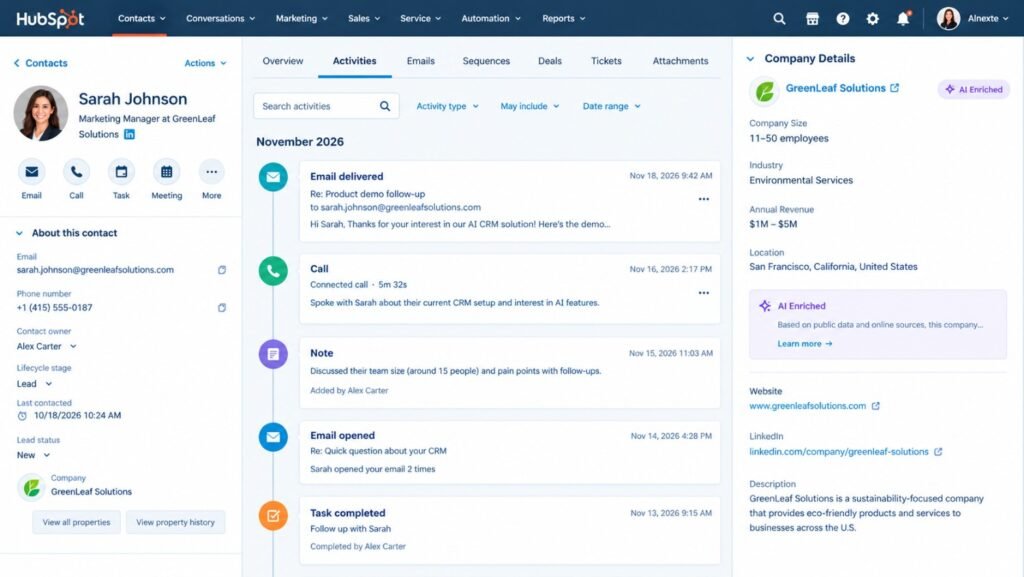
According to HubSpot’s Smart CRM page, the system enriches records automatically, flags data problems, and merges duplicates with AI. Its data agent answers questions about a customer by searching calls, emails, and notes.
Where it shines: fast setup, a tidy interface, and 2,000+ integrations. Where it stings: costs climb once you add Sales Hub or Marketing Hub seats.
2. Zoho CRM: Best Value for Money
Zoho is the budget champion. You get a free plan for up to three users. Paid plans run $14 (Standard), $23 (Professional), $40 (Enterprise), and $52 (Ultimate) per user monthly. Zia, Zoho’s AI assistant, handles lead scoring and deal predictions. The full assistant sits on Enterprise, though Zoho has been pushing basic AI agents into lower tiers. Check your exact plan before buying.
Watch out: Zoho is powerful but busier than HubSpot. Budget extra hours for setup. It’s ideal if you already use other Zoho apps.
3. Pipedrive: Best for Pipeline-Driven Sales Teams
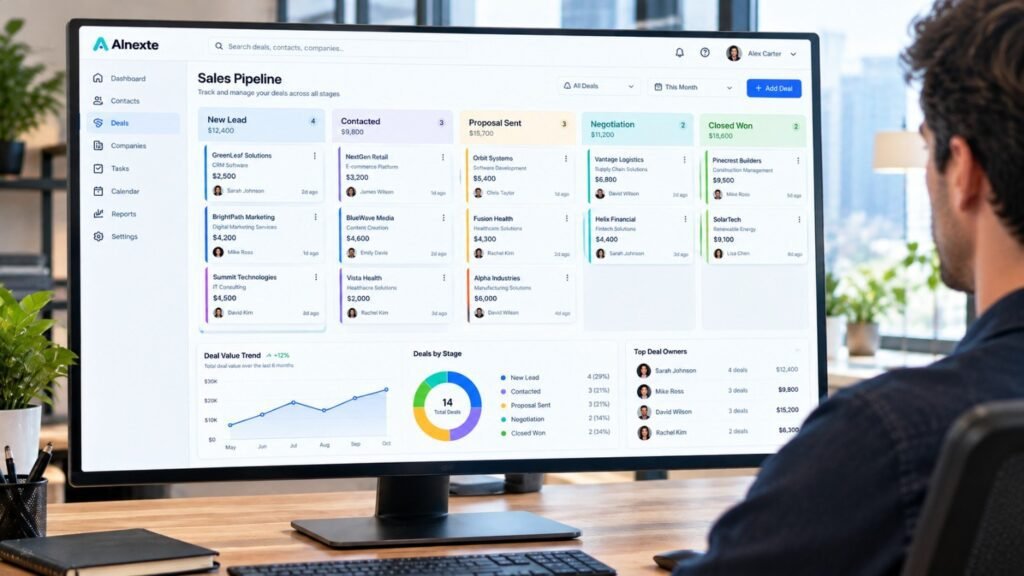
Pipedrive does one thing brilliantly: visual deal pipelines. Every deal is a card you drag across stages. You always know what’s next. Plans start at $14 per seat on annual billing with Lite. Higher tiers add automation and AI email tools. There’s no permanent free plan, only a trial. Pipedrive recently reshuffled its tiers, and prices vary by region. Confirm current rates on its pricing page.
Best for: agencies, real estate brokers, and B2B sellers.
4. Freshsales: Best for Phone-Heavy Teams
Freshsales, from Freshworks, includes a built-in phone system. For roofers, realtors, and insurance agents, that’s a big deal. Calls log themselves. Plans run Free (up to three users), Growth at $9, Pro at $39, and Enterprise at $59. The meatier Freddy AI features live on Pro and Enterprise.
Heads-up: the jump from Growth to Pro is steep. The Freddy Copilot add-on costs about $29 more per user. Budget around $68 per user for the full AI experience.
5. Salesforce Starter Suite: Best for Teams Planning to Scale
Salesforce is the giant. Starter Suite costs $25 per user monthly. Pro Suite jumps to $100. AI is the catch. Agentforce for Sales runs about $125 per user as an add-on, and usage can consume extra credits. For a five-person team, that adds up fast. Choose Salesforce if you expect 50+ employees, complex quoting, or heavy customization. Otherwise, it’s like renting a semi truck to deliver pizza.
Pros and Cons at a Glance
| Tool | Pros | Cons |
|---|---|---|
| HubSpot | Easiest setup, strong free tier, native AI | Costs climb with add-on hubs |
| Zoho | Lowest cost for AI, deep customization | Busier interface, AI varies by tier |
| Pipedrive | Clean pipelines, fast team adoption | No free plan, automation starts higher |
| Freshsales | Built-in phone, affordable entry | Big jump to Pro, AI add-ons cost extra |
| Salesforce | Scales endlessly, huge ecosystem | Pricey AI, complex setup |
How Much Do AI CRM Tools Cost for a Small Business?
Per-seat prices hide the real bill. Here’s a five-user estimate in USD, billed annually. Prices were checked in October 2026, so confirm before buying.
| Tool | Entry Plan | 5 Users / Month | Fuller-AI Plan | 5 Users / Month |
|---|---|---|---|---|
| HubSpot | Starter, $20 | $100 | Professional, $50 | $250 |
| Zoho | Standard, $14 | $70 | Enterprise, $40 | $200 |
| Pipedrive | Lite, $14 | $70 | Premium, about $49+ | $245+ |
| Freshsales | Growth, $9 | $45 | Pro + Copilot, $68 | $340 |
| Salesforce | Starter, $25 | $125 | Pro Suite, $100 | $500 |
Monthly billing costs more. Zoho’s Standard plan, for example, is $20 monthly versus $14 annually. Most people get this wrong by comparing sticker prices only. Add onboarding, data migration, and training. A good rule of thumb is to budget 15% to 25% extra in year one.
Which AI CRM Is Best for Your Type of Business?
The best AI CRM for small business depends on your daily work. Here’s a quick guide:
- Medical and dental practices: Start with HIPAA. Shortlist vendors that will sign a BAA for your specific plan. Compare features after that.
- HVAC, plumbing, and roofing: Freshsales or HubSpot. Speed-to-lead and call logging matter most.
- Shopify and e-commerce stores: HubSpot connects natively with Shopify. See our roundup of AI tools for Shopify stores to build the full stack.
- Startups and solo founders: A free AI CRM for small business is realistic. HubSpot Free or Zoho Free covers most early needs. It’s also the smartest AI CRM software for startups still validating their sales process.
- Agencies, brokers, and B2B sellers: Pipedrive’s pipeline view keeps deals moving.
- Teams heading past 50 people: Salesforce earns its price here.
What Is the Difference Between CRM and ERP? (Explained)
Owners mix these up constantly, so here’s the difference between CRM and ERP explained simply. CRM manages customer relationships: leads, deals, emails, and support history. ERP manages operations: accounting, inventory, purchasing, payroll, and supply chain.
Think of CRM as your front door and greeting. ERP is the back office.
- Choose a CRM if your pain is lost leads and slow follow-up.
- Choose an ERP if your pain is inventory, billing, or cross-department reporting.
Most small businesses need a CRM first, plus light accounting like QuickBooks. Full ERP usually arrives past 50 employees. Many CRMs integrate with accounting tools, so the two can share data.
Is Your Customer Data Safe in an AI CRM?
It can be, but you’re responsible for how you use it. Here are the U.S. rules that matter most:
- HIPAA: Health practices storing patient information need a Business Associate Agreement with the vendor. No BAA, no patient data. Not every plan supports one.
- State privacy laws: California’s CCPA/CPRA and the Texas Data Privacy and Security Act give residents rights over their data.
- TCPA: Texting leads requires proper consent. Lawsuit damages can reach $500 to $1,500 per message.
- CAN-SPAM: Include an unsubscribe link and your physical address in marketing emails.
For AI governance, the NIST AI Risk Management Framework is a useful voluntary checklist. It organizes risk work into four functions: govern, map, measure, and manage.
In practice, that means three habits. Have a human review AI-written emails before they send. Limit who can see sensitive fields. Check your CRM’s audit log monthly.
This isn’t legal advice. Talk to a qualified attorney about your specific situation.
How Do You Set Up an AI CRM in 30 Days?
Follow this order. It prevents most expensive mistakes.
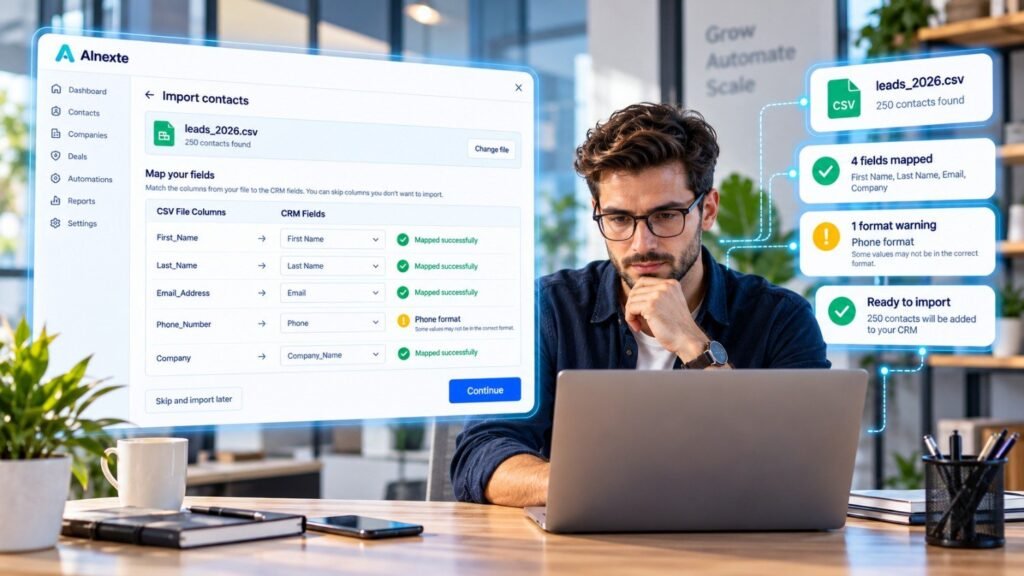
- Clean your data (week 1). Merge duplicates and standardize names. Garbage in, confident garbage out.
- Build a simple pipeline. Use four to six stages. More stages mean less usage.
- Connect email and calendar. Auto-logging is the quickest AI win.
- Turn on one AI feature at a time. Start with auto-logging, then lead scoring.
- Automate one follow-up. Pair your CRM with a task tool so nothing slips. See our list of best free AI task management tools.
- Train weekly for 30 minutes. Remember that 70% of owners say they need more training.
- Review at day 30. Compare reply time and lead-to-booked rate.
What Real Results Can You Expect From an AI CRM?
Here’s what actually happens in two typical setups. These are illustrative scenarios built from common patterns, so treat the numbers as realistic examples, not guarantees.
Example 1: The Texas HVAC company.
Picture a six-person company near Dallas getting about 120 inquiries monthly. Leads sat in a shared inbox. Average reply time was roughly four hours. They moved to a CRM with instant text replies, auto-assigned leads, and AI call summaries. They collected written consent on the web form first. Within 30 days, reply time dropped to about six minutes. Booked jobs rose from 37 to 53 per month. At a $380 average ticket, that’s about $6,000 in extra monthly revenue. Four Freshsales Pro seats cost around $156.
The mistake: They bought the priciest AI add-on in week one. Their data was messy, so lead scores were nonsense. They paused it, cleaned records for two weeks, and switched it back on.
Example 2: The Ohio dental clinic.
Now picture a four-dentist practice in Columbus with 140 weekly appointments. Their no-show rate was 18%. That’s roughly 25 empty chairs, or over $5,000 weekly at $210 per visit. They added automated reminders, two-way texting, and a recall list. Within 90 days, no-shows fell to about 11%. That’s around 10 fewer empty chairs weekly, or roughly $2,100 recovered.
The key step: They confirmed the vendor would sign a BAA before uploading a single patient record.
What Mistakes Should You Avoid With AI CRM Tools?
I’ve seen these trip up smart owners again and again:
- Buying features you’ll never use. Start with the cheapest plan that covers your needs.
- Skipping data cleanup. AI amplifies whatever you feed it, good or bad.
- Letting AI send emails unreviewed. One “Hi [First Name]” blunder erodes trust quickly.
- Skipping the mobile app test. Field teams live on their phones.
- Having no CRM owner. Every CRM needs a boss. Assign one person.
- Ignoring annual discounts. Compare monthly and annual pricing before you commit.
Pro tip: Round out your stack with our guide to the best AI productivity tools. Small wins compound.
Final Thoughts: Your Next 30 Days Start Today
The right CRM won’t magically fix your sales. But it will stop good leads from slipping through the cracks. Here’s my simple advice. Start with a free plan from HubSpot or Zoho. Clean your data. Run a 30-day pilot with one AI feature. Then upgrade only when the numbers justify it. The gap between “using AI” and “running on AI” is where small businesses win in 2027. You don’t need a massive budget. You need a clear plan and the discipline to follow it.
Pick one tool from this list today. Your next lead is already waiting.
What are the best AI CRM tools for small business in 2027?
The top picks are HubSpot Smart CRM, Zoho CRM, Pipedrive, Fresh sales, and Salesforce Starter Suite. HubSpot is easiest to use, Zoho offers the best value, Pipedrive has the best visual pipelines, Fresh sales includes built-in calling, and Salesforce suits teams planning to scale past 50 employees.
How much do AI CRM tools for small business cost?
Most paid plans run about $9 to $50 per user monthly on annual billing. Zoho starts at $14, HubSpot at $20, Pipedrive at $14, Freshsales at $9, and Salesforce Starter at $25. Advanced AI features often cost more through higher tiers or add-ons, so confirm current pricing before buying.
Is there a free AI CRM for small business?
Yes. HubSpot offers a free CRM, and Zoho CRM and Freshsales both have free plans for up to three users. Salesforce also offers a Free Suite. Free plans work well for startups and solo founders, but advanced AI features usually require a paid tier.
What is the difference between CRM and ERP?
A CRM manages customer relationships, including leads, deals, emails, and support history. An ERP manages internal operations like accounting, inventory, purchasing, and payroll. Most small businesses need a CRM first, plus simple accounting software. Full ERP systems usually become worthwhile after about 50 employees.
Are AI CRM tools safe for HIPAA-regulated practices?
Only if the vendor signs a Business Associate Agreement (BAA) for your specific plan. Without a BAA, don’t store patient information in the CRM. Medical and dental practices should also limit access to sensitive fields and review audit logs regularly. This isn’t legal advice, so consult an attorney.
Confused between AI tools? Try our free comparison tool: 👇
Need custom AI automation, chatbot, or integration for your business, medical practice, dental clinic, or app? 👇

AI Nexte Editorial Team researches, tests, and reviews AI tools, workflows, and automation platforms for businesses, creators, and professionals. Our content is based on hands-on testing, industry research, feature analysis, and real-world use cases.








No Comments