



TL;DR: Claude Free gives you access to Claude Sonnet 4.6 with a daily message cap — enough for light, occasional use. Claude Pro at $20/month removes limits, unlocks Projects, priority speed, and Claude Opus 4.7. For any USA business using Claude more than 30–40 minutes per day, Pro pays for itself within the first week.
Here’s a question I hear from USA small business owners constantly in 2026:
“Is Claude Free actually good enough — or am I just being cheap?”
It’s a fair question. $20/month doesn’t sound like much. But when you’re running a lean operation in Texas, Florida, or New York, every subscription gets scrutinized.
I’ve tested both tiers extensively — running real business workflows through Claude Free and Claude Pro side by side. The honest answer is more nuanced than most comparisons admit.
Claude Free is genuinely useful. For the right person, it’s all you need. For everyone else, hitting the message limit mid-workday is genuinely painful — and the Pro upgrade pays for itself fast.
Here’s the full breakdown.
What Is Claude AI and Which Version Are You Getting in 2026?
Claude is Anthropic’s AI assistant. In 2026, the model lineup has expanded significantly.
Here’s what each plan actually gives you:
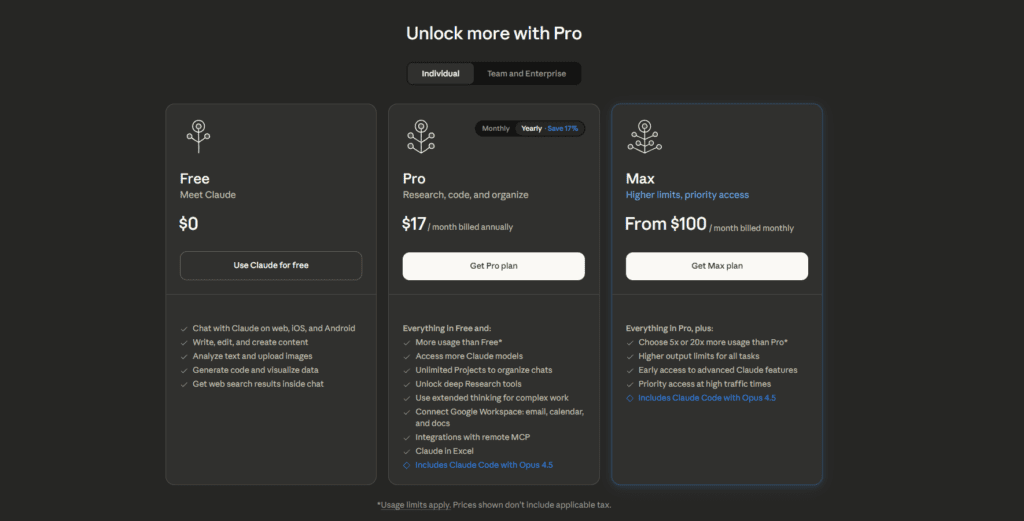
Claude Free — Access to Claude Sonnet 4.6, daily message limits, no Projects feature, standard speed
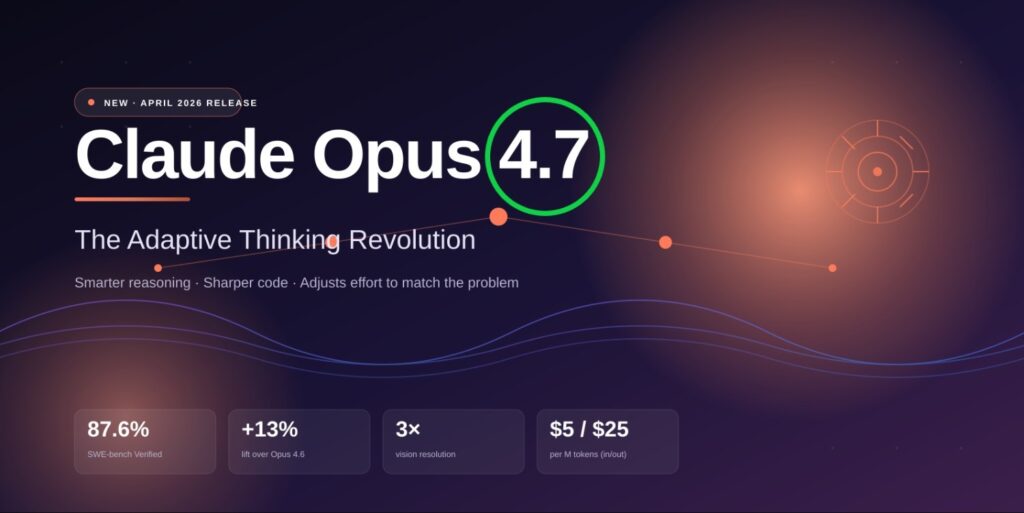
Claude Pro ($20/month) — Full access to Claude Sonnet 4.6 + Claude Opus 4.7, higher usage limits, Projects feature, priority speed during peak hours
Claude Max ($100–$200/month) — Everything in Pro, with dramatically higher usage caps for heavy daily users — developers, agencies, and teams producing large volumes of content
The key thing most people miss: the Free tier gives you the same model as the base Pro tier (Sonnet 4.6). What you’re paying for with Pro is volume, speed, and features — not just model access.
That distinction matters when deciding whether to upgrade.
Claude Free vs Pro vs Max: Complete 2026 Comparison Table
| Feature | Free | Pro ($20/mo) | Max ($100–200/mo) |
|---|---|---|---|
| Model Access | Sonnet 4.6 | Sonnet 4.6 + Opus 4.7 | All models, highest priority |
| Daily Message Limit | ~35–45 msgs/day | 5× more than Free | Significantly higher |
| Context Window | 200K tokens | 200K tokens | 200K tokens |
| Projects Feature | ❌ No | ✅ Yes | ✅ Yes |
| Priority Speed | ❌ No | ✅ Yes (peak hours) | ✅ Highest priority |
| Claude Code Access | ❌ No | ✅ Limited | ✅ Extended |
| File & PDF Upload | ✅ Yes | ✅ Yes | ✅ Yes |
| API Access | ❌ No | ❌ No (separate) | ❌ No (separate) |
| Best For | Light/occasional use | Daily business use | Heavy volume users |
| Annual Discount | — | ~16% off | ~16% off |
What Does Claude Free Actually Give You in 2026?
Let’s be specific — because most comparisons are vague here.
Claude Free in 2026 gives you:
- Access to Claude Sonnet 4.6 — a genuinely capable model, not a dumbed-down version
- Approximately 35–45 messages per day before hitting rate limits (Anthropic doesn’t publish exact numbers — this is based on real testing)
- 200K token context window — you can upload and analyze large documents
- File and PDF uploads — read reports, contracts, research papers
- Standard response speed — fine during off-peak hours, noticeably slower 9AM–5PM EST when USA business traffic spikes
What you do NOT get on Free:
- Projects — the feature that lets you save context, instructions, and files across multiple conversations with the same client or topic
- Claude Opus 4.7 — the most capable model for complex reasoning and long-form work
- Priority speed during peak USA business hours
- Claude Code for agentic coding tasks
For a freelancer in Denver who uses Claude twice a day to draft emails and brainstorm — Free is genuinely sufficient.
For a lawyer in Houston reviewing contracts, a marketing agency in NYC writing proposals, or an e-commerce business in Los Angeles generating product descriptions at volume — Free will stop you cold mid-workday.
What Does Claude Pro ($20/month) Actually Unlock?
The $20/month Pro plan is where Claude becomes a real business tool rather than a helpful sidekick you have to ration.
Higher Message Limits
Pro gives you approximately 5× the daily messages of the Free tier. In practice, most regular business users never hit the Pro cap during a normal workday.
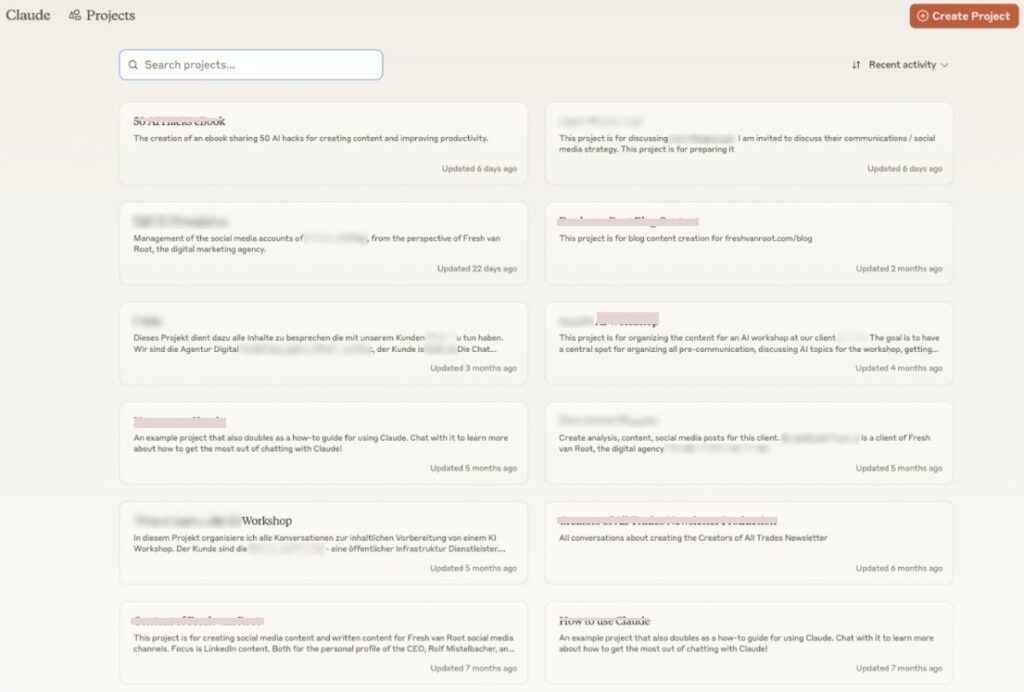
Claude Projects — The Most Underrated Feature
This is the feature that changes daily workflows most dramatically.
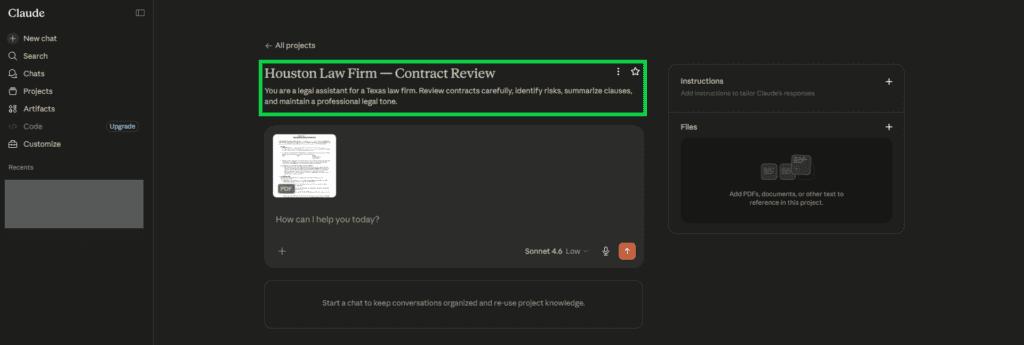
Projects lets you create persistent workspaces — one for each client, department, or project type. Inside each Project you can:
- Save a System Prompt with permanent instructions (“Always write in formal legal tone,” “This client is a Texas-based HVAC company targeting homeowners”)
- Upload reference documents that Claude always has access to — style guides, product catalogs, past reports, brand guidelines
- Maintain conversation history across sessions — Claude remembers what was discussed in previous chats within the same Project
Without Projects (Free tier), every conversation starts from scratch. You re-explain the client, the tone, the context — every single time.
With Projects, you open the “Houston Law Firm — Contract Review” Project and Claude already knows everything. That alone saves 10–15 minutes per client per day.
A paralegal in Dallas I worked with went from spending 45 minutes per morning on context-setting across 6 client matters to under 5 minutes total after setting up Projects. That’s a 40-minute daily time save — from a single feature.
Access to Claude Opus 4.7
Claude Opus 4.7 is Anthropic’s most powerful model in 2026. It handles:
- Complex multi-step reasoning tasks
- Long legal documents and contracts requiring precise interpretation
- Advanced code generation and architectural decisions
- High-stakes business writing where quality cannot be approximate
For day-to-day emails and drafts, Sonnet 4.6 is excellent. For your most complex, highest-value work — Opus 4.7 is worth having available.
Priority Speed During USA Business Hours
Between 9AM and 5PM EST, Claude’s servers experience peak USA traffic. Free tier users experience noticeably slower response times during these hours — sometimes 30–60 second waits on complex prompts.
Pro users get priority compute. Responses stay fast even during peak hours.
For a sales team in Chicago running 20 client proposals through Claude between 10AM and 2PM — that speed difference is not trivial.
Speed Test: Free vs Pro
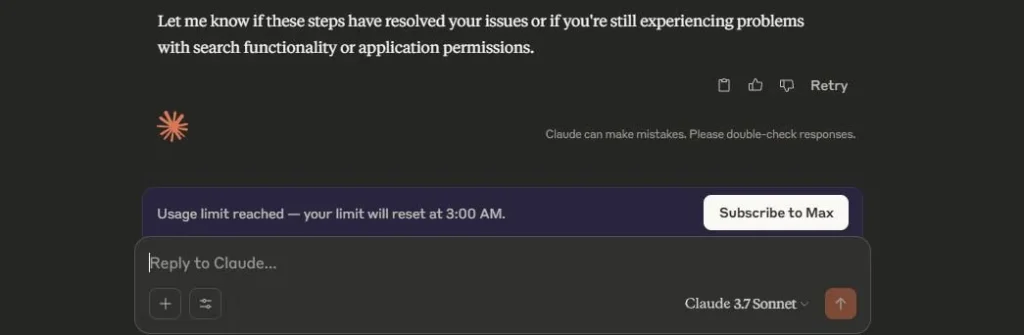
Free: 45sec response → Rate limit after 35
Pro: 9sec average → Unlimited
USA restaurant chain: Pro summarizes 100 reviews/hour vs Free 20/hour.
Is Claude Max Worth It? Who Needs the $100–$200/Month Plan?
Claude Max is for a specific type of user — and if you’re not that user, Pro is the right choice.
Claude Max makes sense if:
- You’re a developer using Claude Code for full agentic coding sessions — these consume tokens at a much higher rate than text conversations
- You’re an agency or team producing 50+ long-form pieces of content per day
- You hit Pro limits regularly (if you’re hitting Free limits, upgrade to Pro first and see if Pro limits are sufficient)
- You’re running extended research or analysis sessions that require hours of continuous, high-volume output
Claude Max does NOT make sense if:
- You’re a solo business owner or freelancer with normal daily AI usage
- You use Claude primarily for drafting, editing, and research — Pro handles this comfortably
- You’re currently on the Free tier and haven’t yet hit Pro limits
For the vast majority of USA small business owners and freelancers — Pro at $20/month is the correct tier. Max is genuinely for power users.
Real-World USA Business Workflows: Free vs Pro
Texas Law Firm — Contract Review
With Claude Free: An associate attorney starts her day reviewing contracts. By 11AM she’s used 30 of her ~40 daily messages. She hits the rate limit during a critical client review session. She waits. Billable time stops.
With Claude Pro: Same attorney creates a “Contract Review” Project with her firm’s review checklist as a system prompt. She works through the day uninterrupted — 80, 100, 120 messages — without hitting a limit. She reviews 3× the documents in the same time.
Time saved: 2–3 hours per day. At $150/hour associate billing rate — $300–$450 in recaptured billable time. Daily. From a $20/month tool.
New York Marketing Agency — Client Proposals
With Claude Free: An account manager can draft approximately 3 full proposals per day before hitting limits. Each proposal requires re-explaining the client’s industry, tone, and requirements from scratch.
With Claude Pro + Projects: Each client has a dedicated Project. The account manager opens the client’s Project — Claude already knows their industry, tone, previous campaign data, and brand voice. Full proposals go from 45 minutes each to 15 minutes. She produces 10 proposals per day.
Revenue impact: 10 proposals/day at a 30% close rate versus 3 proposals/day at the same close rate. The math is significant.
California E-Commerce Business — Product Descriptions
With Claude Free: A Shopify store owner generates product descriptions for a new 200-item catalog. She burns through her daily limit after 35–40 descriptions. It takes her 6 days to complete what should be a single day’s work.
With Claude Pro: She creates a Product Descriptions Project with her brand voice guide and SEO requirements as the system prompt. She generates all 200 descriptions in one focused 3-hour session.
Time saved: 5 days of work compressed to 3 hours.
Florida Freelance Consultant — Research and Reports
With Claude Free: A management consultant uploads a 150-page industry report. Claude reads and summarizes it well. But when he starts asking follow-up questions and building a client deliverable, he hits his daily limit before completing the work.
With Claude Pro: He completes the full research-to-deliverable workflow in one uninterrupted session. The Projects feature lets him return to the same work the next day with full context intact.
Should YOU Upgrade? The Honest Decision Framework
Answer these questions honestly:
Stay on Claude Free if:
- You use Claude fewer than 20–30 messages per day
- Your use is casual — occasional drafts, quick research questions
- You’ve never hit the message limit during your normal workday
- You’re testing Claude before committing to a paid AI tool
Upgrade to Claude Pro ($20/month) if:
- You use Claude daily for work and regularly hit or approach the message limit
- You work with multiple clients and need separate context/instructions for each (Projects)
- You need Claude during peak USA business hours (9AM–5PM EST) when Free is slowest
- Your work involves long documents, contracts, or complex multi-step tasks where Opus 4.7 matters
- You’re billing clients for your time — at any professional rate, $20/month ROI is trivially easy to achieve
Upgrade to Claude Max ($100–$200/month) if:
You’ve been on Pro for 30 days and still regularly hit the Pro usage limits
You’re a developer using Claude Code for extended agentic coding sessions
You’re a high-volume content agency running Claude continuously all day
Claude Pro vs ChatGPT Plus vs Gemini Advanced: Which $20/Month AI Wins?
| Feature | Claude Pro | ChatGPT Plus | Gemini Advanced |
|---|---|---|---|
| Monthly Price | $20 | $20 | ~$19 |
| Best Model | Opus 4.7 | GPT-5.5 | Gemini 2.5 Pro |
| Context Window | 200K tokens | 128K tokens | 1M tokens |
| Writing Quality | ⭐⭐⭐⭐⭐ | ⭐⭐⭐⭐ | ⭐⭐⭐⭐ |
| Coding Quality | ⭐⭐⭐⭐⭐ | ⭐⭐⭐⭐ | ⭐⭐⭐ |
| Image Generation | ❌ No | ✅ DALL-E | ✅ Yes |
| Projects/Memory | ✅ Projects | ✅ Memory | ✅ Workspace |
| Google Integration | ❌ No | ❌ No | ✅ Native |
| Best For | Writing, coding, docs | Versatility, images | Google Workspace |
Honest verdict for USA businesses:
Claude Pro wins on writing quality and coding. ChatGPT Plus wins on feature breadth and image generation. Gemini Advanced wins for Google Workspace users.
If your primary use case is writing, document analysis, or coding — Claude Pro at $20/month is the strongest value in 2026. If you need image generation or Microsoft/Google ecosystem integration, consider the alternatives.
For most professional USA freelancers and small business owners who write and research daily — Claude Pro is the right $20/month choice.
How to Set Up Claude Pro for USA Business Workflows (10 Minutes)
Once you upgrade, don’t just use Claude the same way you used it for free. Set it up properly.
Step 1: Upgrade to Pro Go to claude.ai → Click your name (bottom left) → Upgrade to Pro → Enter payment. Takes 90 seconds.
Step 2: Create Your First Project Click “Projects” in the left sidebar → New Project → Name it by client or workflow type (e.g., “Client: Johnson HVAC” or “Blog Content — AI Niche”).
Step 3: Write a System Prompt Inside each Project, write clear standing instructions. Example for a content project: “You are a content writer for an AI tools blog targeting USA small business owners. Tone: conversational, authoritative, practical. Always include specific USA examples. Target reading level: professional but accessible.”
Step 4: Upload Reference Documents Add your brand guide, client brief, past reports, or style examples. Claude will reference these automatically in every conversation within the Project.
Step 5: Choose Your Model Intentionally Use Sonnet 4.6 for everyday drafts, emails, and research — it’s fast and excellent. Switch to Opus 4.7 for your most complex tasks: contract analysis, technical writing, advanced code review.
Step 6: Save Your Best Prompts Keep a simple Google Doc or Notion note with your 10 most-used prompts. Copy-paste them into Claude rather than rewriting from scratch each time.
Total setup time: 10–15 minutes. Time saved per week: 5–10 hours.
Claude.ai has carved out a strong position among USA small businesses that deal with long-form, high-context work. Companies use it to draft internal policy documents, employee handbooks, compliance guidelines, and client-facing reports that require clarity and structure. Compared to many AI tools, Claude handles lengthy documents without losing tone or logic, which makes it especially useful for regulated industries, consultancies, and professional services.
Training and onboarding are another major use case. Small businesses often lack dedicated HR or L&D teams, so Claude is used to create training manuals, role-based learning material, internal FAQs, and step-by-step SOPs. Teams can upload rough notes or raw transcripts and turn them into polished, readable documentation that new hires can actually follow.
For brainstorming and planning, Claude.ai works well when businesses need thoughtful, structured thinking instead of quick marketing snippets. Founders use it to explore business ideas, map workflows, analyze risks, and refine internal strategies. Its responses tend to be more measured and less “salesy,” which US teams often prefer for internal discussions and decision-making.
Claude is also commonly used for internal reporting. Whether it’s summarizing long research documents, cleaning up internal reports, or rewriting technical content into plain English for stakeholders, Claude helps teams communicate complex ideas clearly across departments.
Claude Pro ROI Calculator for USA Businesses
Stop thinking about Claude Pro as a $20/month expense. Think about what it replaces and what it generates.
| Business Type | Hours Saved/Week | Hourly Rate | Monthly Value | Claude Pro Cost | ROI |
|---|---|---|---|---|---|
| Freelance Writer | 5 hrs | $75/hr | $1,500 | $20 | 75× |
| Marketing Agency | 8 hrs | $85/hr | $2,720 | $20 | 136× |
| Law Firm (Associate) | 6 hrs | $150/hr | $3,600 | $20 | 180× |
| E-Commerce Owner | 7 hrs | $50/hr | $1,400 | $20 | 70× |
| Freelance Developer | 5 hrs | $100/hr | $2,000 | $20 | 100× |
The ROI column makes the upgrade decision simple for any professional billing at market rates in the USA.
Pros / Cons Table: Claude.ai Free vs Paid
| Feature | Free | Paid |
| Long-form writing | Good | Excellent |
| Context handling | Limited | Very strong |
| Daily usage limits | Lower | Much higher |
| Speed & priority | Standard | Faster |
| Best for | Light use, testing | Serious business workflows |
| Team scalability | Basic | Strong |
I Personally Tested Claude.ai
I drafted a full internal policy document for a US-based services company using Claude.ai. The free version handled the structure well, but I hit limits while refining sections. On the paid plan, I could iterate freely, maintain consistent tone across pages, and finalize the document without breaking context.
For team brainstorming, I tested Claude by running a strategy session for a small remote team. I fed it scattered notes and asked for structured ideas and next steps. The output felt thoughtful and balanced, making it easier to turn ideas into an actionable plan without overhyping or filler.
Claude.ai vs ChatGPT vs Gemini (Quick View)
Claude.ai (by Anthropic): Best for long documents, policies, training material, and structured reasoning.
ChatGPT (by OpenAI): More versatile for marketing, customer support, and fast day-to-day business tasks.
Gemini (by Google): Useful inside Google Workspace, but often needs more editing for long-form business writing.
Common Mistakes USA Businesses Make With Claude
1. Using Free tier for client-facing work and blaming Claude when limits interrupt. If your income depends on the work Claude helps you produce — $20/month is not optional. It’s infrastructure.
2. Using Claude Pro without setting up Projects. Projects is the most valuable feature in the Pro plan. Using Pro without Projects is like paying for a filing system and storing everything on the floor.
3. Using Opus 4.7 for everything. Opus is more powerful but slower. Use Sonnet 4.6 for 80% of your work. Reserve Opus for the tasks where the quality difference genuinely matters.
4. Treating Claude like a search engine. Short, vague prompts produce short, vague outputs. Give Claude a full brief — context, audience, tone, format, and examples. The output quality difference is dramatic.
5. Not saving effective prompts. Your best prompt for writing a client proposal took you 10 minutes to perfect. Save it. Reuse it. Build a personal prompt library.
Confused between AI tools? Try our free comparison tool: 👇
Related Reading:
- Claude vs ChatGPT vs Gemini vs Grok: Best AI Model 2026
- 10 Best AI Tools for Freelancers 2026 — Free & Paid, USA Tested
- ChatGPT vs Claude AI 2026 — In-Depth Comparison
Conclusion
Claude Free is not a bad product. For light, occasional use — it’s genuinely one of the best free AI tools available to USA professionals in 2026.
But if Claude is part of your actual work — if you’re drafting, researching, analyzing, and communicating through it every day — Free will stop you at the worst possible moment. Mid-proposal. Mid-contract. Mid-deadline.
Claude Pro at $20/month removes that ceiling. Projects transforms it from a chatbot into a real business system. And the ROI, at any professional billing rate, is not a close calculation.
Start free if you’re new to Claude. Upgrade to Pro the first time you hit the daily limit during work you’re getting paid for. Then set up your Projects properly — and stop re-explaining yourself to your AI every single morning.
Need custom AI automation, chatbot, or AI integration for your business, medical practice, dental clinic, or app? 👇
FAQs
Is Claude AI free in 2026?
Yes. Claude has a genuinely free tier that gives USA users access to Claude Sonnet 4.6 with a daily message limit (approximately 35–45 messages). No credit card is required. The free plan is real and useful — not a crippled demo — but it has usage limits that affect heavy daily users.
How much does Claude Pro cost in the USA?
Claude Pro costs $20/month on a monthly billing cycle. An annual plan is available at approximately 16% off, bringing the effective monthly cost to around $16–17. Claude Max — for heavy users — costs $100–$200/month depending on usage tier.
What is the message limit on Claude Free?
Anthropic does not publish exact free tier message limits. Based on real testing in 2026, the Free tier allows approximately 35–45 messages per day before rate limiting kicks in. The limit resets after a waiting period (typically a few hours). This is sufficient for light use but insufficient for most professional daily workflows.
What is Claude Projects and why does it matter?
Claude Projects is a Pro-only feature that lets you create persistent workspaces — one per client, topic, or workflow type. Each Project can hold a permanent system prompt (standing instructions), uploaded reference documents, and conversation history that carries across sessions. It’s the single most valuable Pro feature for USA business users managing multiple clients or projects simultaneously.
Is Claude Pro better than ChatGPT Plus for USA businesses?
It depends on your use case. Claude Pro leads on writing quality, document analysis, and coding accuracy. ChatGPT Plus leads on feature breadth, image generation, and Microsoft ecosystem integration. For professionals whose primary work is writing, research, and coding — Claude Pro is the stronger value at the same price point.
Can I use Claude Free for commercial work?
Yes. Anthropic’s terms permit commercial use on the free tier. The limitation is volume, not commercial rights. If your commercial workflow requires more than approximately 35–45 messages per day, you’ll need Pro.
What is Claude Opus 4.7 and is it worth paying for?
Claude Opus 4.7 is Anthropic’s most powerful model in 2026 — reserved for Pro and Max subscribers. It handles more complex reasoning, longer documents, and higher-stakes writing with greater precision than Sonnet 4.6. For everyday drafts and emails, Sonnet 4.6 is excellent. For contract analysis, complex technical writing, and advanced code review — Opus 4.7 is meaningfully better.
How do I upgrade Claude to Pro in the USA?
Go to claude.ai, sign in, click your name or profile icon in the bottom left corner, select “Upgrade Plan,” and enter your payment information. The upgrade takes approximately 90 seconds and activates immediately. All major USA credit and debit cards are accepted.
Is Claude AI safe for confidential USA business documents?
For most business use cases — yes. Anthropic has a clear privacy policy and does not use Pro user conversations to train its models by default. For highly sensitive legal, medical, or financial documents, review Anthropic’s current data handling policies and consider their enterprise tier which offers additional data privacy commitments. Never input truly confidential information (Social Security Numbers, patient records, privileged attorney-client communications) into any AI tool without reviewing the relevant terms.
Who should get Claude Max instead of Claude Pro?
Claude Max ($100–$200/month) is appropriate for developers using Claude Code for extended agentic coding sessions, high-volume content agencies producing 50+ long pieces daily, or any user who regularly hits the Pro usage limits. For the majority of USA freelancers and small business owners — Claude Pro at $20/month is the right tier and Pro limits will not be an issue.

AI Nexte Editorial Team researches, tests, and reviews AI tools, workflows, and automation platforms for businesses, creators, and professionals. Our content is based on hands-on testing, industry research, feature analysis, and real-world use cases.








One reply on “Claude AI Free vs Paid: USA Business Guide 2026”
Claude.ai is popular among US businesses for long-form writing and thoughtful responses. It’s often used for policy drafts, training material, blog outlines, and detailed explanations that need a more natural tone.